 Posted by
 RAW Converter Ultimate 3.1.1 Features & Review
RAW Converter Ultimate is a powerful and versatile software designed for photographers and digital imaging enthusiasts who need to convert RAW image files to commonly used formats such as JPEG, TIFF, PNG, and others. This tool allows you to maintain maximum image quality while offering flexibility for post-processing and editing.
With RAW Converter Ultimate, users can efficiently manage large batches of RAW files, making it the ideal tool for professional photographers working with multiple images from DSLR or mirrorless cameras. The software supports a wide range of camera models and RAW file types, ensuring compatibility and a smooth workflow.
Key Features:
- Extensive RAW Format Compatibility: Compatible with RAW files from most DSLR and mirrorless cameras, including Canon, Nikon, Sony, and Fujifilm.
- Batch Conversion: Convert multiple RAW files simultaneously, saving time and increasing workflow efficiency.
- High-Quality Output: Convert images without losing detail, color accuracy, or resolution.
- Multiple Output Formats: Export images to JPEG, TIFF, PNG, BMP, and more.
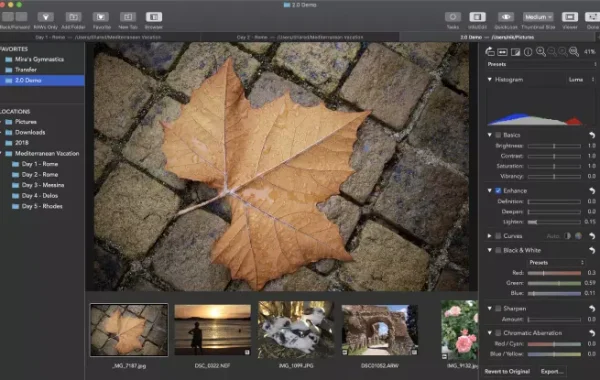
- Color and Exposure Adjustment: Precisely adjust brightness, contrast, saturation, and exposure during conversion.
- Metadata Preservation: Preserves important metadata such as EXIF and IPTC information for proper image cataloging.
- Customizable Output Settings: Control resolution, quality, file names, and destination folders.
- Intuitive Interface: Easy-to-use interface that allows both beginners and professionals to efficiently convert RAW files.
- Fast processing: Optimized for fast conversion without compromising image quality.
What’s New
- Added HEIC format support
- Improved performance
- More camera support
- Fixed automatic white balance issue
- Added image format conversion function
- Added preset function
- Multi-language support
Pros and Cons
Pros
- Simple and intuitive interface for beginners.
- Compatible with multiple RAW image formats.
- Fast RAW tProso JPG/PNG conversion.
- Batch conversion function available.
- High-quality images.
- Lightweight and easy-to-use software.
- Supports HEIC format.
- Drag-and-drop functionality.
Cons
- Primarily available for macOS users.
- Some advanced features require payment.
- Limited editing tools compared to professional software.
- Occasional bugs reported by users.
- Does not include advanced photo enhancement features.
- Not ideal for intensive professional editing work.
System Requirements
- Operating System: macOS 10.12 (Sierra) or later
- Processor: Intel-based Mac
- RAM: Minimum 2 GB
- Hard Disk Space: At least 500 MB free space
How to install
- Download the RAW Converter Ultimate installer from the official website.
- Open the downloaded file and drag the application to your Applications folder.
- Launch the application from your Applications folder or Launchpad.
- Enter your license key to activate Premium features, if applicable.
- Update the software to the latest version for optimal performance and compatibility with your camera.
FAQs
- Does it support batch conversion?
- Yes. Batch conversion is one of its main features. Users can drag multiple RAW files into the application and convert them simultaneously.
- Is RAW Converter Ultimate free?
- The application is free to download on macOS, but some features require an in-app purchase. One of the available upgrades is access to “Full Features.”
- Is it available for Windows?
- The official application is primarily for macOS. Some third-party websites mention Windows compatibility layers/emulators, but the official App Store version is only for Mac.
- Does it preserve image quality?
- The developer claims it offers “very high conversion quality,” but some user reviews report issues such as inaccurate colors or reduced JPG quality.
Conclusion
RAW Converter Ultimate is a simple and efficient RAW image converter designed for Mac users. It supports multiple RAW file formats, offers fast batch conversion, and produces high-quality images. With an intuitive interface and useful features like HEIC support and drag-and-drop import, it’s an excellent choice for photographers and casual users who need quick RAW file conversion.
Learn more about Shadow Defender Final’s features in our guide.