 Posted by
 PDF Expert 3.11 for macOS

PDF Expert is a powerful and intuitive PDF editor designed to help individuals and professionals read, annotate, and manage PDF documents seamlessly. Developed by Readdle, PDF Expert is renowned for its speed, ease of use, and comprehensive feature set, making it one of the most popular PDF tools available for Mac, iPhone, and iPad users.
With PDF Expert, users can efficiently handle a variety of PDF-related tasks—from simple reading and note-taking to advanced editing and form-filling—making it an essential tool for both personal and business use.
Key Features:
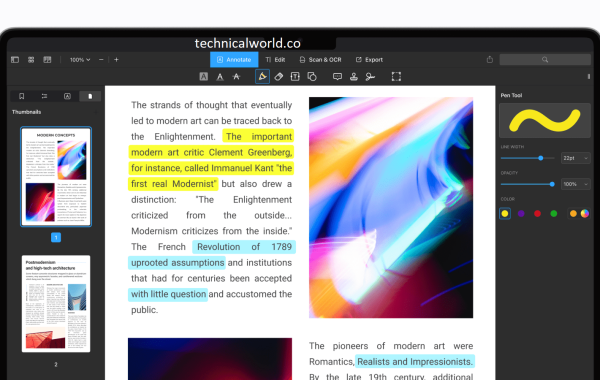
- PDF Reading: Smooth and fast rendering of PDF files. Night mode and customizable viewing options for better reading comfort. Ability to search and highlight text quickly.
- Annotation Tools: Highlight, underline, and strike-through text. Add sticky notes, shapes, and freehand drawings. Annotate PDFs collaboratively with team members.
- PDF Editing: Edit text and images directly in PDF files. Add links, adjust fonts, and modify layouts without converting files. Merge, split, or rearrange PDF pages easily.
- Form Filling & Signing: Fill interactive PDF forms and save them. Sign documents digitally with a secure electronic signature. Create and save multiple signatures for quick use.
- File Management & Integration: Organize PDFs into folders for easy access. Sync files with cloud storage services like iCloud, Dropbox, Google Drive, and OneDrive. Protect sensitive documents with passwords and encryption.
System Requirements:
- Mac: macOS 11.0 or later
- iPhone & iPad: iOS 13.0 or later
- Minimum of 500 MB free storage recommended
How to Install PDF Expert:
For Mac:
- Visit the official PDF Expert website
- Download the Mac version and open the .dmg file.
- Drag PDF Expert to the Applications folder and launch it.
For iPhone & iPad:
- Open the App Store.
- Search for “PDF Expert” and download the app.
- Launch the app and sign in or start using it immediately.
Learn more about Shadow Defender Final’s features in our guide.