 Posted by
 MacPaw Hider 2.5.1 for macOS

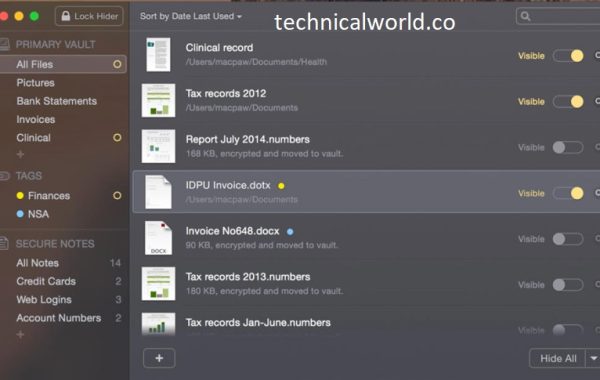
MacPaw Hider is a powerful privacy and data-protection tool designed specifically for macOS users who want to keep sensitive files, folders, and passwords completely out of sight—and out of reach. Think of it as a digital safe, only much smarter, much more secure, and far easier to use. Instead of scattering your private documents across different folders or relying on weak password-protected files, MacPaw Hider gives you a centralized, encrypted environment that stores everything behind a single master password. It’s like having an invisible toolbox that only appears when you call for it.
What makes MacPaw Hider particularly appealing is its combination of simplicity and security. Most file-protection tools either overwhelm you with complicated settings or try to impress with flashy features that don’t really matter. Hider avoids both extremes. Its design is minimal, its features are practical, and its core mission is straightforward: help you hide and encrypt your most important data without slowing you down. Whether you’re storing financial records, personal diaries, private work files, or even photos you simply don’t want anyone else to see, Hider wraps everything in rock-solid AES-256 encryption—the same standard used by banks and government institutions.
Key Features of MacPaw Hider:
- Advanced File Encryption: MacPaw Hider uses strong encryption algorithms to secure your files. This means even if someone manages to find your hidden files, they won’t be able to access them without the correct password. It’s like locking your files in a high-security vault.
- Seamless Integration with macOS: The app is designed to blend perfectly with macOS, ensuring a smooth experience. You won’t feel like you’re using a third-party app; everything works as naturally as your Mac’s built-in features.
- User-Friendly Interface: One of the standout features of MacPaw Hider is its simple and intuitive interface. Even beginners can easily hide, unhide, and manage their files without any technical knowledge.
- Quick File Hiding and Unhiding: Speed matters when dealing with sensitive files. MacPaw Hider allows you to hide or unhide files in just a few clicks, saving time while keeping your data secure.
- Support for Multiple File Types: From images and videos to PDFs and documents, MacPaw Hider supports a wide range of file types. You can protect everything from personal photos to professional documents.
- Secure Folder Locking: Beyond individual files, you can lock entire folders. This is perfect for projects or collections of files that need comprehensive protection.
- Automatic Backups: MacPaw Hider ensures that your encrypted files are safely backed up. In case of accidental deletion or system failure, you can restore your files without compromising security.
- Customizable Privacy Settings:You have full control over your privacy. Hider allows you to set different passwords for different files or folders and configure access permissions as needed.
- Fast Search and Access: Even with layers of security, MacPaw Hider provides a fast search feature to quickly locate and access your files. This makes file management efficient without sacrificing security.
- Cross-Device Compatibility: If you use multiple Macs, Hider ensures that your protected files remain accessible across devices. Synchronization is simple, secure, and hassle-free.
- No Impact on System Performance: Despite its robust features, MacPaw Hider is optimized to run efficiently without slowing down your Mac, ensuring a smooth overall performance.
- How MacPaw Hider Ensures Security: Security is more than just hiding files. MacPaw Hider combines encryption, secure folders, and password protection to keep your data safe from unauthorized access. Even if someone attempts to bypass it, the app’s encryption ensures your files remain unreadable.
System Requirements:
- macOS 10.12 or later
- At least 100 MB of free disk space
- Internet connection for updates
How to Install MacPaw Hider:
- Download the installer from the official MacPaw website.
- Open the file and drag Hider to the Applications folder.
- Launch the app and follow the setup wizard.
- Start hiding your files securely.
Conclusion:
MacPaw Hider is an essential tool for anyone serious about protecting their digital privacy on Mac. With its advanced encryption, user-friendly interface, and robust features, it makes securing your files simple, fast, and reliable. Whether you’re a professional handling sensitive data or just someone who values privacy, Hider has you covered.
Learn more about Shadow Defender Final’s features in our guide.