Download BMB Tool Pro Our lives would not be the same without our smartphones, which serve as a repository for sensitive data, memories, and personal information. However, it can be upsetting when access to these devices is lost owing to forgotten passwords or security features like FRP. BMB Tool Pro V7.0 can help in this situation.
Tools for Device Unlocking Are Required:
Strong security measures on modern smartphones are important for safeguarding personal info. In the event that we lose our usernames or passwords, they can potentially provide difficulties. FRP can also restrict access if a device is bought used and the former owner’s credentials are still associated with it. Strong unlocking tools like BMB Tool Pro V7.0 have become more popular as a result of these problems.
Welcome to BMB Tool Pro V7.0:
The unlocking of Android devices has never been easier thanks to BMB Unlock Tool Pro V7.0. It makes bypassing FRP locks, carrying out factory resets, and unlocking devices simpler than they would otherwise be. It has developed into a vital tool for professionals and customers alike because to its user-friendly interface and brand compatibility.
Key Features:
Bypassing FRP
If you’re locked out of your Android smartphone, FRP, or Factory Reset Protection, might be a major obstacle. With the use of the effective FRP bypass techniques provided by BMB Tool Pro V7.0, users may obtain access again with little to no technical expertise.
Back to Factory
To return a device to its factory settings, a factory reset frequently has to be carried out. This procedure is simplified by BMB Tool Pro V7.0, making it simple and fast.
System Unlocking
BMB Tool Pro V7.0 offers trustworthy unlocking techniques that save time and effort, whether you’re transferring carriers or working with a locked used smartphone.
Numerous Brand Compatibility
BMB Tool Pro V7.0 supports a wide variety of smartphone manufacturers, guaranteeing that users from all demographics may take use of its capabilities. These are some of the brands it endorses:
Samsung
BMB Tool Pro V7.0 provides specialised solutions for numerous Samsung devices, including both the newest Samsung models and more traditional variations.
Apple
With BMB Tool Pro V7.0, even Apple users may unlock and debug their devices.
Lenovo
The list of supported brands also includes Lenovo products, enhancing the tool’s adaptability.
Realme
The specialised features of BMB Tool Pro V7.0 make it simpler to unlock and manage Realme devices.
Oppo
Users of Oppo may forget about access-related problems owing to the tool’s all-encompassing remedies.
Nokia
The specialised bypass techniques and unlocking solutions made available by BMB Tool Pro V7.0 are also advantageous to users of Nokia devices.
Vivo
Users of Vivo devices are guaranteed to have efficient tools available to them for a range of unlocking needs thanks to BMB Tool Pro V7.0.
Wiko
The compatibility landscape includes Wiko devices as well, demonstrating the tool’s dedication to diversity.
BMB Tool Pro V7.0 makes it easier to unlock Xiaomi smartphones, bypass FRP, and carry out other activities.
Tecno
The characteristics of the programme may be used by Tecno users to easily unlock their gadgets and get around access restrictions.
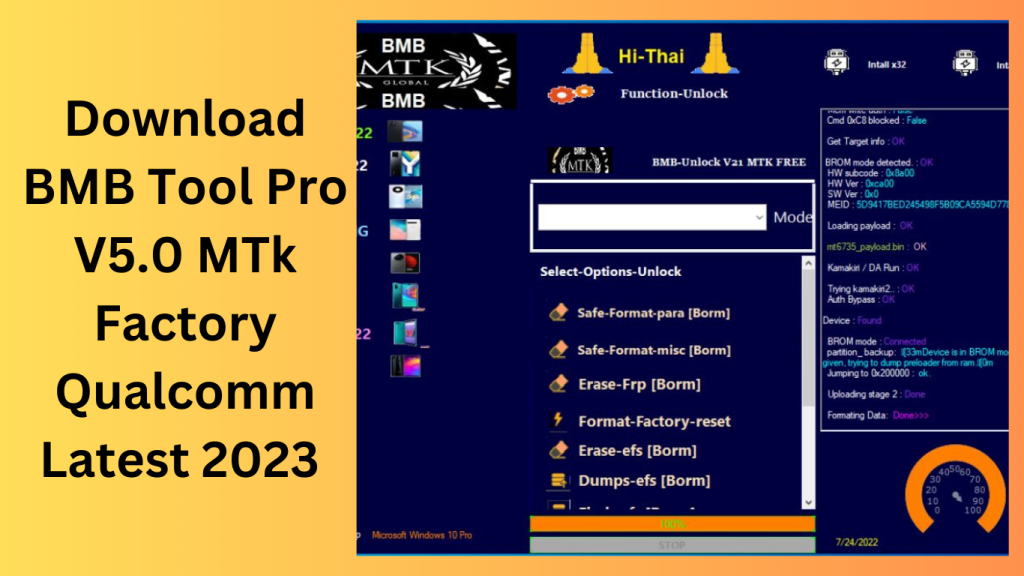
solutions that are specific to each model:
The capability of BMB Tool Pro V7.0 to offer model-specific bypass techniques and unlocking alternatives is one of its noteworthy features. This guarantees that consumers receive solutions that are customised to their unique device models, increasing the unlocking process’s success rate.
Friendly User Interface:
Using BMB Tool Pro V7.0 does not require technical expertise. The unlocking procedure is walked through step-by-step by the tool’s user-friendly interface.
How to Use:
The method of using BMB Tool Pro V7.0 is simple. Here is a quick explanation on how to utilise it:
- On your PC, download and install the tool.
- Open the application and attach your locked smartphone.
- To choose the model of your smartphone and start the unlocking procedure, adhere to the on-screen instructions.
- Allow the tool to do its magic so you can get back into your device.
Benefits of Using BMB Tool Pro V7.0
Using BMB Tool Pro V7.0 has the following benefits:
- when compared to manual unlocking techniques, saves time and effort.
- Interface with a simple user interface requires less technological expertise.
- Wide compatibility guarantees that different brands and models are supported.
- Solutions tailored to a certain model raise the success rate.
- simplifies the factory reset and FRP bypass procedures.
Conclusion:
A flexible and dependable method for unlocking Android devices, getting around FRP restrictions, and performing factory resets is BMB Tool Pro V7.0. It is a go-to tool for technicians and consumers looking to recover access to their devices because of its wide brand compatibility and model-specific solutions. BMB Tool Pro V7.0 makes sure that everyone can understand the intricacies of unlocking thanks to its user-friendly interface.
Learn more about Shadow Defender Final’s features in our guide.
]]>
BMB Tool PRO V7.0 Tool is a little utility made for Windows laptops. Users who are afraid to spend money on pricey instruments will find it to be of great use. This program has a wide range of capabilities that enable users to solve many software issues with Android with remarkably little effort. Notably, the utility has expanded its compatibility by now supporting both Qualcomm and MTK devices.
It offers a wide range of possibilities, including circumventing authentication controls, the FRP system, flashing Qualcomm devices into EDL mode, and much more. Please be aware that while I can explain the characteristics of software tools and offer information about them, I cannot help you download copyrighted or proprietary software or provide links to do so without the required license.
Features BMB Tool Pro:
- Format Factory Reset Secure
- Disable Factory Reset Protection (FRP)
- Vivo Bootloader Unlock, Brom Enable, and MDM Unlock
- Bypass Samsung FRP using Oppo SIM Unlocking and Sideloading (MTP technique)
- Samsung FRP and KG Unlock for MTK Devices, as well as FRP Bypass
- Flash a Brom-based fully flashed ROM.
- Using a scatter file to flash ROM on a Brom
- ROM Backup Customised Erase Partition Read GPT Partition
- SIM Unlock for Vivo
- Dumps for Qualcomm Devices in EDL Mode
What’s New:
Android:
- MTP (Media Transfer Protocol) now allows bypassing generic FRP (Factory Reset Protection).
Additional general FRP bypass techniques utilizing ADB and Fastboot
Samsung:
- Download mode now has a new security option that adds support for ODIN Flash.
Apple:
- iOS 12.4 to 13.4 users can skip iCloud.
iCloud bypass for Windows and jailbroken iPhones that need a password
Lenovo:
- Support for the Lenovo Tab P12 Pro (TB-Q706Z model) has been added.
Support for the Lenovo Tab P11 5G (TB-J607Z model) has been added.
Lenovo Tab 5G (Model: TBJ607Z) ADB support
Realme:
- FRP (Factory Reset Protection) erasing
Added support for the Realme C33 (RMX3624 model)
Realme SPD FACTORY support
Oppo:
- FRP (Factory Reset Protection) erasing
Vivo:
- Destroy DEMO and carry out a Factory Reset
Wiko:
- FRP (Factory Reset Protection) erasing
Erase MI without rooting Xiaomi devices (perhaps referring to Xiaomi/Mi devices)
Tecno:
- FRP (Factory Reset Protection) erasing

How to Use:
- Start by downloading the utility using the URL given.
- Navigate to the downloaded file and extract its contents when the download is finished.
- Important: Fill the C: drive (the C: drive’s root directory) with the contents of the extracted files.
- Before starting the installation, momentarily disable your antivirus program. To avoid any disruptions to the tool’s installation procedure, this is crucial.
- Find the setup file within the unpacked folder, then double-click it to start the installation process.
- To finish the installation, adhere to the simple on-screen directions.
- Start the program by executing “BMB-Tool-Pro-V7.0.exe.”
- You can skip this step if you’ve already installed the necessary drivers for your devices.
- The required drivers must be installed, though, if you haven’t done so already.
- Connect your phone to the computer using a compatible USB cable.
- Try utilising utilizing the tool to accomplish the particular objective you have in mind. You may select from several operations, such as bypassing FRP, flashing a ROM, and bootloader unlocking, according to your requirements.
- You can benefit from the features of the program once you’ve finished the intended work.
Conclusion:
A strong tool that has various uses is BMB Tool Pro. The most recent upgrades and enhancements to BMB Tool Pro 7.0 provide improved speed, dependability, and a smooth user experience. You may unlock your smartphone or avoid FRP.
Password: technical world.co
Download Link!
]]>