Are you looking for the most recent Gryphon Unlocker tool? Look no further than the most recent release from the acclaimed Gryphon Team, Gryphon Unlocker 6.3.1. Gryphon, a reputable manufacturer of phone unlocking tools, has released this new model with improved features and functionality, making it a need for both DIY enthusiasts and seasoned mobile repair professionals.

With the Gryphon Unlocker, unlocking phones has never been simpler:
With this effective tool, you can easily get past locked screens, unlock a variety of phone models, and remove FRP locks. This most recent edition provides the tools you need to complete your unlocking jobs speedily and successfully, whether you’re a tech-savvy person or a specialist in the mobile repair sector.
You may carry your phone anywhere with the Gryphon Unlocker:
taking the ability to repair to the next level. The application has a user-friendly design that makes it simple for novices to use while also meeting the requirements of more experienced users. With frequent updates and assistance from the Gryphon Team, stay informed about the most recent phone models and their unlocking requirements.
Key Features:
- Phone Unlocking: Remove FRP locks and easily get past locked screens on a variety of phone types.
- Broad Device Compatibility: Expand your repair services by unlocking a variety of phone models from various manufacturers.
- User-Friendly Interface: Take use of a simple, intuitive interface that is appropriate for both novice and seasoned technicians.
- Regular upgrades: The Gryphon Team provides regular software upgrades so you may stay current with the newest phone models and their unlocking specifications.
- Effective Unlocking Method: Unlock phones swiftly and effectively to save time and labor while fixing mobile devices.
- Technical assistance: To help with any problems or inquiries you might have, contact dependable technical assistance from the Gryphon Team.

System Requirements:
- Operating System: Windows 7, Windows 8, Windows 8.1, or Windows 10 (32- or 64-bit versions) are the available operating systems.
- CPU: an Intel Core i3 or above (or an AMD CPU that is comparable).
- RAM: 4 GB of minimum RAM is required, with 8 GB or more suggested for best performance.
- Storage: Installation requires at least 500 MB of free disc space.
- A functioning USB port is required to connect the phone to the PC.
- Internet connection: Software updates and technical help require a live internet connection.
How to Install:
- Get the setup file here: To download the Gryphon Unlocker 6.3.1 setup file, go to the Gryphon Team website or a reliable source.
- Locate installation file: Navigate to the directory where the setup file has been saved on your computer when the download is complete.
- Run the setup program: The setup file must be double-clicked to begin the installation procedure. Your operating system might ask you to confirm your action.
- Take the Installation Wizard’s advice: You will be led through the installation procedure by the installation wizard.
- Select Components: Depending on the installation procedure, you might have the ability to choose particular components or extra features to install together with the tool.
- Install the Tool: Click the “Install” or “Next” button after making the appropriate options.
Learn more about Shadow Defender Final’s features in our guide.
]]>With the most recent release of the Mi Bypass Tool, version 3.9.0, unlocking, bypassing, and flashing Xiaomi devices has never been simpler. This cutting-edge tool, created to meet the demands of Xiaomi device users, provides a quick and easy way to unlock Xiaomi devices, get through lock screens, and flash the program firmware. Whether you’re a seasoned mobile technician or a DIY enthusiast, the Mi Bypass Tool 3.9.0 is your go-to partner for simple device administration.

With Confidence, Unlock and Bypass:
With it, lock screen irritations are a thing of the past. This programme offers a simple way to unlock and go around lock screens on Xiaomi smartphones. Hence, It handles any lock screen or security barrier. Whether you misplaced your password, PIN, or lock pattern.
Flashing Firmware Easily:
With the Mi Bypass Tool 3.9.0, you can easily customize your Xiaomi smartphone or fix software-related problems. With the help of this adaptable utility, you can easily flash OEM ROMs or custom firmware into your smartphone. Hence, it delivers a speedy and dependable flashing procedure, guaranteeing that your Xiaomi device functions smoothly and ideally whether you want to improve performance, add custom features, or fix software bugs.
Key Features:
- Utilising the Mi Bypass Tool: 3.9.0, you may quickly unlock and go beyond the lock screen or security measures on Xiaomi smartphones.
- Flashing Firmware: To customize or fix software-related problems on your Xiaomi gadget, flash official ROMs, program programs, or custom firmware.
- User-Friendly design: The Mi Bypass Tool 3.9.0 is accessible to users of all skill levels thanks to its user-friendly design. Technical knowledge is not necessary.
- Speed and effectiveness: You can quickly unlock, bypass, and flash your Xiaomi smartphone, which will save you time and effort.
- Safe and Reliable: The Mi Bypass Tool 3.9.0 was created with the idea of safety in mind, guaranteeing a secure and dependable operation without the possibility of data loss or device damage.

System Requirements:
- Operating System: Windows operating systems, including Windows 7, 8, and 10, are compatible with the programme.
- Xiaomi Device: Moreover, A variety of Xiaomi devices are supported by it. Make sure the tool is compatible with your particular device.
How to Install:
- Get the setup file here: To get it setup file, look for a reliable source or go to the official website.
- Find the setup file: Hence, After the download is finished, go to the folder or place on your computer where the setup file was saved.
- Run the setup program, The setup file must be double-clicked to begin the installation procedure. Your operating system might ask you to confirm your action.
- Take the Installation Wizard’s advice: Hence, You will be led through the installation procedure by the installation wizard. If asked, read and agree to the terms and conditions. You can also be prompted to select the tool’s installation location.
- Launching the Installation: To begin the installation procedure, click the “Install” or “Next” button.
Password: technical world.co
Mirror Link!
]]>Are you seeking a quick and simple way to modify your iPhone’s serial number? Look no further than the best utility ever created by the acclaimed Miko-Force Team, SN Changer V1.0. With its extensive capabilities and compatibility with iOS devices running iOS 12 to 15, SN Changer provides a simple method for changing iPhone serial numbers.

Easy Serial Number Modification:
The SN Changer V1.0 program offers a simple method for changing the serial number of your iPhone. This application is suitable for users of all skill levels and was created especially for Windows computers. It also features a user-friendly interface. Change the serial number when the mode is purple to enjoy a simple modification procedure.
Compatible with iPhone models from 7 to X:
All iPhone models, from the iPhone 7 to the iPhone X, are compatible with SN Changer V1.0. Please be aware, though, that some gadgets cannot be used without jailbreaking. With the help of this effective tool, you may unlock your iPhone’s full capability and take control of the serial number.
Reliable and Secure Operation:
Having the Miko-Force Team behind SN Changer V1.0, you can rely on its dependable and secure operation. You may have peace of mind when making modifications to your iPhone thanks to the accuracy with which this tool has been designed to provide a safe and efficient serial number alteration procedure.
Key Features:
- Serial Number Modification: Using the simple interface of SN Changer V1.0, you can quickly modify the serial number of your iPhone.
- Compatible with iOS devices running iOS 12 to 15, SN Changer V1.0 supports a variety of iPhone models, from the iPhone 7 to the iPhone X.
- Purple-Color option: To ensure a quick and accurate serial number modification, choose the purple-colored option.
- User-Friendly Interface: SN Changer V1.0 has a user-friendly interface that is comfortable for users of all skill levels and makes it accessible.
- Secure Operation: SN Changer V1.0, created by the reputable Miko-Force Team, guarantees a secure and safe serial number changing operation.

System Requirements:
- Operating System: A desktop or laptop computer running Windows (the version chosen by the Miko-Force Team).
- iOS Compatibility: The SN Changer V1.0 is suitable for iOS 12 through iOS 15.
- Jailbroken Device: Your iPhone has to be jailbroken to utilize SN Changer V1.0. Before attempting to change the serial number on your device, please make sure that you have successfully jailbroken it.
- Storage Space: Make sure you have enough free disc space to fit installation.
How to Install:
- Downloading the setup file requires going to the official website or a reliable source. Ensure that the source from which you obtain it is reputable and safe.
- Go to the folder on your computer where you saved the setup file.
- The setup file must be double-clicked to begin the installation procedure. Your operating system might ask you to confirm your action.
- You will be led through the installation procedure by the installation wizard. If asked, read and agree to the terms and conditions. You can also be prompted to select the tool’s installation location.
- To begin the installation procedure, click the “Install” or “Next” button. Your computer will download and install it.
- Hold off until the installation is complete. It could take a little while. You will normally get a notification or confirmation message after the installation is finished.
Password: technical world. co
Mirror Link!
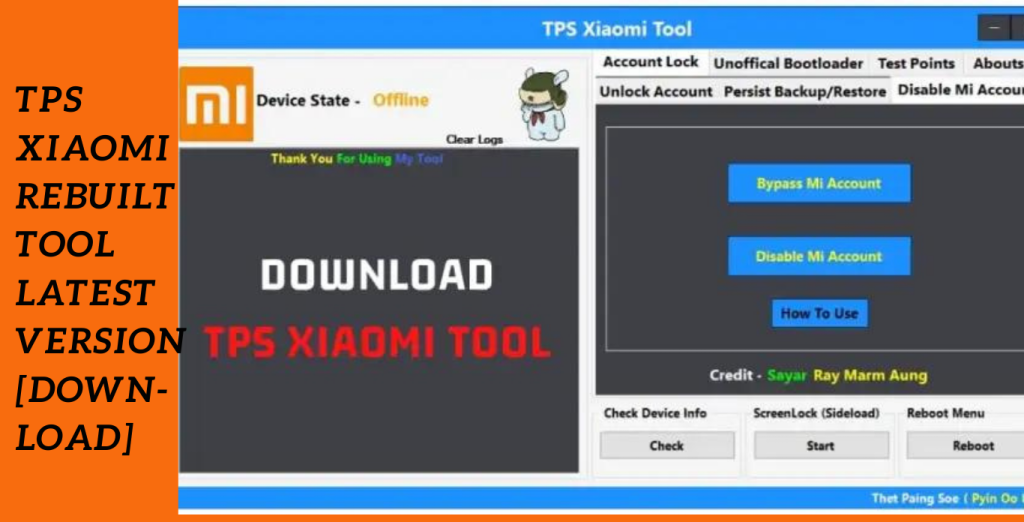
]]>An effective tool created to streamline the administration of Xiaomi accounts and device data is the TPS Xiaomi Rebuilt Tool. This program offers an effective approach to managing account-related activities on Xiaomi devices with its user-friendly interface and extensive capabilities. The TPS Xiaomi Tool gives users in EDL mode or Fastboot mode handy choices, like the ability to delete accounts and access the reboot menu.
Easy Account Deletion:
One of the TPS Xiaomi Tool’s noteworthy characteristics is its capacity to remove accounts from Xiaomi devices. The account deletion process is quick and simple with this program, whether you’re in EDL mode or Fastboot mode. Users may easily delete undesirable accounts from their devices by following the clear guidelines given.
Access to the reboot menu:
Access to the reboot menu is effortless thanks to the TPS Xiaomi Tool, which also lets customers manage their accounts. When doing system upgrades or troubleshooting, this function is quite helpful. Users may easily reboot their Xiaomi smartphones with a few clicks, assuring seamless and ongoing operation.
Effective Screen Lock Management:
The TPS Xiaomi Rebuilt Tool makes managing screen locks simple. This programme provides a simple procedure for controlling screen locks, whether you wish to modify the lock pattern, PIN, or password on your device. Protect your smartphone while personalising the lock settings to suit your tastes.
Key Features:
- Delete accounts from Xiaomi devices quickly and easily in Fastboot or EDL mode.
- Access the reboot menu without difficulty to run system updates or troubleshooting.
- Change patterns, PINs, or passwords for screen locks to manage them quickly and easily.
- User-Friendly Interface: Take advantage of an intuitive and simple to use interface that makes using the product a breeze.
- Convenience: Manage your devices and perform account-related chores quickly and easily.
System Requirements:
- Operating systems: Windows 7, Windows 8, Windows 8.1, or Windows 10 (32- or 64-bit versions) are the available operating systems.
- RAM: A minimum of 2 GB is required, with 4 GB or more being suggested for best performance.
- USB Port: A functional USB port is required to connect the Xiaomi gadget to a computer.
- Compatibility with Xiaomi Devices: The TPS Xiaomi Tool is compatible with a variety of Xiaomi devices. For a list of supported devices, consult the tool’s manual or website.
- Internet connection: The utility and any required updates must be downloaded via an active internet connection.
- Drivers: Ensure that your computer has the required Xiaomi device drivers installed. These drivers facilitate effective communication.
How to Install:
- Get the tool here: To obtain the TPS Xiaomi Tool setup file, go to the official website or a reliable source. Ensure that the source from which you obtain it is reputable and safe.
- Your operating system might ask you to confirm your action.
- Take the Installation Wizard’s advice: You will be led through the installation procedure by the installation wizard. If asked, read and agree to the terms and conditions.
- If necessary, certain installation wizards may offer alternatives for choosing components.
Password: technicalworld.co
Mirror Link!
]]>