Are you looking for the most recent Gryphon Unlocker tool? Look no further than the most recent release from the acclaimed Gryphon Team, Gryphon Unlocker 6.3.1. Gryphon, a reputable manufacturer of phone unlocking tools, has released this new model with improved features and functionality, making it a need for both DIY enthusiasts and seasoned mobile repair professionals.

With the Gryphon Unlocker, unlocking phones has never been simpler:
With this effective tool, you can easily get past locked screens, unlock a variety of phone models, and remove FRP locks. This most recent edition provides the tools you need to complete your unlocking jobs speedily and successfully, whether you’re a tech-savvy person or a specialist in the mobile repair sector.
You may carry your phone anywhere with the Gryphon Unlocker:
taking the ability to repair to the next level. The application has a user-friendly design that makes it simple for novices to use while also meeting the requirements of more experienced users. With frequent updates and assistance from the Gryphon Team, stay informed about the most recent phone models and their unlocking requirements.
Key Features:
- Phone Unlocking: Remove FRP locks and easily get past locked screens on a variety of phone types.
- Broad Device Compatibility: Expand your repair services by unlocking a variety of phone models from various manufacturers.
- User-Friendly Interface: Take use of a simple, intuitive interface that is appropriate for both novice and seasoned technicians.
- Regular upgrades: The Gryphon Team provides regular software upgrades so you may stay current with the newest phone models and their unlocking specifications.
- Effective Unlocking Method: Unlock phones swiftly and effectively to save time and labor while fixing mobile devices.
- Technical assistance: To help with any problems or inquiries you might have, contact dependable technical assistance from the Gryphon Team.

System Requirements:
- Operating System: Windows 7, Windows 8, Windows 8.1, or Windows 10 (32- or 64-bit versions) are the available operating systems.
- CPU: an Intel Core i3 or above (or an AMD CPU that is comparable).
- RAM: 4 GB of minimum RAM is required, with 8 GB or more suggested for best performance.
- Storage: Installation requires at least 500 MB of free disc space.
- A functioning USB port is required to connect the phone to the PC.
- Internet connection: Software updates and technical help require a live internet connection.
How to Install:
- Get the setup file here: To download the Gryphon Unlocker 6.3.1 setup file, go to the Gryphon Team website or a reliable source.
- Locate installation file: Navigate to the directory where the setup file has been saved on your computer when the download is complete.
- Run the setup program: The setup file must be double-clicked to begin the installation procedure. Your operating system might ask you to confirm your action.
- Take the Installation Wizard’s advice: You will be led through the installation procedure by the installation wizard.
- Select Components: Depending on the installation procedure, you might have the ability to choose particular components or extra features to install together with the tool.
- Install the Tool: Click the “Install” or “Next” button after making the appropriate options.
Learn more about Shadow Defender Final’s features in our guide.
]]>An essential tool for flashing Android device firmware is the SPRD Upgrade Tool. This application is useful whether you need to update the software on your device or resolve software-related problems. We’ll provide you a thorough tutorial on how to use the SPRD Upgrade Tool in this post so you can successfully flash firmware on your Android smartphone.

How to Use the SPRD Upgrade Tool Step by Step:
Start by getting the SPRD Upgrade Tool’s most recent version from a reputable source. Select a version that works with the chipset in your device. After the download is finished, extract the files to a useful location on your computer.
Set Up Your Android smartphone:
Check the battery life of your Android smartphone before continuing. Backup your critical information to avoid data loss during flashing. Additionally, turn on USB debugging mode on your device by selecting “Settings” > “Developer options” > “USB debugging.”
Start the SPRD Upgrade Tool:
Find the SPRD Upgrade Tool on your computer after installation, then start it. A user-friendly UI need to appear. To choose the firmware file you want to flash, click “Load Packet” or “Browse” in the SPRD Upgrade Tool. Make sure you have the right firmware file for your chipset and device model.
Key Features:
- Flashing Firmware: You may flash firmware on your Android smartphone using the SPRD Upgrade Tool. The software of the device must be installed or updated throughout this procedure in order to fix software-related problems, enhance performance, or add new features.
- Wide variety of Android smartphones with Spreadtrum (SPRD) chipsets are supported by the programme. It guarantees that you can use the tool efficiently regardless of the brand or model of your device, provided that it makes use of a compatible chipset.
- User-Friendly Interface: The SPRD Upgrade Tool has an intuitive user interface that is simple to use even for persons with little background in technology. The flashing procedure is made simple by the clear instructions and easy style.
- Multiple Firmware Formats: The utility is capable of working with PAC and P5C firmware. You can use it to
- The SPRD Upgrade Tool gives you the opportunity to make your Android smartphone capable of USB debugging.
- Tracking Progress: The SPRD Upgrade Tool shows the progress on the screen while the firmware is being flashed. This function enables you to keep track of the operation’s state while preserving transparency and allowing you to calculate the remaining time.

System Requirements:
- Operating system: 32-bit or 64-bit versions of Windows XP, Windows 7, Windows 8,
- Windows 8.1, or Windows 10.
- Processor: Pentium 4 or later from Intel.
- RAM: For slick performance, 512 MB at the very least.
- Storage: 100 MB or more of unoccupied disc space.
- A working USB port is required to connect your Android handset to a computer.
- USB drivers: Make sure the USB drivers you’ve loaded for your Android device are the right ones and compatible with your operating system.
How to Install:
- To install on your PC, follow these steps:
- Download: Download setup file from the official website or a reliable source.
- Extract the contents of the downloaded file using a file extraction tool like WinRAR or 7-Zip, extract the files to a location of your choice.
- Run the Setup: To start the installation procedure, find the extracted folder and double-click the setup file, which is typically called “Setup.exe” or something similar.
- Accept Licence Agreement: To continue with the installation, carefully read the licence agreement and click the “I Agree” or “Accept” option.
- Select Installation Location: Either keep the installation location as the default one or choose the target folder. To proceed, click “Next”.
- Start the installation procedure by clicking on the “Install” or “Next” button. It can take a short while to finish.
Password: technicalworld.co
Mirror Link!
]]>The latest version of the Xiaomi ADB Bypass (XAB) Tool, created by Sahril Techno, offers a method to get around Mi account lockouts and unlock your Xiaomi phone. The XAB Tool enables you to recover access to your device with its sophisticated features and user-friendly UI.
Mi Account Lockouts Can Be Unlocked:
Smartphones are becoming a necessity in our fast-paced digital world because they provide us with convenience, connectivity, and access to a variety of services and capabilities. Xiaomi phones have significantly increased in popularity in recent years as a result of its low cost, quick performance, and user-friendly design. Xiaomi phones can, however, have problems like Mi account lockouts, just like any other gadget.
Review of the tool’s conditions of use are essential:
Visit a reliable source or the official website to obtain the most recent version of the Xiaomi ADB Bypass (XAB) Tool by Sahril Techno. Review and comprehension of the tool’s conditions of use and any related hazards are essential before moving forward with the bypass procedure. Additionally, always backup your data before making any changes to your device and use caution when doing so.
Key Features:
- Mi Account Bypass: The XAB Tool lets you to unlock Mi account lockouts on your Xiaomi phone by utilising the ADB (Android Debug Bridge) mode.
- Latest Version: To maintain compatibility with the most recent Xiaomi phone models and firmware updates, Sahril Techno’s XAB Tool is routinely updated. You may benefit from the newest features and advancements by downloading the most recent version.
- User-Friendly Design: The XAB Tool has been created with the user’s comfort in mind. It offers a straightforward and intuitive user interface that makes it easy for both novice and experienced users to go through the bypassing process.
- Other features: It’s crucial to make sure you utilise the tool ethically and within the law, though.

System Requirements:
- Operating System: Make sure your machine complies with the specifications for the particular version of Windows that the utility supports.
- Hardware: In order to operate the XAB Tool successfully, your computer should have sufficient hardware specs.
- USB Connectivity: Your Xiaomi phone and your PC must have a solid USB connection in order to use the XAB Tool. To create a dependable connection, confirm that your computer has working USB ports and a suitable USB cable.
- Compatibility with Xiaomi Phones: The XAB Tool was created particularly for Xiaomi phones. A compatibility list produced by the tool should be reviewed.
How to Install:
- Obtain the installation package for the Xiaomi ADB Bypass (XAB) Tool from a reliable source.
- Make sure your PC satisfies the tool’s recommended system requirements.
- Enable USB Debugging: In the Developer Options settings on your Xiaomi phone, enable USB debugging option.
- Connect your Xiaomi phone to your computer using a USB cord that is suitable.
- Launching the Installer To launch the installer, double-click the downloaded installation package.
- Follow the on-screen directions to complete the installation procedure.
- Install ADB Drivers (if Required): To establish connection between the tool and your Xiaomi phone, install the ADB drivers if required.
- Finished with the installation: You’ll get a confirmation when the installation is complete.
Password: technicalworld.co
Mirror Link!
]]>A ground-breaking tool created by Techno Fayez to unlock the bootloader of Huawei and Honour handsets is the PotatoNV Bootloader Unlock Tool. With this program, customers may fully use the capabilities of their Huawei Kirin CPUs and take advantage of a variety of customization program possibilities. In this post, we’ll examine PotatoNV Extra’s main features, call attention to the newest tools included with the programme, and lay down the requirements needed to fully utilize its possibilities.
CPUs supported:
Numerous Huawei Kirin CPUs are supported by the PotatoNV Bootloader Unlock Tool, including but not restricted to:
- Akira 970
- Akira 980
- Kirin 710
- Kirin 810,
- Kirin 820,
- Kirin 9000 modern tools
Bootloader Unlock:
PotatoNV Extra makes it simple to unlock the bootloader for Huawei and Honour smartphones, allowing users to install specialized software, flash specialized operating systems, and explore more complex personalization possibilities.
Installation of Custom Kernels:
Users of Huawei and Honour handsets may install Custom Kernels using PotatoNV Extra. This improves the overall user experience by enabling fine-tuning of performance, battery life, and other device factors. The tool has overclocking features that let users increase the performance of their Huawei Kirin processors beyond what is possible in factory settings. Moreover, The user finds this feature to be really attractive.
Key Features:
- PotatoNV Extra makes it simple to unlock the bootloader on Huawei and Honour handsets, enabling users to flash custom ROMs, install custom recoveries, and do other sophisticated customizing.
- Using PotatoNV Extra, users may install custom kernels on their Huawei and Honour smartphones.
- This function offers a customized user experience by enabling fine-tuning of device performance, battery life, and other factors
- PotatoNV Extra has overclocking features that let users push their Huawei Kirin CPUs over their maximum stock speeds.
- Moreover, Users looking for their gadgets to operate at their peak efficiency would love this feature.
- Using the program, users may change the frequency scaling, governor settings, and other CPU-related factors, giving them control over the CPU settings.

System Requirements:
- Operating System: The programme is compatible with Windows 7, 8, and 10 operating systems.
- Huawei/Honor Device: A variety of Huawei and Honour handsets with Kirin CPUs are supported by the PotatoNV Bootloader Unlock Tool. Before continuing, make sure the tool is compatible with your device.
- USB connection: Moreover, To unlock your Huawei or Honour handset, you must connect it to your Windows PC using a suitable USB connection. Ensure you have a solid, functional USB cord on hand.
- USB Drivers: On your Windows PC, install the required USB drivers for your Huawei or Honour device. These drivers help the tool and the device communicate effectively.
- Developer Options: Open Settings > About phone to enable Developer Options on your Huawei or Honour handset.
How to Install:
- Get the tool here: The PotatoNV Bootloader Unlock Tool setup file may be downloaded from the official website or other reliable sources. Ensure that the source from which you obtain it is reputable and safe.
- Locate the setup file: Moreover, that you downloaded when the download is finished and extract the files from there. To extract the contents of the zipped file, use the “Extract” option from the context menu when right-clicking on the file or a file extraction program.
- Open the folder: Bring up the Installer Locate the installation file (typically with a.exe extension) by opening the extracted folder. To start the installation procedure, double-click the installer file.
- Look at the terms and conditions: The terms and conditions offered during the installation procedure must be read and accepted. Understanding and accepting the conditions is necessary.
- Select the Destination Folder: Moreover, This is where you will install the PotatoNV Bootloader Unlock Tool. You have the option of selecting your computer’s default location or a specific folder.
- Launching the Installation: To begin the installation procedure, click the “Install” or “Next” button. Your PC will now have the tool installed. Hold off until the installation is finished.
Password: technical world.co
Mirror Link!
]]>With the release of the ground-breaking tool iRnx MDM Tool, customers looking to get beyond MDM (Mobile Device Management) locks on iPhones and iPads now have a choice. By removing MDM limitations, this cutting-edge technology enables users to recover control over their devices and enjoy complete flexibility to personalize and customize their iOS experience.

Unlock Your iOS Device’s Full Potential:
The solution you’ve been looking for is in MDM if you’ve been having trouble with MDM limitations on your iPhone or iPad. You can utilize all of your device’s features, customize settings, install desired apps, and reclaim control of your iOS experience by getting beyond MDM locks.
Authorizations or legal rights:
It’s vital to remember that getting around MDM locks may go against any rules or agreements established by your university or organization administrator. Always use caution and abide by any rules and regulations that may be relevant.
Enjoy the flexibility of customising and modifying:
Enjoy the flexibility of customizing and modifying your iOS device. Discover a new degree of device management and personalize your iOS usage.
Key Features:
- MDM Bypass For iPhones and iPads that have been MDM-locked, iRnx MDM provides a smooth bypass option. By passing the MDM profile, users can take back control of their devices.
- iRnx MDM is accessible to people of all technical backgrounds thanks to its user-friendly interface. Step-by-step directions are provided by the gadget, guaranteeing an easy and hassle-free bypass procedure.

System Requirements:
- Storage Space: Ensure that your computer’s hard disc has enough free space for the installation of iRnx MDM and any required files.
- administrator capabilities: Depending on your system settings, installing and running iRnx MDM may require administrator capabilities. Make sure you have the required authorizations.
How to Install:
- To obtain the iRnx MDM installation package, go to a reliable website or the company’s main page.
- After the download is complete.
- Launching the Installer To begin the installation procedure, double-click on the installation package file. Your operating system might ask you to confirm your action.
- You will be led through the installation procedure by the installation wizard. If asked, read and agree to the terms and conditions.
Password: technical world. co
Mirror Link!
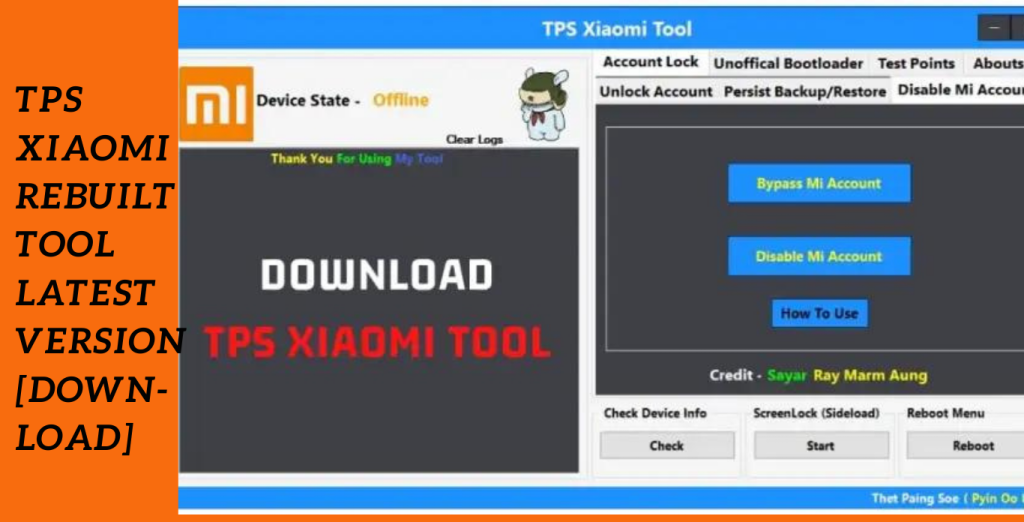
]]>An effective tool created to streamline the administration of Xiaomi accounts and device data is the TPS Xiaomi Rebuilt Tool. This program offers an effective approach to managing account-related activities on Xiaomi devices with its user-friendly interface and extensive capabilities. The TPS Xiaomi Tool gives users in EDL mode or Fastboot mode handy choices, like the ability to delete accounts and access the reboot menu.
Easy Account Deletion:
One of the TPS Xiaomi Tool’s noteworthy characteristics is its capacity to remove accounts from Xiaomi devices. The account deletion process is quick and simple with this program, whether you’re in EDL mode or Fastboot mode. Users may easily delete undesirable accounts from their devices by following the clear guidelines given.
Access to the reboot menu:
Access to the reboot menu is effortless thanks to the TPS Xiaomi Tool, which also lets customers manage their accounts. When doing system upgrades or troubleshooting, this function is quite helpful. Users may easily reboot their Xiaomi smartphones with a few clicks, assuring seamless and ongoing operation.
Effective Screen Lock Management:
The TPS Xiaomi Rebuilt Tool makes managing screen locks simple. This programme provides a simple procedure for controlling screen locks, whether you wish to modify the lock pattern, PIN, or password on your device. Protect your smartphone while personalising the lock settings to suit your tastes.
Key Features:
- Delete accounts from Xiaomi devices quickly and easily in Fastboot or EDL mode.
- Access the reboot menu without difficulty to run system updates or troubleshooting.
- Change patterns, PINs, or passwords for screen locks to manage them quickly and easily.
- User-Friendly Interface: Take advantage of an intuitive and simple to use interface that makes using the product a breeze.
- Convenience: Manage your devices and perform account-related chores quickly and easily.
System Requirements:
- Operating systems: Windows 7, Windows 8, Windows 8.1, or Windows 10 (32- or 64-bit versions) are the available operating systems.
- RAM: A minimum of 2 GB is required, with 4 GB or more being suggested for best performance.
- USB Port: A functional USB port is required to connect the Xiaomi gadget to a computer.
- Compatibility with Xiaomi Devices: The TPS Xiaomi Tool is compatible with a variety of Xiaomi devices. For a list of supported devices, consult the tool’s manual or website.
- Internet connection: The utility and any required updates must be downloaded via an active internet connection.
- Drivers: Ensure that your computer has the required Xiaomi device drivers installed. These drivers facilitate effective communication.
How to Install:
- Get the tool here: To obtain the TPS Xiaomi Tool setup file, go to the official website or a reliable source. Ensure that the source from which you obtain it is reputable and safe.
- Your operating system might ask you to confirm your action.
- Take the Installation Wizard’s advice: You will be led through the installation procedure by the installation wizard. If asked, read and agree to the terms and conditions.
- If necessary, certain installation wizards may offer alternatives for choosing components.
Password: technicalworld.co
Mirror Link!
]]>