
BigBro Activator All in One v7 It supports managing apps, enforcing security regulations, and safeguarding sensitive data. The security and integrity of the device and the data it holds may be jeopardized if an attempt is made to circumvent MDM without the required authority.
I advise getting in touch with the IT department of your company or the administrator that oversees the device if you are having problems with MDM or device management on your iPhone or iPad. They can help you obtain the authorizations or measures needed to appropriately remedy the problem.
It’s crucial to utilize hardware and software sensibly and by the standards established by organizations and manufacturers. Unintentional repercussions might result from unauthorized attempts to get around security measures and may cause device faults or violate warranties.
The BigBro version comes with Activator All in One v7:
- These programs enhance the functionality of your gadget and open up new possibilities.
- MDM Bypass: This functionality enables you to get beyond Mobile Device Management (MDM) restrictions.
- By eliminating any limitations put in place by MDM, it enables you to reclaim authority over your iOS device.
- GSM Bypass Signal 7X (12–14.5): Using this unique bypass method, your phone will always receive a strong GSM signal.
- It fixes network connectivity difficulties and makes sure you don’t miss any calls.
- MEID Bypass (No Signal Compromise): This program provides an easy way to go around MEID-enabled devices without sacrificing the signal’s quality.
- It enables you to get around MEID limitations without encountering any signal-related issues.
- One-Click Auto Bypass: Using this capability, you can quickly bypass your iOS device.
- The user interface (UI) is relatively straightforward in design, making it simple to access and utilize.
BigBro Activator All in One v7 feature:
- GSM with Signal (7-X): With the aid of a strong signal, you may enable GSM connectivity on your smartphone.
- GSM Untethered: By using this function, you may free your GSM connection from tethering and guarantee uninterrupted use of it.
- MEID no Signal Untethered: This feature offers an untethered alternative for MEID-equipped devices, enabling you to get around problems with signal.
- Broken Baseband: The BigBroActivator AIO Tool has a function that allows you to diagnose and resolve broken baseband issues with your device.
- MDM not needed All iOS JB: Without the necessity for jailbreaking, this functionality enables you to get around Mobile Device Management (MDM) limitations on iOS devices.
- Backup Device: With the help of this function, you may make a copy of the data on your device for long-term storage.
- Backup activation: Using this function, you may make a backup copy of your device that has already been made.
- wipe iOS 12–14: You may reset and wipe iOS 12–14-compatible devices using this capability.
- Erase a11 device: The utility has an erase and reset option for A11 devices.
- Fix Services: Using this feature, you can ensure that the various services on your device are fixed and functioning correctly.
- Baseband Enablement: Using this function, you may make your device’s baseband active.
- Disable Baseband: The utility gives you the choice of turning off your device’s baseband.
- Enable Over-the-Air (OTA) updates: You may enable OTA updates on your smartphone using this function.
- Disabled OTA: Using this option, you may stop your device from receiving OTA updates.
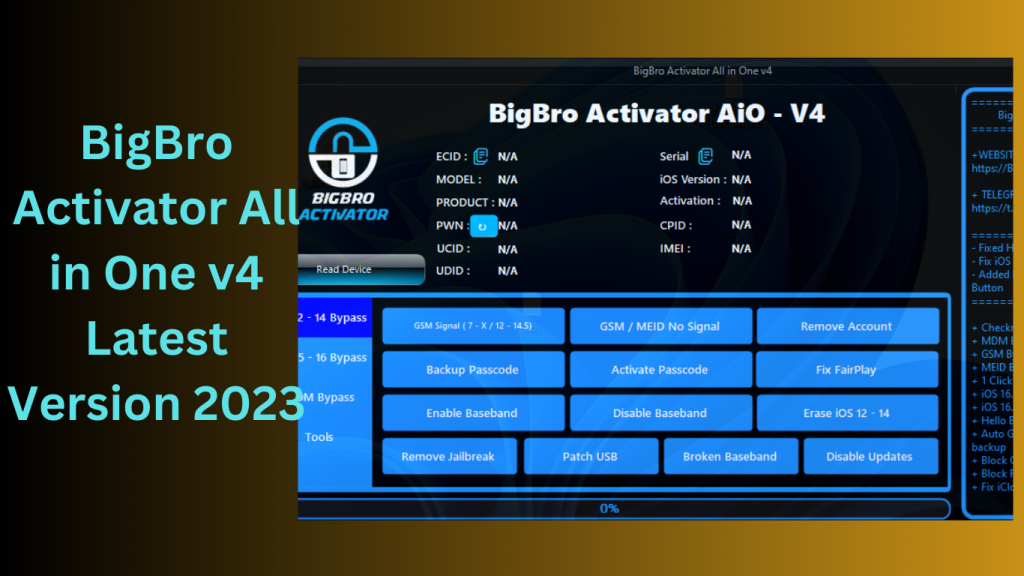
How To install:
- Make sure the program is compatible with the hardware requirements and operating system of your device by checking compatibility.
- If the downloaded file is zipped or in a zip format, unzip it and extract the contents to a folder using a file extraction programme.
- Install: Look for the installation file, which is frequently a.exe or.dmg executable file for Windows or macOS, respectively.
- To start the installation procedure, double-click the file.
- Simply follow the instructions provided by the installation wizard to complete the installation.
- Take the time to properly read the directions and follow them.
- Wait for Finishing: Permit the installation procedure to finish. Depending on the size of the program and the speed of your device, it could take some time.
- To run the program, double-click the icon.
- If asked, follow the steps to activate the program.
Learn more about Shadow Defender Final’s features in our guide.
]]>
MFK Tool Windows RamDisk V6.2.1 By removing these obstacles, the ground-breaking enables customers to restore access to their devices without the need for in-depth technical expertise.
Here is MFK Tool V6.2.1:
Unlocking Devices Quickly
The purpose of MFK Tool V6.2.1 is to make the unlocking of iPhones and iPads simpler. Users may quickly unlock iCloud locks and take back control of their devices using its user-friendly UI and simple instructions.
iOS v16.x compatibility
iOS versions also advance in line with technology.
What Is the MFK Tool V6.2.1 Process?
No need to get out of jail
The MFK Tool V6.2.1 unlocks devices without the need for complicated processes like jailbreaking, in contrast to certain unlocking techniques. Users may now unlock their gadgets without endangering the warranty or running the risk of harm, thanks to this.
No need for a Mac or computer
By removing this restriction, the MFK Tool V6.2.1 enables users to unlock their Windows devices straight from their PCs.
Gains from MFK Tool V6.2.1:
Friendly User Interface
With its straightforward and user-friendly design, MFK Tool V6.2.1 is usable by users of all technical backgrounds. The detailed instructions guarantee a simple unlocking procedure.
Rapid and Trustworthy Results
Waiting endlessly for your smartphone to unlock is a thing of the past thanks to MFK Tool V6.2.1 The tool minimises delay and irritation by delivering prompt and dependable results.
Compatibility and Flexibility
The unequalled compatibility of MFK Tool V6.2.1 is available for both iPhone and iPad users. It is a flexible option for different iOS users because it supports a broad variety of devices.

How-to Guide for Using MFK Tool V6.2.1:
Installation and Downloading
The installation procedure is simple and involves little work.
carrying out the unlocking procedure
To start the unlocking procedure, adhere to the MFK Tool V6.2.1’s on-screen instructions. The programme will perform its magic to make sure you can use your gadget once again.
Conclusion:
Users of the iPhone and iPad who have had trouble with the iCloud lock may breathe a sigh of relief thanks to the MFK Tool V6.2.1 It is a game-changer in the field of smartphone accessibility because to its user-friendly design, compatibility with the most recent iOS versions, and quick unlocking procedure.
Password: technical world.co
Download Link!
]]>
BigBroActivator iOS 15-16 Windows Ramdisk Tool is renowned for its security and dependability, there are moments when it feels constrained in terms of customization and device management. To fill this need, BigBroActivator offers consumers the chance to jailbreak their iOS 16.x smartphones operating on Windows. This programme offers a variety of features intended to improve the user experience in addition to jailbreaking.
Knowledge of BigBroActivator:
BigBroActivator is a piece of software that enables Windows users to jailbreak and customise iOS 16.x devices. In this sense, the term “jailbreaking” refers to the act of eliminating Apple’s software limitations, giving users the flexibility to add third-party applications, change system settings, and reach a higher level of personalisation.
Features key:
BigBroActivator’s most recent version adds a number of intriguing new features that improve its usability and usefulness, including:
- The PwnDFU mode, which is stable and quick, enables firmware updates and downgrades.
- The most recent BigBroActivator version guarantees a quick and reliable PwnDFU option, facilitating easier firmware maintenance.
- Users have the option to convert to a custom serial number (SN) thanks to this functionality.
- This might be especially helpful if you want to protect your privacy or give your gadget a distinct identity.
- Block OTA Upgrades: Prevent OTA updates that might harm your jailbreak or customisation.
- By choosing this option, you may protect your customised device from unintended upgrades.
- Alternative Approach: In the world of software, not every technique is successful on the first try.
- BigBroActivator takes this into consideration by offering a backup plan in case the primary procedure fails.
- Updated Activation: The programme provides updated activation options to make sure that after jailbreaking, your device still works and is unlocked.
- Anti-Reset/Update Options: Protect your customisation work by making use of anti-reset and update options, which lowers the likelihood that your customised settings will be lost during software upgrades.
Breaking into Prison Easily:
Using BigBroActivator to jailbreak your iOS iPhone is a simple process. Here is a short, detailed instruction:
- Install and Download: On your Windows PC, start by downloading and installing the most recent BigBroActivator version.
- Connect Your Device: Use a USB connection to link your iOS 16.x device to your computer.
- Start the tool: Launch BigBroActivator, then start the jailbreaking procedure by following the on-screen directions.
- Follow Your Progress: The tool will walk you through the jailbreak process. Keep an eye on the process and obey any instructions.
- Embrace Your Freedom: Your smartphone will be free to install third-party apps and explore customization possibilities after the jailbreaking procedure is finished.

Improving Device Personalization:
BigBroActivator gives customers the ability to further customise their devices without having to jailbreak them. You may completely personalise your smartphone by changing the serial number, preventing OTA updates, and preventing unintentional updates or resets.
Solution Finding and Alternatives:
The reliable PwnDFU option and alternate techniques offered by BigBroActivator might help you if you run into problems when jailbreaking your device. For troubleshooting support, you may also go to internet forums and groups.
Conclusion:
Windows-based iOS 16.x devices benefit from additional options thanks to BigBroActivator. Users are given the tools to jailbreak their devices, along with a number of strong features, enabling them to overcome restrictions and enjoy a more unique mobile experience. Accept the promise of BigBroActivator, but do so while being mindful of the dangers. With the correct safety measures, you can customise and have complete control over your iOS device.
Password: technical world.co
Download Link!
]]>