LPro AIO Ramdisk Tool v1.5 for Windows is a potent tool made to improve iOS usage for ardent and enthusiastic users. Users may carry out a number of tasks with the help of this crucial programme, including device setup, SSH backup checks, file recovery, and avoiding the Hello screen. This article will examine the most recent iteration of LPro’s AIO Ramdisk Tool for Windows, emphasising the enhancements and new capabilities that make it essential for iOS users.
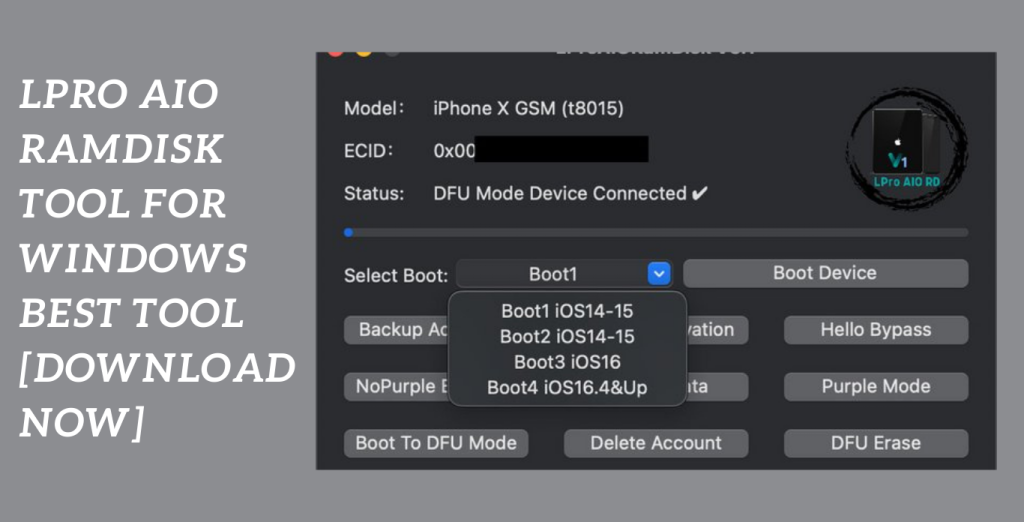
Most recent LPro AIO Ramdisk Tool:
LPro AIO Ramdisk Tool v1.5 for Windows is available without charge.
Download the most recent LPro AIO Ramdisk Tool for Windows to fully use your iOS device. You may get a variety of cutting-edge features, more functionality, and better performance with this free download.
Unprecedented access to your iOS device:
LPro AIO Ramdisk Tool v1.5 for Windows gives you unprecedented access to your iOS device. This version’s additions and enhancements make it a must-have companion for iOS users who like discovering all of their devices’ potential. This programme gives you the power to preserve your data and simplify your iOS experience, from sophisticated backups to seamless file recovery. Enjoy improved speed, improved stability, and a user-friendly interface that makes difficult tasks simple. Take use of LPro AIO Ramdisk Tool v1.5 for Windows to improve how you use your iOS device. Get it right away to take your iOS device management and optimisation to a new level.
Key Features:
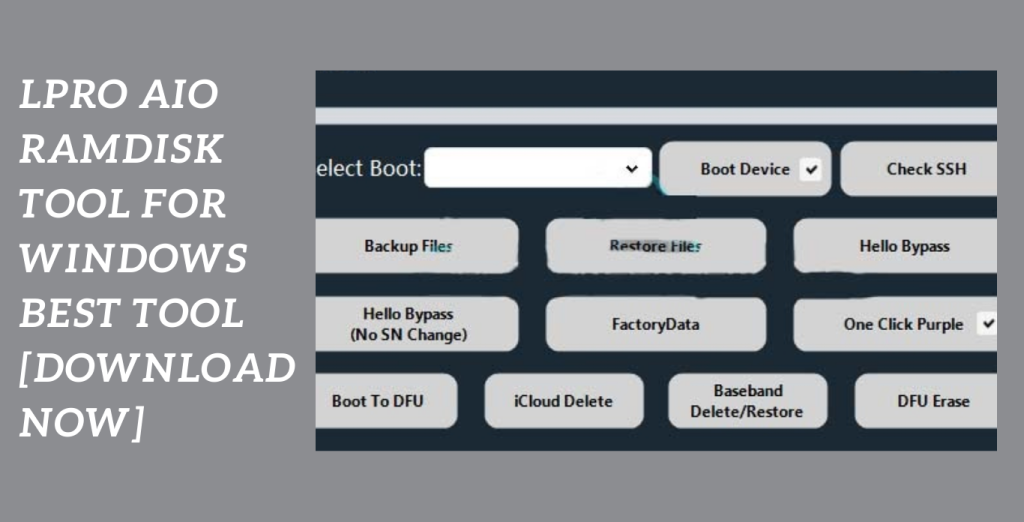
- Enhanced Device Initialization: LPro AIO Ramdisk Tool v1.5 makes it easier to initialise devices, enabling you to swiftly and easily configure your iOS device. Say goodbye to the inconvenience of challenging setup processes.
- SSH Check for Backups: You can easily carry out SSH checks for backups using this utility. You may feel secure knowing that the backup files on your iOS device are secure and authentic.
- File Recovery Streamlined: Did you accidentally remove any crucial files? The LPro AIO Ramdisk Tool simplifies file recovery, enabling you to quickly and easily recover lost data. Never again stress over losing important files.
- Bypass the Hello screen to avoid being caught there when configuring your iOS device. LPro AIO Ramdisk Tool v1.5 offers a seamless bypass, enabling you to continue without interruption.
- Performance and Stability Improvements: The most recent version of LPro’s AIO Ramdisk Tool for Windows has a number of improvements that increase both performance and stability. Utilise an iOS device management tool that is more dependable and streamlined.
- User-Friendly Interface: The product has an intuitive user interface that makes it accessible to both novice and experienced users. Utilise a clear and organised tool interface to complete jobs quickly.
System Requirements:
- Windows 7, Windows 8, Windows 8.1, or Windows 10 as the operating system.
- Processor: Intel Pentium 4 or more (or similar).
- RAM: For optimum performance, you should have a minimum of 2 GB (4 GB is suggested).
- Storage: The tool installation will require at least 100 MB of free disc space.
- Display: A screen resolution of at least 1024×768 pixels is advised.
- Internet access is necessary for downloading the programme and obtaining updates.
- Additional Software: To guarantee compatibility with iOS devices, make sure iTunes is updated and installed on your computer.
How to Install:
- Get the installation package here Download the LPro AIO Ramdisk Tool v1.5 for Windows installation package from the official website or another reliable source. The downloaded file should be saved somewhere on your PC.
- Run the Installer To launch the installer, find the downloaded installation package file and double-click it. Make sure you have the required rights to install software on your computer since you could be requested for administrator access.
- Recognising the Licence Agreement If you accept the terms of the licence agreement after carefully reading it, tick the box next to it. To continue, click the “Next” or “Install” button.
- Select the Installation Location: The installer will give you the chance to select the target folder for the tool’s installation.
- By choosing the “Browse” option, you can choose a different folder or maintain the default position. Once you’ve decided, press “Next” or “Install” to continue.
- Launching the Installation The installation procedure will now start with the installer. It can take a short while to finish. A progress indicator that shows how far along the installation is may also be seen.
- Complete the Installation A “Finish” or “Done” button will appear after the installation is complete. To finish the installation procedure, click on it.
Password: technicalworld.co
Mirror Link!
]]>As a user of a Xiaomi phone, you are aware of the significance of trustworthy tools for software fixes to guarantee the best possible functionality of your device. Avatar Auth Tool is a specialised professional service tool created to offer a full repair solution for Xiaomi phones. Thus, The most recent version, Avatar Auth Tool V1.0.5, adds a number of improvements and additions that improve its functionality. We shall examine the features and advantages of Avatar Auth Tool V1.0.5 for Xiaomi phone repairs in this article.

Use Mi Assistant Mode, reset FRP, and more:
On Xiaomi phones, the Avatar Auth Tool V1.0.5 provides a broad variety of repair functions to fix common software faults. With this tool, you may use Mi Assistant Mode for sophisticated troubleshooting, reset FRP (Factory Reset Protection), perform factory resets to return your Xiaomi phone to its factory default settings and delete data to fix software problems. These features make sure you have access to a complete repair solution.
Increased Efficiency and efficacy:
The most recent version of the Avatar Auth Tool has a number of improvements that increase its efficacy and efficiency while fixing Xiaomi phones. The tool enables quicker and more reliable repairs thanks to optimised algorithms and performance improvements. Thus, this ensures that your Xiaomi phone is kept in top condition and reduces downtime throughout the repair procedure.
Professional Service Tool:
The Avatar Auth Tool was created as a professional service tool with Xiaomi phone repairs in mind. Both seasoned experts and novice users may use it because to its user-friendly design and simple controls DIY aficionados. Avatar Auth Tool offers the functionality and tools required to complete any task, from simple fixes to more difficult software problems.
Key Features:
- FRP Reset: Avatar Auth Tool allows you to reset FRP (Factory Reset Protection) on Xiaomi phones. This feature helps you bypass the FRP lock and regain access to your device.
- Mi Assistant Mode: With the Mi Assistant Mode, you can perform advanced troubleshooting on your Xiaomi phone. This mode provides additional options and tools to diagnose and resolve software-related issues effectively.
- Wipe Data: The tool enables you to wipe data on your Xiaomi phone. Thus, This feature is useful when you encounter software conflicts or need to start afresh with a clean slate.
- Factory Reset: Perform a factory reset on your Xiaomi phone to restore it to its default settings. This feature helps in resolving persistent software issues and bringing your device back to its original state.
- Comprehensive Repair Solution: Avatar Auth Tool offers a comprehensive repair solution for Xiaomi phones. It covers various aspects of software repair and maintenance, providing a wide range of functionalities to address common issues.
- Efficiency and Effectiveness: The latest version, V1.0.5, includes enhancements that improve the tool’s efficiency and effectiveness. Optimized algorithms and performance.

System Requirements:
- DIY aficionados. Operating System: Windows 7, Windows 8, Windows 8.1, or Windows 10 (32-bit or 64-bit), whether you need to make simple fixes or deal with more complicated software difficulties.
- Processor: Intel Pentium 4 or more (or similar).
- RAM: For optimum performance, you should have a minimum of 2 GB (4 GB is suggested).
- Storage: The tool installation will require at least 200 MB of free disc space.
- USB port is required to connect your Xiaomi phone to a computer.
- Operating system should be compatible with these drivers. The Auth Tool offers the functionality and tools required to do the task.
How to Install:
- Get the installation package here for the installation package for your Windows operating system, go to a reliable supplier or the Avatar Auth Tool website.
- Thus,Locate the downloaded file and use a file extraction programme like WinRAR or 7-Zip to extract its contents. A new folder containing the extracted files will be created as a result.
- Launching the Installer Find the installation file by opening the extracted folder. To start the installation procedure, double-click the installer file.
- Accept the Licence Agreement to continue with the installation, carefully read the licence agreement and click the “Accept” or “Agree” button.
- Select a location for installation You’ll be prompted by the installation process to select the location.
- The Avatar Auth Tool will be set up. By choosing the “Browse” option, you can choose a different folder or maintain the default position. Once you’ve decided, press “Next” or “Install” to continue.
- Launching the Installation You’ll notice a progress bar showing how far along the installation is as the process starts. Hold off till the procedure is over.
- Thus, Complete the Installation A “Finish” or “Done” button will appear after the installation is complete. To finish the installation procedure, click on it.
Password: technicalworld.co
Mirror Link!
]]>Hunter Unlocker Tool. You may rely on the Hunter Unlocker Tool V1.0 if you use a Samsung TracFone and wish to unlock your cellphone for free. In this post, we’ll walk you through downloading and using this program to easily unlock your Samsung TracFone.

Free Samsung TracFone Unlocking:
The Hunter Unlocker Tool V1.0 offers a simple way to unlock your Samsung TracFone for nothing. You may quickly unlock your TracFone smartphone by following the straightforward instructions provided below and downloading the program to your computer.
With the help of the dependable:
and cost-free Hunter Unlocker Tool V1.0, customers may easily unlock Samsung Trac Fones. You may open your Samsung TracFone for free by following the step-by-step instructions and downloading the program to your computer. Utilize your unlocked cellphone with freedom and discover more network possibilities.
Key Features:
- The product has an easy-to-use interface that is basic and straightforward, so even users with little technical expertise can utilize it. With a few clicks, you may unlock your Samsung TracFone.
- As a result, You can unlock a variety of TracFone smartphones because it supports a broad range of Samsung TracFone models.
- This guarantees that even inexperienced users can easily unlock their Samsung TracFones.
- It allows you to unlock your smartphone quickly and effortlessly while saving you time and effort.
- For Samsung TracFones, a trustworthy unlocking method is provided by the tool.

System Requirements:
- Operating System: 32-bit or 64-bit versions of Windows 7, 8, 8.1, or 10.
- Processor: Intel Pentium 4 or more (or similar).
- Storage: The tool installation will require at least 100 MB of free disc space.
How to Install:
- Get the tool here Download the Hunter Unlocker Tool V1.0 from a reputable website or another source.
- Locate the downloaded file and use a file extraction program like WinRAR or 7-Zip to extract its contents.
- Launching the Installer Find the installation file by opening the extracted folder. To start the installation procedure, double-click the installer file.
- Accept the Licence Agreement: To continue with the installation, carefully read the license agreement and click the “Accept” or “Agree” button.
- Launching the Installation: You’ll notice a progress bar showing how far along the installation is as the process starts. Hold off till the procedure is over.
- Launch the Tool: After the installation is complete, you can receive an automated request to start the Hunter Unlocker Tool. If not, double-click on the shortcut icon to launch the program by finding it on your desktop or in the Start menu.
Password: technical world. co
Mirror Link!
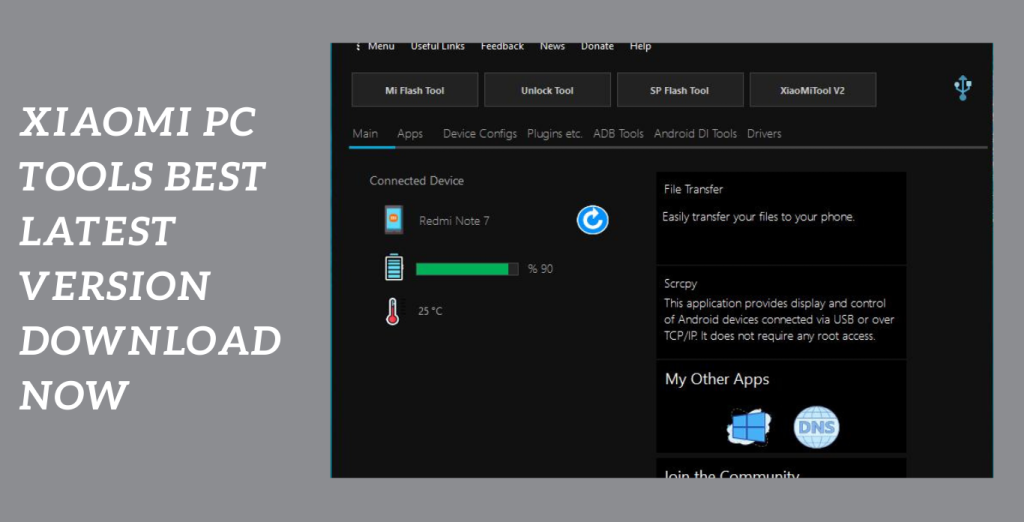
]]>A complete solution for simply controlling your Xiaomi and Redmi smart devices is provided by Xiaomi PC Tools. You may backup and restore contacts, music, movies, images, and other important items saved on your device’s storage with its most recent version. Tasks are made easier by this official English program, which also offers a smooth user interface. In this post, we’ll examine Mi PC Suite’s main features and how they make seamless file transfers.
File Transfer, Backup, and recovery:
Mi PC Suite enables you to transfer, backup, and recover crucial files from your smartphone. No matter what type of data you have—photos, music, videos, or contacts—you can make sure it is securely saved and easily retrievable. Additionally, the program can allow for efficient file transfers between your PC and mobile device.
Screencasting and screenshots:
They are both possible with Mi PC Suite when using a smartphone or tablet. With the help of this function, you may view your device’s interface on a larger display in a larger and more useful manner. Additionally, you may easily capture significant details or moments by taking screenshots of each window.
Internet Sharing:
Mi PC Suite offers options for sharing your computer’s internet connection with other devices. With this capability, you easily access the internet on your Xiaomi or Redmi smart smartphone without having to root it.
Key Features:
- Internet sharing: Without the necessity for rooting, you may connect your Xiaomi or Redmi device to the internet through your PC. Using the internet connection on your PC.
- Device administration: Mi PC Suite provides a user-friendly interface made especially for Xiaomi and Redmi device administration. The Mi PC Suite UI makes it simple to update the system software and firmware on your device.
- Mi PC Suite gives efficient file transfer between your PC and smart device first priority. You may transfer files to and from your device quickly and effortlessly with a smooth and simplified approach.
- Internet sharing: Without the necessity for rooting, you may connect your Xiaomi or Redmi device to the internet through your PC.
- Device administration: Mi PC Suite provides a user-friendly interface made especially for Xiaomi and Redmi device administration. The Mi PC Suite UI makes it simple to update the system software and firmware on your device.
- Mi PC Suite gives efficient file transfer between your PC and smart device priority. You may transfer files to and from your device quickly and effortlessly with a smooth and simplified approach.
System Requirements:
- Operating System: 32-bit or 64-bit versions of Windows 7, 8, 8.1, or 10.
- Processor: Intel Pentium 4 or more (or similar).
- RAM: For optimum performance, you should have a minimum of 2 GB (4 GB is suggested).
- Storage: The installation of the application requires at least 500 MB of free disc space.
- Display: A screen resolution of at least 1024×768 pixels is advised.
- USB Port: A working USB port is required to connect your Xiaomi or Redmi handset to a computer.
- Internet connection: Downloading the program and getting updates both require a live internet connection.
How to Install:
- The installation package for your Windows operating system may be downloaded by going to the official Mi PC Suite website or another reliable source.
- To launch the installer, find the downloaded installation package file and double-click it.
- Click the “OK” or “Next” button after selecting the required language (for instance, English) from the list of alternatives.
- Carefully read the license agreement. Select the tick confirming your agreement with the conditions.
- acceptance. To continue, click the “Next” or “Install” button.
- By choosing the “Browse” option, you can choose a different folder or maintain the default position. Once you’ve decided, press “Next” or “Install” to continue.
- The installation procedure will now start with the installer. It can take a short while to finish.
Password: technical world.co
Mirror Link!
]]>A useful utility programme called Samsung FRP Hijacker Tool was created by GSM Hagard to get beyond Samsung Galaxy phones’ FRP (Factory Reset Protection) protection. This programme allows you to unlock FRP in download, dialer, and ADB modes, solve Softbrick issues, and conduct factory resets in just a few simple steps. This tutorial will walk you through downloading the most recent Samsung FRP Hijacker Tool and successfully removing the FRP lock from your Samsung smartphone.
Circumvented using the FRP Hijacker Tool:
On Samsung Galaxy phones, the FRP lock may be circumvented using the FRP Hijacker Tool, which was created with this purpose in mind. After a factory reset, this security feature stops unauthorised access to the device. This utility allows you to remove the most recent you can restore access of your Samsung phone by signing in to a current Google account without using the password.
Fix Softbrick Error and Complete Factory Reset:
The FRP Hijacker Tool can overcome FRP lock and repair Softbrick errors, which are frequent problems that might happen when the device is starting. Additionally, you may use this programme to do a factory reset, which can assist fix many software-related issues and restore your Samsung phone to its initial settings.
FRP may be Unlocked:
Using the Download, Dialer, and ADB modes of the Samsung FRP Hijacker Tool. This programme offers simplicity and versatility when it comes to getting around the FRP lock on your Samsung smartphone, regardless of whether you prefer utilising the download mode, dialer mode, or ADB method.
Key Features:
- The FRP Hijacker Tool was created particularly to get around the FRP lock on Samsung Galaxy phones. By deleting the last active Google account without requesting the password, you can recover access to your device.
- Fix for Softbrick issues: Using this utility, you may repair Softbrick issues that could appear while your Samsung Galaxy phone boots up. This tool aids in addressing typical software-related problems and restores your device’s functioning.
- Factory Reset: You may do a factory reset on your Samsung Galaxy phone with the FRP Hijacker Tool. When you wish to fix software issues and return your device to its default settings, this option is helpful.
- Multiple Modes to Unlock FRP: The tool provides versatility to remove FRP in several modes, including as download, dialer, and ADB modes. This enables you to select the most practical approach in light of your unique requirements and device compatibility.
- User-Friendly design: Even for those with little technical expertise, the FRP Hijacker Tool is simple to use and navigate because to its user-friendly design. The FRP bypass procedure is made simple by the clear instructions and easy structure.
System Requirements:
- Operating System: 32-bit or 64-bit versions of Windows 7, 8, 8.1, or 10.
- Processor: Intel Pentium 4 or more (or similar).
- RAM: For optimum performance, you should have a minimum of 2 GB (4 GB is suggested).
- Storage: The tool installation will require at least 100 MB of free disc space.
- USB port: It is required to connect your Samsung Galaxy phone to a computer.
- USB Driver: Ensure that you have the correct, operating system-compatible USB drivers installed for your Samsung Galaxy phone.
How to Install:
- Download the FRP Hijacker Tool from a reliable source or the Gsm Hagard website. The downloaded file should be saved somewhere on your PC.
- Locate the downloaded file and use a file extraction programme like WinRAR or 7-Zip to extract its contents. A new folder containing the extracted files will be created as a result.
- Find the FRP Hijacker Tool executable file by opening the extracted folder. To start the utility, double-click the file.
- Enable USB Debugging by going to “Settings” > “About Phone” > “Software Information” on your Samsung Galaxy phone and repeatedly tapping the “Build Number” until it reads “You are now a developer.” Return to the default settings and select “Developer Options”.
- Using a USB cord that is suitable, join your Samsung Galaxy phone to your computer. Make sure that your phone is in ADB or download mode.
- Choose the required action, such as “Remove FRP” or “Factory Reset” from the FRP Hijacker Tool interface. Observe the tool’s prompts and instructions that are displayed on the screen.
- Observe the process till it is finished. The FRP Hijacker Tool will carry out the chosen action on your Samsung Galaxy phone. Hold off till the procedure is over. It could take a while.
- Your phone should now be disconnected from the computer when the procedure is finished.
Password: technicalworld.co
Mirror Link!
]]>