iPhone and Android Team Tools that increase the usefulness and capacities of these devices have become crucial in a world where smartphones and tablets predominate. The iPhone and Android Team DR.LINH Thanh Apple Phong Baria Version Multi Tool represents a significant advancement in this field by providing a full complement of capabilities specifically designed for Apple products with A5-A6 processors.
The Innovation Journey of the Phong Baria Team:
Every significant technical development is the result of a hardworking group of inventors. When it comes to using mobile device tools, the Phong Baria team has continually pushed the envelope. They have improved their methodology and integrated user feedback with each iteration to provide a solution that really meets community requirements.
DR.LINH Thanh Apple Phong Baria Version Multi Tool Unveiling for iPhone and Android:
Version 6.2.1, the most recent release, keeps the Phong Baria team’s reputation for quality workmanship. This multi-tool is made to provide customers who want to optimise their Apple devices with a smooth experience. This tool has you covered whether you’re an enthusiast looking to explore additional functions or a user with technical difficulties.
Key Features:
iPwndfu being run in mode
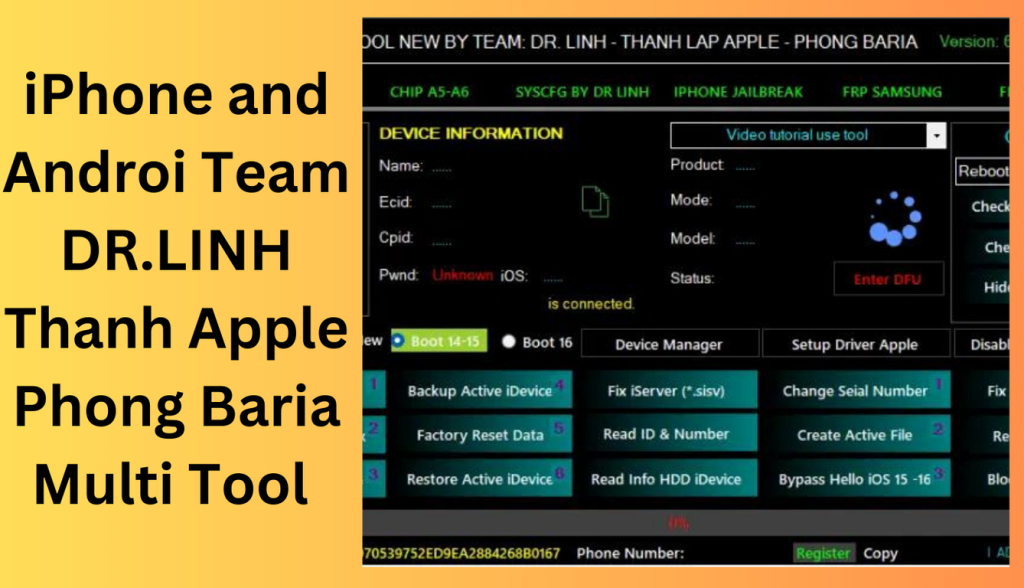
Users can run iPwndfu in mode with the help of the iPhone and Android Team DR.LINH Thanh Apple Phong Baria Version Multi Tool. This creates possibilities for sophisticated customization and gives consumers unprecedented control over the settings and configurations of their devices.
SSH connection on an iOS device
SSH access is a strong technology that gives users the ability to connect securely to their device. The multi-tool makes this procedure simple so that even those with little technical knowledge may complete it. For individuals who wish to remotely examine their device’s file system and run commands, this functionality is a game-changer.
Data Factory Reset
In some cases, a new beginning is required to tackle ongoing problems. Users may erase the data on their devices with the tool’s factory reset feature while still using it easily. It’s a dependable method for handling problems with performance and bugs that might develop over time.
iServer (*.sisv) repair
Fixing iServer (*.sisv) problems is another prevalent worry that the utility solves. When users experience issues with server connections, this feature is helpful. Users may reestablish smooth connectivity thanks to the multi-tool’s streamlined troubleshooting approach.
What’s New
- Improved support for the latest Android and iPhone models.
- Faster device detection and connection process.
- Enhanced user interface for easier navigation.
- Better compatibility with recent operating system updates.
- Increased stability and performance.
- Improved security and reliability.
- Faster execution of supported functions.
- Various bug fixes and optimizations.
Pros and Cons
Pros
- Supports both Android and iPhone devices.
- Easy-to-use interface for technicians and users.
- Fast device recognition and communication.
- Regular updates with improved compatibility.
- Useful for device management and maintenance tasks.
Cons
- Some features may not support all device models.
- Requires proper driver installation.
- Advanced functions may require technical knowledge.
- Performance can vary depending on device compatibility.
- Certain features may be limited on newer software versions.
System Requirements
- Windows 7, 8, 10, or 11 (64-bit recommended)
- Minimum 4 GB RAM (8 GB recommended)
- At least 1 GB of free storage space
- Stable internet connection
- USB drivers installed for Android and iPhone devices
- Original USB cable for reliable connectivity
- Administrator access on Windows
How to obtain
- It’s simple to get started using the iPhone and Android Team DR.LINH Thanh Apple Phong Baria Version Multi Tool.
- Users with various technological backgrounds can utilise its potential thanks to the official website’s comprehensive installation and usage instructions.
- Devices that are Compatible and Supported
- The multi-tool works with a variety of Apple products with A5-A6 processors. This covers a wide range of iPhone models and offers customers of various device generations an all-inclusive solution.
- User Testimonials and Experiences
- Users from all around the globe have praised the iPhone and Android Team DR.LINH Thanh Apple Phong Baria Version Multi Tool.
FAQs
- Does the tool work with the most recent iPhone models? A: The utility currently primarily supports chip-based devices. In upcoming versions, compatibility with more recent models could be investigated.
- Can I undo the modifications the tool made? A: Yes, there are choices in the programme to undo modifications and return your device to how it was before.
- Is technical knowledge necessary to use the multi-tool? A: Although having some acquaintance with device settings may be advantageous, the tool is intended to be usable by users with different degrees of technical expertise.
- Does the tool need to be connected to the internet in order to work? A: Although the programme itself does not need a continual internet connection, some functions, including downloading updates, could.
- Where can I find the Dr. Linh Thanh Apple Phong Baria Version Multi Tool for iPhone and Android? A: Use the tool and maximise its capabilities at
Conclusion
The DR.LINH Thanh Apple Phong Baria Version Multi Tool for iPhone and Android is a spectacular example of mobile device innovation. It has developed into a useful tool for owners of Apple devices due to its numerous functions, approachable user interface, and capacity to handle different problems. This solution, which gives consumers unprecedented control over their devices, is a testament to the Phong Baria team’s commitment to improving user experiences.
Password: technicalworld.co
Download Link!
]]>
WMT Team Ramdisk V6.2.1 iCloud Bypass Tool In this digital age, smartphones have become integral to our lives. They store our memories, connect us to the world, and house important data. However, what happens when you forget your passcode or your device gets locked? That’s where the World Mobile Windows Ramdisk Tool V6.2.1 comes to the rescue. This article will explore this paid tool’s capabilities, how it bypasses passcodes, disables Meid/GSM without jailbreak notifications, and what it means for iCloud services and sim calls. Let’s dive in.
Understanding the World Mobile Windows Ramdisk Tool:
What is it?
The World Mobile Windows Ramdisk Tool V6.2.1 is a powerful software designed to unlock and regain control of your iOS device. This tool is compatible with Windows computers and offers a solution to various device-related issues.
Bypassing Passcodes
One of the standout features of this tool is its ability to bypass passcodes. Whether you’ve forgotten your passcode or are locked out of your device, this tool can help you regain access without the need for a complicated jailbreaking process.
Disabling Meid/GSM without Jailbreak Notifications
This tool offers a discreet solution for users looking to disable Meid/GSM without attracting unwanted attention through jailbreak notifications. It allows you to achieve your goal without raising any red flags.
iCloud Services and Sim Calls
The World Mobile Windows Ramdisk Tool V6.2.1 also affects iCloud services and sim calls. We’ll delve into these aspects below:
iCloud Services
When you use this tool, it’s important to note that it may have an impact on your iCloud services. Make sure to back up your data before proceeding, as this process could affect the synchronization of your device with iCloud.
Sim Calls
While the tool works wonders in many aspects, it’s essential to understand that it may impact sim calls, except for the carrier locked to your device. This means that you might face some limitations in making calls depending on your carrier.

How to Use:
Using this tool is relatively straightforward. Here are the basic steps to get you started:
- Download: Access the tool from the official source to ensure authenticity and security.
- Installation: Install the software on your Windows computer.
- Connect Your Device: Connect your iOS device to your computer using a USB cable.
- Launch the Tool: Open the World Mobile Windows Ramdisk Tool V6.2.1.
- Follow On-Screen Instructions: The tool will guide you through the process, so follow the on-screen instructions carefully.
- Wait for Completion: Be patient as the tool does its work. It may take some time, depending on your device and situation.
- Access Restored: Once the process is complete, your device should be unlocked and ready to use.
Conclusion:
The World Mobile Windows Ramdisk Tool V6.2.1 is a valuable solution for those who find themselves locked out of their iOS devices. It offers a simple and effective way to bypass passcodes, disable Meid/GSM without jailbreak notifications, and regain control of your device. However, it’s crucial to use it responsibly, considering its potential impact on iCloud services and sim calls. Always back up your data before using such tools to avoid data loss.
FAQs:
- Is the World Mobile Windows Ramdisk Tool V6.2.1 safe to use?
- Yes, the tool is safe to use when obtained from the official source. Be cautious of downloading it from untrusted websites.
- Can I use this tool on a Mac computer?
- No, this tool is designed specifically for Windows computers.
- Will using this tool erase my data?
- While the tool aims to preserve your data, it’s always recommended to back up your device before using it to avoid any potential data loss.
- Does this tool work on the latest iOS versions?
- The tool’s compatibility with the latest iOS versions may vary. Check for updates and user reviews for the most accurate information.
- What should I do if I encounter any issues while using the tool?
- If you encounter any problems or have questions about using the tool, refer to the official documentation or seek assistance from their support team.
Password: technical world.co
Download Link!
]]>
MFK Tool Windows RamDisk V6.2.1 By removing these obstacles, the ground-breaking enables customers to restore access to their devices without the need for in-depth technical expertise.
Here is MFK Tool V6.2.1:
Unlocking Devices Quickly
The purpose of MFK Tool V6.2.1 is to make the unlocking of iPhones and iPads simpler. Users may quickly unlock iCloud locks and take back control of their devices using its user-friendly UI and simple instructions.
iOS v16.x compatibility
iOS versions also advance in line with technology.
What Is the MFK Tool V6.2.1 Process?
No need to get out of jail
The MFK Tool V6.2.1 unlocks devices without the need for complicated processes like jailbreaking, in contrast to certain unlocking techniques. Users may now unlock their gadgets without endangering the warranty or running the risk of harm, thanks to this.
No need for a Mac or computer
By removing this restriction, the MFK Tool V6.2.1 enables users to unlock their Windows devices straight from their PCs.
Gains from MFK Tool V6.2.1:
Friendly User Interface
With its straightforward and user-friendly design, MFK Tool V6.2.1 is usable by users of all technical backgrounds. The detailed instructions guarantee a simple unlocking procedure.
Rapid and Trustworthy Results
Waiting endlessly for your smartphone to unlock is a thing of the past thanks to MFK Tool V6.2.1 The tool minimises delay and irritation by delivering prompt and dependable results.
Compatibility and Flexibility
The unequalled compatibility of MFK Tool V6.2.1 is available for both iPhone and iPad users. It is a flexible option for different iOS users because it supports a broad variety of devices.

How-to Guide for Using MFK Tool V6.2.1:
Installation and Downloading
The installation procedure is simple and involves little work.
carrying out the unlocking procedure
To start the unlocking procedure, adhere to the MFK Tool V6.2.1’s on-screen instructions. The programme will perform its magic to make sure you can use your gadget once again.
Conclusion:
Users of the iPhone and iPad who have had trouble with the iCloud lock may breathe a sigh of relief thanks to the MFK Tool V6.2.1 It is a game-changer in the field of smartphone accessibility because to its user-friendly design, compatibility with the most recent iOS versions, and quick unlocking procedure.
Password: technical world.co
Download Link!
]]>