
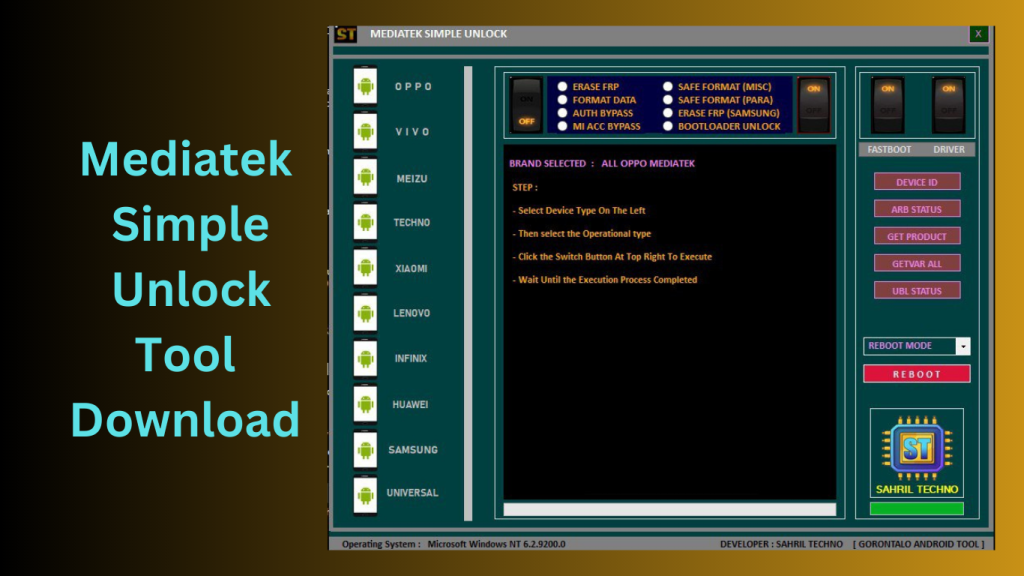
Mediatek Simple Unlock Tool The Mediatek Simple Unlock Tool (MSU) is a flexible software program created especially to function with Android tablets and smartphones using MediaTek processors. It has the ability to remove FRP (Factory Reset Protection), flash firmware, and unlock patterns on compatible devices, among other things. The tool’s broad range of device model support guarantees compatibility with many MediaTek-based gadgets.
Certainly! In the competitive mobile market of today, when many users consider unlocking numerous smartphone features and capabilities to be essential, the MediaTek Simple Unlock Tool (MSU) 20.0 is very important. The MSU tool stands out as a superb option with the rising desire for simpler FRP removal, data formatting, and bootloader unlocking. It has a wide range of top smartphone brand compatibility and offers a number of outstanding benefits.
Functions Supported by the System:
- FRP Elimination: This function enables customers to go over Factory Reset Protection so they can use the device without having to enter their Google login information previously.Secure Format (Misc): Users can format different device information in a certain way to start again with a clear and uncluttered device.
- Users have the option to entirely erase all personal data and reset the device to its factory default settings by formatting and organizing its data disc.
- Secure Format (Para): By enabling a secure format for the “para” partition, which houses crucial device-specific data, this feature makes sure that formatting is both efficient and secure.
- Users have the option of avoiding the authentication procedure to access more options and functionalities.
- Specifically created for Samsung devices, the FRP Erase function enables users to get around the FRP security on their Samsung cellphones.Mi Account Bypass: Xiaomi customers may quickly avoid the Mi Account authentication process and take full advantage of all the features available on their smartphone.
- Bootloader Unlock: With the MediaTek Simple Unlock Tool 20.0, users may unlock the bootloader of the compatible devices they own, opening the door to more complex customization possibilities and the installation of unofficial firmware.
Key Features:
- Bypassing the device’s authentication procedure gives you access to more functions and capabilities.
- Mi Acc Bypass: On Xiaomi smartphones, this function enables you to avoid the Mi account verification process.
- You may securely format a device’s miscellaneous partition using the secure format (Misc) command.
- Secure Format (Para): This format securely constructs the device’s parameter partition.
- With the use of the Erase FRP (Samsung) tool, you may free Samsung devices from the Google account lock.
- You can unlock the bootloader on most devices using this.
Supported Models:
- Devices from the following brands are compatible with the MediaTek Simple Unlock Tool 20.0:
- OPPO VIVO
Samsung Meizu
Nokia Xiaomi Huawei Lenovo Tecno Vsmart Asus Infinix
What’s New in Mediatek Simple Unlock Tool
- The latest version of Mediatek Simple Unlock Tool introduces several improvements focused on performance, device compatibility, and overall usability.
- Expanded MediaTek Device Support
- The tool now supports a wider range of MediaTek-powered smartphones and tablets, allowing users to work with more devices than before.
- Improved Processing Speed
- Recent optimizations have reduced operation times, helping users complete supported tasks more efficiently.
- Enhanced Stability
- Developers have improved the software’s reliability, minimizing errors and improving overall performance during device operations.
- Better User Interface
- The updated interface offers a cleaner layout, making navigation easier for both new and experienced users.
- Bug Fixes and Compatibility Updates
- Several bugs have been resolved, and compatibility has been improved for newer Windows versions and supported MediaTek chipsets.
Pros and Cons
Pros
- Simple and user-friendly interface
- Supports a wide range of MediaTek devices
- Fast operation speeds
- Lightweight software package
- Regular updates and improvements
- Suitable for both beginners and technicians
Cons
- Limited to supported MediaTek devices
- Some advanced features may require technical knowledge
- Compatibility can vary depending on device model and firmware version
- Requires proper drivers for optimal functionality
How to Use:
- Utilise the supplied download link to get the MSU MediaTek Simple Unlock Tool.
- Find and open the extracted folder.
FAQs
- What is Mediatek Simple Unlock Tool used for?
- It is a utility designed to assist users in managing and servicing supported MediaTek-powered devices through various maintenance and diagnostic functions.
- Does the tool support all MediaTek devices?
- No. Compatibility depends on the specific chipset, device model, and software version.
- Is Mediatek Simple Unlock Tool beginner-friendly?
- Yes. The software features a straightforward interface that makes it relatively easy to use for most users.
- Does the tool receive regular updates?
- Yes. Developers periodically release updates to improve compatibility, performance, and stability.
Conclusion
Mediatek Simple Unlock Tool has become a popular utility among users and technicians working with MediaTek-powered devices. Its lightweight design, broad device compatibility, and user-friendly interface make it a practical solution for various device management tasks. With regular updates, improved stability, and expanding support for newer hardware, the tool continues to be a valuable option for those who frequently work with MediaTek smartphones and tablets.
Password: technicalworld.co
Download Link!
]]>
Dragonfly Tool I can provide some basic guidance or suggest well-known and reliable products that are already on the market if you’re seeking for tools to help with Android cellphones. In order to prevent any security dangers or legal problems, always make sure you are downloading software from legitimate sources.
What exactly is Dragonfly?
GSM Sulteng created the software application Dragonfly with Windows machines in mind. It promises to offer an effective and convenient solution for different Android smartphone-related chores.
It is significant to note that, as of my most recent update in September 2023, I was unaware of any more improvements to the Dragonfly Tool v1.0.1 code. As a result, I suggest checking out the official website or other trustworthy sources to get the most up-to-date details on Dragonfly and its features. Whenever using any programme, make sure you Download it from reliable sources to prevent malware or any security problems.
Features Key:
- MTK Universal: This capability makes a wide range of MTK-based smartphones possible by enabling interoperability with devices that use MTK CPUs.
- On Android smartphones, Dragonfly can assist you with problems relating to pattern locks.
- You may reset your smartphone to its factory default settings by performing a factory reset on it.
- Factory Reset (Old MTK): To execute a factory reset on a device with an older MTK CPU, choose this option.
- Protected Format Data: This function safely and securely formats the data on your device without causing any data loss.
- Reset Account: Dragonfly can assist with resetting account-related issues on your device.
- Remove FRP (Factory Reset Protection): After a factory reset, you may unlock the device because the FRP lock is no longer there.
- Remove FRP (2nd Method): There is a different way to get around the device’s FRP lock.
- Samsung FRP Eraser: This function is made particularly to remove FRP from Samsung devices.
- Eliminate MI Cloud Tam: This aids with unlocking Xiaomi devices’ MI Cloud locks.
- Dragonfly offers methods for interacting with the device’s bootloader in bootloader mode.
- Unlock Bootloader (UBL): You may make use of this capability to unlock your device’s bootloader.
- Secure Bootloader (ReUBL): After unlocking the device, lock the bootloader once again to increase security.
- You can use the device’s modem-related features while in this mode.
- Erase NvRam using Dragonfly to get rid of non-volatile memory for the device’s random access memory (NvRam).
- NvData should be removed to make the device’s non-volatile data (NvData) clean.
- NvRam and NvData backup: You can make a copy of your device’s NvRam and NvData.

How to Use?
- Download the application: Obtain the Dragonfly tool from a reliable source or, if available, the official website. Make sure you’re getting the most recent and authentic version of the programme.
- After downloading the Dragonfly utility, extract the contents from the package (which are often in RAR format) and save them to a folder on your computer.
- provide Login Information: To use the tool, provide your login ID and password if prompted. Don’t use any unauthorised or shared accounts, and make sure you received the login information legally.
- Install Drivers (If Required): The utility may ask you to install drivers if your computer does not already have them installed for your Android smartphone. To install the necessary drivers, adhere to the on-screen directions.
Password: technicalworld.co
Download Link!
]]>