
EGSM Auth Tool v3.4.1 This tool’s special characteristics enable users to easily switch from Xiaomi smartphones to any Qualcomm-based model without using the Xiaomi authenticator. Let’s investigate the EGSM Auth Tool v3.4.1’s capabilities and how it alters the flashing process.
EGSM Auth Tool v3.4.1: Opening Up New Worlds:
For owners of Xiaomi devices, the EGSM Auth Tool v3.4.1 has swiftly attracted notice as a game-changing tool. With its user-friendly interface, this powerful Windows computer utility revolutionizes the device flashing procedure and opens up new opportunities.
Beyond Boundaries Flashing:
This offers up a world of gadget modification and improvement.
Xiaomi Authenticator is not necessary:
In the past, the Xiaomi authenticator was frequently needed for flashing Xiaomi devices.
Rapid and Effective Upgrades:
A device upgrade should be a quick and easy procedure. Upgrades are simplified with EGSM Auth Tool v3.4.1, enabling consumers to quickly switch from their Xiaomi handset to a Qualcomm-based model. Users may take use of the advantages of their updated gadget without needless delays thanks to its optimised operations.

Unavoidable for Anyone Using a Xiaomi Device:
Every owner of a Xiaomi device will be able to utilise all the features of their smartphone thanks to its ability to eliminate restrictions and enable cross-device flashing.
How to Use:
- The process for using EGSM Auth Tool v3.4.1 is simple:
- Download the tool from the official source, install it,
- connect your Xiaomi device to your Windows computer,
- choose the Qualcomm-based model you want to upgrade to,
Learn more about Shadow Defender Final’s features in our guide.
]]>
E-Gsm Tool is a little piece of Windows software made by GSMXTEAM, on your Windows computer. It is completely broken and functional both online and off. With the aid of this tool, it is simple to reset FRP, perform a factory reset, and repair an IMEI. Users may use the programme without an internet connection thanks to its offline data. Utilising the tool is simple.
Features Key:
- Dual SIM IMEI Repair: This function enables customers to update the IMEI of the dual SIM model of the Note 9 and Redmi 9.
- With the aid of the programme, the Redmi 9 and Note 9.
- There are two ways to fix IMEIs in diagnostic mode: With the use of this capability, users can change the device’s IMEI by connecting to Diag mode in one of two methods.
- IMEI repair with Meta Mode: Through their device in Meta mode, customers may utilise this capability to fix the IMEI on their handset.
Turn on Meta Mode for certain types: Users can activate Meta mode on specific models using this functionality. - Download Firmware Flash in EDL or Fastboot mode: Users can use this functionality to flash the firmware on a device that is running in Fastboot or EDL mode.
- While in EDL Mode, read the following: When using this function, users may seek up information about the device when in EDL mode.
Changelog!!!
New features and compatibility for numerous Xiaomi models are included in the most current version of the EGSM Tool. Here is a quick summary of the modifications:
assistance with new models: These Xiaomi models are helped by this update:
- Xiaomi Note 11 Pro 5G
- Xiaomi POCO X4 Pro 5G Qualcomm Auth
- Xiaomi Redmi K40S [munch] Qualcomm Auth
- Xiaomi Redmi K40 Pro [HAYDN] Qualcomm Auth
- Xiaomi RedmiK40 [alioth] Qualcomm Auth
- Xiaomi Mi 11T Pro [vili] Qualcomm Auth
- Xiaomi Redmi 10 Qualcomm Auth [selene] MTK
What is the ideal method of application?
- To begin, click the link below to download the file.
- You should then delete all files from the C: disc (essential).
- Make sure your antivirus is switched off before installing the programme.
- Install the setup file after which follow some simple steps to open the folder.
- Utilise through “XTM_E-GSM Tool v3.5.3.”
- After that, you must finish typing your name before hitting the submit button.
- Start the loader after that and sign into the tool by entering your login information.
- After that, you may install all of your current drivers. Skip this step if it’s still necessary.
- Once the phone is connected, try to do any job.
- Enjoy !!!

How To use:
- The procedures listed below may be used to download the E-GSM Tool v3.5.3 Lifetime Full Free Crack.
- Visit the software’s official website first.
- Next, select the “Download” option.
- Select the ‘Free Download’ option after that. Finally, start the downloading process by clicking the “Download Now” option.
Learn more about Shadow Defender Final’s features in our guide.
]]>
E GSM Tool V4.0 Full Work Offline Download tools are critical in the realm of technology for simplifying activities and increasing efficiency. One such tool that has been making ripples in the IT sector is the E GSM Tool V4.0 This post will go through the basics of this tool, including its functionality and usefulness.
What is E GSM Tool?
E GSM Tool V4.0 is a small Windows software designed to cater to various needs of computer users. This version of the tool offers a unique selling point – it can be used completely offline. All the necessary data is already included in the program, eliminating the need for constant internet connectivity.
The Evolution of E GSM Tool:
In the earlier versions of E GSM Tool, users faced limitations as data had to be retrieved from external servers. However, with the introduction of version V4.0, all data is readily available within the tool itself. This significant improvement has garnered attention from tech enthusiasts and professionals alike.
Key Features:
Let’s take a deeper look at the characteristics that make E GSM Tool V4.0 an appealing option for Windows users:
Offline Usability
One of the most significant aspects of this application, as previously said, is its capacity to function totally offline. This means you may carry out a variety of chores without being concerned about internet access. This function is a game changer for people who frequently find themselves in areas with little or no internet connectivity.
Inclusion of Comprehensive Data
Unlike previous versions, the newest edition of provides all required data within the programme. This comprises databases, resources, and tools needed for smooth operation. Users no longer need to download extra data, decreasing setup time.
enhanced performance
E GSM Tool V4.0 has been improved in terms of performance. It performs well on Windows PCs, ensuring that activities are performed as quickly as possible. Even while performing resource-intensive processes, users may anticipate less latency and faster reaction times.
Versatility
has you covered whether you need it for data recovery, device administration, or software troubleshooting. Its versatility makes it an invaluable companion for electronics aficionados.
Updates on a regular basis
This commitment to continuous enhancement guarantees that consumers always have access to the most up-to-date and dependable tools.

Availability and Compatibility:
E GSM Tool V4.0 is compatible with Windows operating systems, making it available to a wide range of users.
How To Use:
- Get the software here:
- The first step is to get the programme from the URL provided.
- Before you begin, make sure you’ve backed up all of your vital data, as this procedure may need changes to your system.
- Delete files from the C: Drive:
- It is critical to delete all files from your C: disc.
- Turn off Antivirus:
- Disable your antivirus programme temporarily to avoid problems during installation. This is necessary to guarantee a smooth installation.
- Installation:
- Locate the setup file in the location where you downloaded the software.
Run the installation file and follow the basic installation instructions. Typically, this entails picking installation choices, agreeing to conditions, and deciding on an installation directory. - Access the Internet:
- Some features may require an internet connection to work properly.
- After you’ve started the E GSM Tool, you can begin utilising it to do different device-related operations. The tool should have an easy-to-use interface that allows you to navigate its features.
- Enjoy:
Conclusion:
Its offline capabilities, extensive data inclusion, enhanced efficiency, adaptability, and frequent updates make it an appealing option for anybody wishing to simplify their computer responsibilities.
FAQs:
- Is Mac OS X compatible?
- No, this utility is only compatible with Windows operating systems.
- Is there a monthly charge for utilising?
- No, the utility is freely available on the official website.
Learn more about Shadow Defender Final’s features in our guide.
]]>
E-GSM TOOL Its versatile characteristics enable a variety of applications, from straightforward information extraction to sophisticated bootloader modification. The variety of the Android environment makes the EGSM Tool an essential tool for users to ease device administration.
Key Features:
Reading information and removing FRP
The EGSM Tool’s main function is to let users get important data from their Android smartphones. Additionally, it solves the problem of Factory Reset Protection (FRP) by making it simple for consumers to deactivate it. When users run into issues with locked devices or authentication, this capability comes in quite handy.
NVDATA Backup, Recovery, and Factory Reset for Devices
Data preservation is important for device management. Additionally, it provides the ease of factory resetting the device, guaranteeing a new beginning whenever required.
IMEI patching, relocking, and bootloader unlocking
Additionally, it provides IMEI patching, which enhances and optimizes the performance of the device.
Repairing certificates and flashing firmware
The EGSM Tool goes above and beyond the fundamentals by providing certificate repair to resolve problems with security certificates. To improve security and functionality, users may also utilize the tool’s firmware flashing option to upgrade their devices with the most recent software releases.Data preservation is a significant part of device management. Resetting the screen lock gives customers access to their devices without further hassles in situations when they are having trouble with screen locks, thanks to a feature of the EGSM Tool.
Development of the EGSM Tool:
A committed group of programmers who understood the necessity for an all-encompassing Android device management solution came up with the idea for the EGSM Tool. They conceptualized and painstakingly constructed the tool, drawing on their knowledge, to satisfy both beginning users and seasoned fans.
How the EGSM Tool Helps with Android Device Management and Gives Users More Control:
The EGSM Tool provides a comprehensive solution, whether it’s for guaranteeing data integrity, improving performance, or resolving security issues.
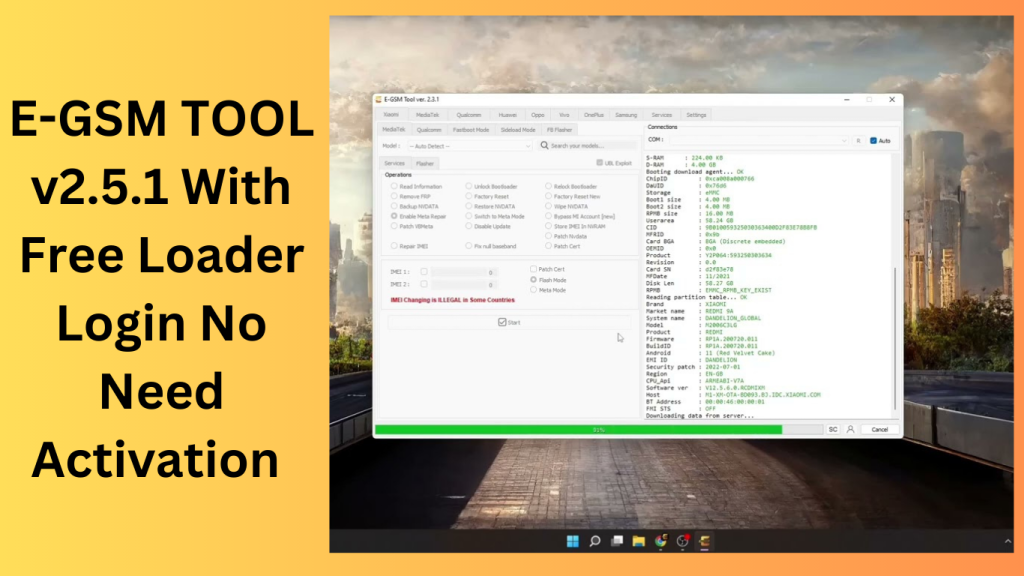
The EGSM Tool: A User-Friendly Guide for Getting Started:
- Follow the steps to install the tool on your computer.
- Launch the tool after connecting your Android smartphone via USB.
- Examine the tool’s user interface and choose the required functionality from the list.
- For easy task completion, adhere to the instructions and suggestions on the screen.
- Future Prospects in Android Device Management.
Prospects for Android Device Management in the Future:
The environment of device management is changing along with the Android ecosystem. The EGSM Tool establishes a precedent for flexible solutions that are in line with new technological developments and user needs. Future releases could include even more complex capabilities to meet the constantly evolving demands of Android users.
Learn more about Shadow Defender Final’s features in our guide.
]]>
RomFW Tool V6.6 is a user-friendly program made to make managing different mobile devices easier and more effective. Let’s examine RomFW Tool V6.6’s primary features.
Device Optimization:
A wide range of optimization options are offered by RomFW Tool V6.6 to improve the functionality of your mobile device as a whole. You may make system settings adjustments, delete cache files, stop pointless background programmes, and free up priceless storage space. These improvements may lead to a rise in responsiveness, efficiency, and speed.
Firmware Management:
You can quickly manage the firmware of your mobile device using RomFW Tool V6.6. It gives you the ability to upgrade the firmware of the device to the most recent version, guaranteeing that you have access to the newest features, security updates, and bug fixes published by the producer.
ROM Customization:
This utility makes it simple for users to modify the read-only memory (ROM) of their device. It offers a variety of customization options, including the ability to add custom ROMs, apply themes, change the system fonts, and alter the look of the device to suit your tastes. Users may personalise their smartphone experience to fit their preferences thanks to ROM customisation.
Backup and Restore:
RomFW Tool V6.6 simplifies the process of backing up and restoring your device’s data.This feature provides peace of mind and allows for a seamless migration between devices.
Root Access and Advanced Features: RomFW Tool V6.6 gives advanced users the option to take control of the mobile device’s root access. With higher capabilities provided by root access, users may install custom recovery software, view system files, and perform sophisticated modifications.
Device Compatibility:
The RomFW Tool V6.6 is made to work with a variety of mobile devices from different manufacturers. No matter what brand or model of smartphone or tablet you own, there’s a strong possibility that RomFW Tool V6.6 will work with it.
Key Features:
- Disabling FRP Sideload and resetting EFS Sideload on Qualcomm-powered Xiaomi smartphones may be challenging for users of the company’s products.
- Tera Tool V6.6 introduces the “Remove FRP Sideload” and “Reset EFS Sideload” methods to address these problems.
- The Redmi Note10, Redmi Note10 Max, Poco M3, Mi 11 Lite, Mi 10 5G, and Note 10 Pro are among the supported gadgets.
- This feature can aid in enhancing network connectivity and fixing network-related issues.Improved Restore QCN: Tera Tool version 2.5.9 has made improvements to the “Restore QCN” function.
- may now skip IMEIs throughout the QCN restoration process, saving them valuable time.Xiaomi Mediatek in Flash Mode Partition Manager and Root Device:
- For Xiaomi devices with Mediatek CPUs, Tera Tool V6.6 offers a Partition Manager and Root Device functionality in flash mode.
- This allows managing partitions and rooting Xiaomi devices with Mediatek CPUs easier.
- Tera includes server improvements, bug fixes, and GUI updates.

How to Use:
- To get the zip file, use the provided URL.Unzip the files to your C: disc.
- Inspect the zip folder to make sure you have extracted every file.
- To install the required drivers, adhere to the directions given by the Tera Tool programme.
- Utilise Tera Tool with pleasure for your phone-related duties..
Password: technicalworld.co
Download Link!
]]>You may access a wealth of new features that enhance your software flashing and fixing skills with the most recent version of E-GSMthe Tool. E-GSM Tool has you covered whether you’re having software problems or need to unlock new phone models. Thus, this innovative solution allows you to easily manage challenging software issues and stay one step ahead of the competition.

Get Rid of Old Cracks:
The consumers’ previous problems with outdated cracks are now a thing of the past. The most recent version of the E-GSM Tool crack has been found, assuring a smooth and effective experience for all users. This straightforward crack makes it simple to flash or fix software issues. Thus, it offers a dependable answer to your smartphone service requirements.
Enhanced User Experience:
The goal of the most recent iteration of the E-GSM Tool is to improve the user experience. Both new and experienced users will find it simpler to go through the tool’s capabilities and features thanks to the easy interface and streamlined navigation.
E-GSM Tool Broadened Model Support:
The most recent version of the E-GSM Tool offers broader model support to accommodate a more extensive range of smartphones. E-GSM Tool is made to work with a variety of models and brands, regardless of whether you have the newest flagship model or a low-cost handset. Thus, You may depend on the utility to carry out software-related operations on a variety of devices thanks to the expanded model support.
Key Features:
- Software Flashing: Easily flash different smartphone models with stock firmware and custom ROMs.
- Comprehensive software repair: capabilities to address software-related problems and bring back device functionality.
- Model Compatibility: Broadened assistance for several smartphone models from various manufacturers.
- User-Friendly Interface: Simple, simple-to-use interface for efficient operations and easy navigation.
- Capabilities for unlocking: Thus, For more freedom, unlock locked devices and take network limitations off.
- Quick and dependable: Processes have been optimized for software flashing and repair procedures that are quick and dependable.
- Regular upgrades: to improve functionality as well as committed support for user help.

System Requirements:
- Operating systems: Windows 7, Windows 8, Windows 8.1, or Windows 10 (32- or 64-bit) are the available operating systems.
- RAM: For optimum performance, you should have a minimum of 4 GB RAM and a maximum of 8 GB RAM.
- Free space: For installation and temporary data, there should be at least 20 GB of free space on the hard disc.
- Graphics: To improve visual performance, a graphics card should support OpenGL 2.0.
- Screen resolution: A minimum of 1280×768 pixels or more should be used for screen resolution.
- Internet Connection: For access to support resources and software upgrades, a reliable internet connection is advised.
How to Install E-GSM Tool:
- Get the most recent E-GSM Tool version from a reliable source.
- The setup file should be saved somewhere on your PC.
- Thus, To launch the installer, find the saved setup file and double-click it.
- Accept the terms and conditions of the license agreement.
- Select the installation’s final destination folder.
- To start the installation process, click the “Install” or “Next” button.
- Hold off until the installation finishes.
- To close the installation, click on the “Finish” or “Close” button.
- On your desktop or in the Start menu, look for the E-GSM Tool shortcut.
- Thus, To launch the shortcut and the E-GSM Tool, double-click it.
Password: technical world .co
Mirror Link!
]]>