
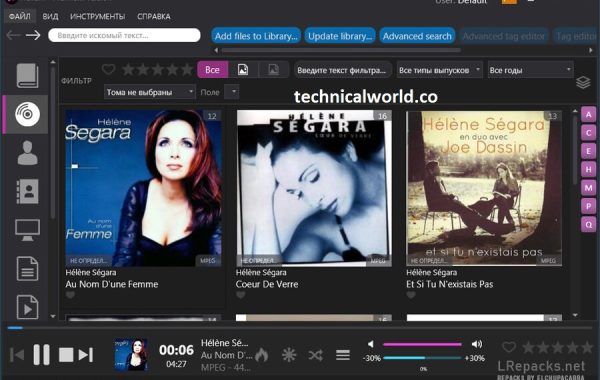
Helium Music Manager is a music management software designed to help users organize, catalog, and play their music collections efficiently. It offers features like tag editing, audio playback, playlist creation, and support for a wide range of audio formats. It can also fetch album art, lyrics, and other metadata to enhance your music library.
Key Features:
- Music Library Management: Organize and manage large music collections with ease, supporting various audio formats.
- Tag Editing: Edit tags such as artist, album, genre, year, and more to keep your library well-organized.
- Audio Playback: Built-in audio player supports playback with customizable playlists and crossfading.
- Automatic Tagging: Retrieve missing metadata, album art, and lyrics automatically from online databases.
- Playlist Creation: Create and manage playlists with drag-and-drop functionality and smart playlist support.
- Music Discovery: Explore music by artist, genre, or mood using powerful search and filtering tools.
- Duplicate Finder: Identify and manage duplicate tracks in your collection to save space.
- Audio Format Conversion: Convert audio files between different formats like MP3, FLAC, WAV, and more.
System Requirements:
- Operating System: Windows 11, 10, 8.1, 8, 7 (both 32-bit and 64-bit supported)
- Processor: Minimum: 1 GHz or faster processor
- RAM: Minimum: 512 MB (1 GB or more recommended for large libraries)
- Hard Disk Space: At least 100 MB free space for installation
How to Install:
- Download the Installer: Go to the official Helium Music Manager website or a trusted source. Download the latest version of the Helium Music Manager setup file.
- Run the Installer: Locate the downloaded setup file (usually in your Downloads folder). Double-click the file to launch the installation wizard.
- Start Installation: When the installer opens, click “Next” to continue.
- Accept License Agreement: Read the license terms. Select “I accept the agreement” and click “Next.”
- Choose Installation Location: Select the folder where you want to install Helium Music Manager. You can use the default folder or click “Browse” to choose another location.
Learn more about Shadow Defender Final’s features in our guide.
]]>
Dexibell T2L Electric Piano is a professional digital stage piano known for its high-quality sound, realistic feel, and advanced features. Designed for musicians who demand authentic piano tones and expressive performance capabilities, the T2L combines innovative sound technology with a responsive keyboard action tailored to replicate the nuances of an acoustic piano.
Key Features of Dexibell T2L Electric Piano:
- Natural Sound Engine: Uses Dexibell’s proprietary Acoustic Morphing technology for rich, realistic piano tones and other instrument sounds.
- 88-Key Weighted Keyboard: Hammer-action keys with graded weighting to mimic the feel of a traditional acoustic piano.
- Multiple Sound Layers: Ability to layer and split sounds for versatile performance options.
- High-Quality Effects: Built-in effects like reverb, chorus, and EQ to enhance sound.
- User-Friendly Interface: Easy-to-navigate controls and display for quick access to settings.
- Connectivity: MIDI, USB, audio outputs, and headphone jacks for versatile integration with other equipment.
- Compact and Portable: Designed for easy stage setup and transport.
System Requirements:
- Windows: starting with version 10 (64-bit)
- Mac OS (64-bit): starting with 10.13
- RAM minimum: 8 GB
- One gigabyte is the minimum hard disc space.
How to Install:
- Switch on the piano and attach the headphones or speakers.
- Using the UI, select a sound (strings, electric piano, piano, etc.).
- Adjust the basic pitch and loudness settings.
- For a more expressive performance, use the pedals (sustain, soft, etc.).
- Examine the built-in presets for different methods of interpretation.
- To record or use DAW programs, connect it via USB/MIDI.
- To make it easier to access your favourite settings later, save them.
Learn more about Shadow Defender Final’s features in our guide.
]]>
Synapse Audio is a music software company known for developing high-quality digital audio workstations (DAWs) and virtual instruments. Their products are designed for music production, sound design, and audio editing, catering to both professional musicians and hobbyists.
Key Features:
- Orion Studio: A powerful DAW featuring multi-track recording, sequencing, mixing, and advanced audio editing tools.
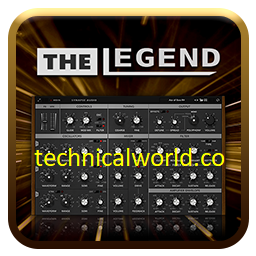
- The Legend: A virtual analog synthesizer emulating classic analog synth sounds with modern features.
- Obsession: A high-quality virtual analog synthesizer with rich sound design capabilities.
- DUNE Series: A range of advanced synthesizers known for their complex sound engines and versatility.
Discover more related articles in our technicalworld:
System Requirements:
- Operating System: macOS 10.12 (Sierra) or later
- Processor: Intel Core i5 or Apple Silicon (M1/M2)
- RAM: Minimum 4 GB (8 GB or more recommended)
- Storage: At least 500 MB free disk space
- Audio Hardware: Core Audio compatible device recommended
- Display: 1280 x 720 resolution or higher
- Additional: AU or VST compatible DAW required for plugin use
How to Install:
- Download the Installer: Visit the official Synapse Audio website or the platform where you purchased the software. Download the correct installer for your operating system (Windows .exe or macOS .dmg).
- Close Other Applications: Exit any running DAWs or audio software to prevent conflicts.
- Run the Installer: Locate the downloaded file in your Downloads folder. Double-click to launch the installer.
- Allow Installation: If prompted by User Account Control (Windows) or macOS security warnings, click “Yes” or “Allow.”
- Accept License Agreement: Read and accept the license terms. Click “Next” or “Continue.”
Learn more about Shadow Defender Final’s features in our guide.
]]>