ACT Unlock Tool I advise contacting the authorised service centres or certified experts for help if you need to unlock your mobile phone or carry out any maintenance procedures. They are equipped with the skills and resources needed to maintain and safely unlock your device while abiding by all regulations and terms of service.
Always respect intellectual property rights and work to help reputable software creators by using only licenced products. Please feel free to ask any further questions you may have or for help with any legal or moral issues.
Key Features:
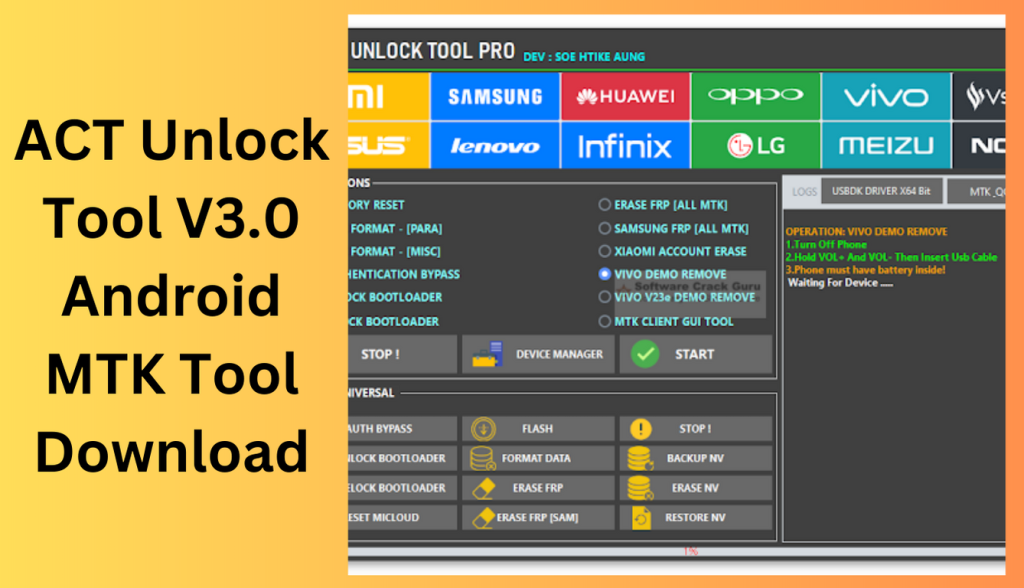
- On compatible devices, this capability enables circumventing authentication or permission procedures.
- Format Data: It makes it possible to format or delete data on the device.
- Remove Factory Reset Protection (FRP): This feature aids in removing the Factory Reset Protection feature, which is a security precaution to guard the device from unauthorised access after a factory reset, on compatible devices.
- Remove FRP (Samsung): Created especially to get rid of FRP on Samsung gadgets.
- Reset MiCloud: Enables users of Xiaomi devices to reset their MiCloud accounts.
- On approved devices, this feature enables the bootloader to be unlocked, allowing users to install unique recoveries and firmware.
- Relock Bootloader: After being unlocked, the bootloader is relocked.
- Flash: Enables the installation of modified ROMs or firmware on the device.
- This function allows for the backup and restoration of NV (Non-Volatile) data, which contains crucial device-specific settings.
- Gives users the opportunity to execute a factory reset on their device.
- Format for safety: [PARA] A safety format function, perhaps utilised for particular instances or devices, is called MiscSafe Format in PARA.
- Remove FRP (ALL MTK [ALL MTK]) is a programme designed to erase the FRP from MediaTek (MTK) chipset-equipped devices.
- Focusesing on eliminating FRP on Samsung devices using MediaTek (MTK) chipsets, Samsung FRP (ALL MTK) is designed to do just that.
- Erase Xiaomi accounts from compatible devices using the Xiaomi Account Erase tool.
- A graphical user interface (GUI) utility for MediaTek (MTK) devices, the MTK Client GUI utility.
How to Use:
- From a trustworthy site, download the tool’s zip file to your PC.
- To store the downloaded zip file on your computer, pick an appropriate spot.
- To run the setup programme, extract the zip file’s contents.
- Installing the ACT Unlock Tool on your PC is as simple as running the setup programme and following the on-screen directions.
- As the password, type “act1” (without the quotations).
- For the ACT Unlock Tool shortcut to run with the appropriate rights, choose “Run as administrator” from the context menu when right-clicking.
- When prompted for an activation key, type “SahirlTecno” (without the quotations).
- Use a USB cord to now link your mobile device to your PC.
- Keep in mind to only use the tool responsibly and on devices that you own or have the right to change.
Conclusion:
For individuals involved in mobile phone repair and service, this ease reduces the need for several software tools, making it a significant asset. However, it’s crucial to employ the ACT Unlock Tool V6.0 in a morally and properly manner. To unlock and change mobile devices, make sure you have the required authority.
You should also respect intellectual property rights. Before making any changes, always make a backup of any vital data. Mobile technicians and repair experts may effectively unlock and maintain a variety of mobile phone models by using the ACT Unlock Tool V6.0 in the right ways. This increases the effectiveness and efficiency of their job.
Learn more about Shadow Defender Final’s features in our guide.
]]>
Z-Tool v2.0 ADB & Fastboot Tool In this fast-paced digital world, Android smartphones have become an essential part of our lives. We rely on them for communication, productivity, entertainment, and much more. To make the most of our Android devices, having the right tools is crucial. Z-Tool v2.0 is one such versatile and powerful tool that can enhance your Android experience by providing various functionalities.
What is Z-Tool v2.0?
Users may interact with their Android cellphones directly from a computer using Z-utility v2.0, an ADB (Android Debug Bridge) and Fastboot utility. It is a useful tool for developers, tech aficionados, and Android users in general since it offers a command-line interface for performing numerous tasks on Android devices.
Key Features:
- Z-Tool v2.0 supports a variety of Fastboot commands that let users flash custom recovery, unlock the bootloader, and do other tasks.
- ADB Commands: Users may install programmes, push and pull files, take screenshots, and use a variety of device-specific features using ADB support.
- Checking the FRP (Factory Reset Protection) state of an Android device is possible with Z-Tool v2.0, which is crucial for security reasons.
- Z-Tool v2.0 allows users to easily lock and unlock the bootloader, which is useful for installing custom ROMs and doing other customizations.
- Z-Tool 2.0 is compatible with a variety of Android smartphones made by various manufacturers.
How to Download:
- Go to the official website of Z-Tool v2.0.
- Locate the download link for the newest version of the tool.
- Click on the download link to save the installation file to your computer.
- Once the download is complete, start the installer. Follow the on-screen directions to finish the installation.
Unlocking the Bootloader with Z-Tool v2.0
- On your Android handset, touch “Settings” > “About Phone” > “Build Number” seven times to
- enable Developer Options.
- Enable USB Debugging by going to “Settings” > “Developer Options.”
- Utilise USB to connect your gadget to the PC.
- On your PC, launch Z-Tool v2.0.
- whether your device is not identified, use the following command to see whether it is:
- Enter the command to unlock the bootloader if your device is found:
- To verify the bootloader unlock, follow the on-screen steps on your Android smartphone.
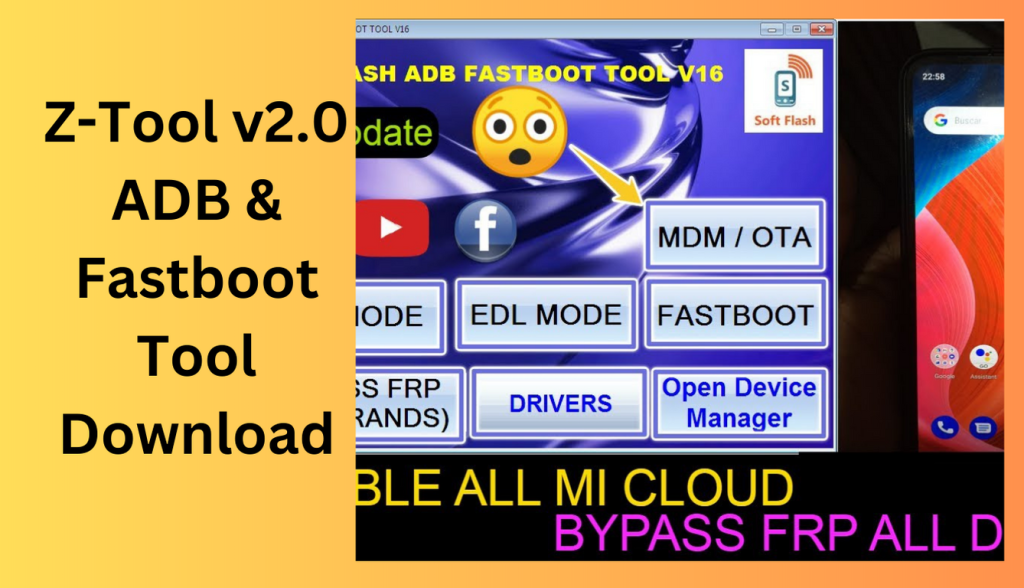
Checking FRP with Z-Tool v2.0
- Your Android smartphone should be connected to the PC.
- Start Z-Tool 2.0 and type the following command:
- Check to see whether your device has been found.
- Type the command: The result will show your device’s FRP state.
Locking and Unlocking the Bootloader
- You can easily lock and unlock the bootloader with Z-Tool v2.0. For security reasons and to prevent unauthorised access to your device, locking the bootloader is essential.
- Use the following command to lock the bootloader:
- Use the following command to release the bootloader:
Other Functions of Z-Tool v2.0
In addition to the above listed crucial functionalities, Z-Tool v2.0 also provides other features like:
- Flash Custom Recovery: To improve the capabilities of their Android smartphone, users can flash custom recovery such as TWRP.
- Flash Firmware: Users of Z-Tool v2.0 may install updates and custom firmware on their Android devices.
- Users may make backups of their Android devices and restore them as necessary.
8. Why Choose Z-Tool v2.0?
Friendly User Interface
The user-friendly interface of Z-Tool v2.0 makes it simple for both novice and experienced users to explore and carry out tasks effectively.
Uncomplicated Activation
The programme simplifies the process of connecting your Android handset to the computer and may be launched with only one click.
Device compatibility with Android
Z-Tool v2.0 is a flexible tool for Android lovers since it works with a variety of Android smartphones from different manufacturers.
Security and Safety
Safety and security are given first priority by Z-Tool v2.0’s creators, who make sure that users may issue instructions without endangering the integrity of their equipment.
Conclusion:
To sum up, Z-utility v2.0 is a crucial ADB and Fastboot utility for Android users who want to easily carry out a variety of functions on their devices. It has been popular among developers and Android aficionados thanks to its user-friendly interface and device compatibility. When using complex capabilities like bootloader unlocking, keep in mind to proceed with caution as it could violate warranties and cause data loss.
FAQs:
Q1: Is Z-Tool v2.0 safe to use?
Z-Tool v2.0 is secure to use, yes. Users should be cautious when executing, nevertheless.
Password: technical world.co
Download Link!
]]>
ROM Area Tool For ADB And Fastboot v1.0 Tool Having the appropriate tools is crucial in the dynamic world of Android development and customization. With the help of the ROM Area Tool for ADB and Fastboot v1.0, users may easily communicate with their Android devices using ADB and Fastboot commands.
What is the ROM Area Tool for ADB and Fastboot v1.0?
ADB and Fastboot v1.0 are enhanced and the Android development process is streamlined with The ROM Area Tool, a specialised piece of software. On Android devices connected to a computer through ADB and Fastboot, it offers a user-friendly interface to run commands and perform numerous functions.
Key Features:
- Advanced ADB and Fastboot Commands: By providing a comprehensive set of advanced commands that enable users to easily do a variety of activities, the ROM Area Tool expands the capabilities of ADB and Fastboot.
- Flashing custom ROMs and firmware is a feature that users may take use of to explore a broad variety of customisation choices and realise the full potential of their Android devices.
- Device Unlocking and Bootloader Control: The ROM Area Tool makes it easier to unlock and control the bootloader, which is necessary for installing custom recoveries and performing device changes.
- Performance Enhancement: With Users may increase the speed and responsiveness of their Android smartphones for a more streamlined experience by using the tool’s performance optimisation capabilities.
How to Install:
- Visit the ROM Area Tool’s official website.
- Find the download link for the ADB and Fastboot v1.0 compatible utility.
- To download the installation file to your computer, click the download link.
- To finish the installation procedure, adhere to the on-screen directions.
Unlocking the Potential with ADB and Fastboot
- Make sure USB Debugging is turned on for your Android device.
- Utilise USB to connect your gadget to the PC.
- On your PC, launch the ROM Area Tool.
- Through the tool’s UI, you may access the ADB and Fastboot commands.
- To carry out numerous actions on your Android device, run the required instructions.
Flashing Custom ROMs and Firmware
- Your machine should now have the chosen modified ROM or firmware.
- To choose and flash the downloaded custom ROM or firmware, use the tool’s flashing option.
Backing up and Restoring Data
- Utilise USB to connect your Android handset to the PC.
- Use the ROM Area Tool to gain access to the backup function.
- To backup the selected data, adhere to the on-screen directions.
- Utilise the tool’s restoration capability and choose the most recent backup to recover data.

Performance Optimization
- Utilise USB to connect your Android handset to the PC.
- Use the ROM Area Tool to access the performance optimisation option.
Compatibility and Device Support
- A broad variety of Android devices are compatible with the ROM Area Tool.
- The tool often works with devices made by different manufacturers, enabling a wide range of users able to access it.
Safety and Precautions
- A broad variety of Android devices are compatible with the ROM Area Tool.
- The tool often works with devices made by different manufacturers, enabling a wide range of users able to access it.
Conclusion
It simplifies difficult operations and creates a vast array of customization options for Android thanks to its broad features and device compatibility. To guarantee a pleasant and risk-free experience, users must prioritise data backup and undertake sophisticated activities cautiously.
FAQs:
A1: Can all Android devices use the ROM Area Tool?
The ROM Area Tool is made to work with a variety of Android devices made by various manufacturers.
Does using the ROM Area Tool void the warranty on my hardware?
The warranty on your device can be voided if you use the ROM Area Tool to conduct certain operations including flashing modified firmware and bootloader unlocking. Users should proceed with caution and thoroughly study the warranty’s terms and conditions.
Password: technical world.co
Download Link!
]]>