
Mediatek Simple Unlock Tool The Mediatek Simple Unlock Tool (MSU) is a flexible software program created especially to function with Android tablets and smartphones using MediaTek processors. It has the ability to remove FRP (Factory Reset Protection), flash firmware, and unlock patterns on compatible devices, among other things. The tool’s broad range of device model support guarantees compatibility with many MediaTek-based gadgets.
Certainly! In the competitive mobile market of today, when many users consider unlocking numerous smartphone features and capabilities to be essential, the MediaTek Simple Unlock Tool (MSU) 20.0 is very important. The MSU tool stands out as a superb option with the rising desire for simpler FRP removal, data formatting, and bootloader unlocking. It has a wide range of top smartphone brand compatibility and offers a number of outstanding benefits.
Functions Supported by the System:
- FRP Elimination: This function enables customers to go over Factory Reset Protection so they can use the device without having to enter their Google login information previously.Secure Format (Misc): Users can format different device information in a certain way to start again with a clear and uncluttered device.
- Users have the option to entirely erase all personal data and reset the device to its factory default settings by formatting and organizing its data disc.
- Secure Format (Para): By enabling a secure format for the “para” partition, which houses crucial device-specific data, this feature makes sure that formatting is both efficient and secure.
- Users have the option of avoiding the authentication procedure to access more options and functionalities.
- Specifically created for Samsung devices, the FRP Erase function enables users to get around the FRP security on their Samsung cellphones.Mi Account Bypass: Xiaomi customers may quickly avoid the Mi Account authentication process and take full advantage of all the features available on their smartphone.
- Bootloader Unlock: With the MediaTek Simple Unlock Tool 20.0, users may unlock the bootloader of the compatible devices they own, opening the door to more complex customization possibilities and the installation of unofficial firmware.
Key Features:
- Bypassing the device’s authentication procedure gives you access to more functions and capabilities.
- Mi Acc Bypass: On Xiaomi smartphones, this function enables you to avoid the Mi account verification process.
- You may securely format a device’s miscellaneous partition using the secure format (Misc) command.
- Secure Format (Para): This format securely constructs the device’s parameter partition.
- With the use of the Erase FRP (Samsung) tool, you may free Samsung devices from the Google account lock.
- You can unlock the bootloader on most devices using this.
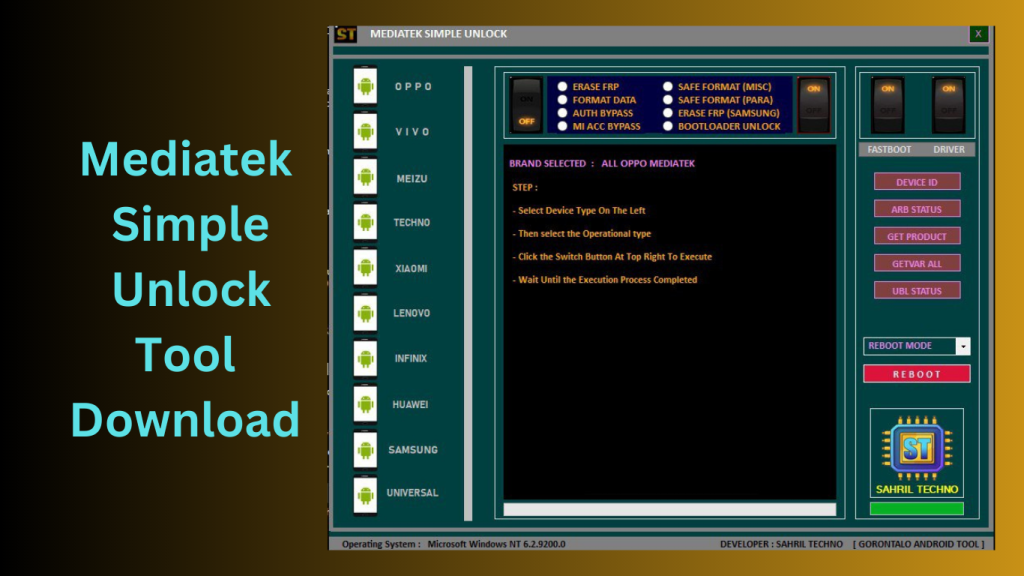
Supported Models:
- Devices from the following brands are compatible with the MediaTek Simple Unlock Tool 20.0:
- OPPO VIVO
Samsung Meizu
Nokia Xiaomi Huawei Lenovo Tecno Vsmart Asus Infinix
What’s New in Mediatek Simple Unlock Tool
- The latest version of Mediatek Simple Unlock Tool introduces several improvements focused on performance, device compatibility, and overall usability.
- Expanded MediaTek Device Support
- The tool now supports a wider range of MediaTek-powered smartphones and tablets, allowing users to work with more devices than before.
- Improved Processing Speed
- Recent optimizations have reduced operation times, helping users complete supported tasks more efficiently.
- Enhanced Stability
- Developers have improved the software’s reliability, minimizing errors and improving overall performance during device operations.
- Better User Interface
- The updated interface offers a cleaner layout, making navigation easier for both new and experienced users.
- Bug Fixes and Compatibility Updates
- Several bugs have been resolved, and compatibility has been improved for newer Windows versions and supported MediaTek chipsets.
Pros and Cons
Pros
- Simple and user-friendly interface
- Supports a wide range of MediaTek devices
- Fast operation speeds
- Lightweight software package
- Regular updates and improvements
- Suitable for both beginners and technicians
Cons
- Limited to supported MediaTek devices
- Some advanced features may require technical knowledge
- Compatibility can vary depending on device model and firmware version
- Requires proper drivers for optimal functionality
How to Use:
- Utilise the supplied download link to get the MSU MediaTek Simple Unlock Tool.
- Find and open the extracted folder.
FAQs
- What is Mediatek Simple Unlock Tool used for?
- It is a utility designed to assist users in managing and servicing supported MediaTek-powered devices through various maintenance and diagnostic functions.
- Does the tool support all MediaTek devices?
- No. Compatibility depends on the specific chipset, device model, and software version.
- Is Mediatek Simple Unlock Tool beginner-friendly?
- Yes. The software features a straightforward interface that makes it relatively easy to use for most users.
- Does the tool receive regular updates?
- Yes. Developers periodically release updates to improve compatibility, performance, and stability.
Conclusion
Mediatek Simple Unlock Tool has become a popular utility among users and technicians working with MediaTek-powered devices. Its lightweight design, broad device compatibility, and user-friendly interface make it a practical solution for various device management tasks. With regular updates, improved stability, and expanding support for newer hardware, the tool continues to be a valuable option for those who frequently work with MediaTek smartphones and tablets.
Password: technicalworld.co
Download Link!
]]>
Samsung G930W8 U7 is a strong and adaptable smartphone, network unlocking can occasionally be difficult. This article might help you if you’re having trouble unlocking your smartphone on the U7 Network. You may soon enjoy the independence of an unlocked smartphone if you properly follow the guidelines.
Knowing the Problem:
Mobile carriers frequently use network locking to limit a device’s ability to connect to their network. When you want to move carriers or use your phone overseas, this might be an issue. The Samsung Galaxy S7 (G930W8) has a U7 Network problem that is related to the seventh firmware release, which has unique unlocking criteria.
Before You Start: Requirements:
- Make sure you have the following conditions in place before beginning the unlocking process:
- The unlocking procedure depends on the IMEI Number, a special identification number.
- Telephone Details: Obtain details on the firmware version, carrier, and model of your phone.
- Authentic Unlocking Service Choose a reputable unlocking technique or service to guarantee a smooth and secure operation.
Guide for Unlocking in Steps:
- IMEI Check: Verify that your device is eligible for unlocking by using a reputable online IMEI checker.
- Select an Unlocking Technique: There are several unlocking options, including contacting your carrier, using unofficial unlocking services, or using third-party services.
- Pick the approach that works best for you.
- Gather Required Information: Keep your phone’s details and IMEI number handy.
Carrier to contact: If your smartphone is still under contract, speak with your carrier to learn how to unlock it. - They could give you a code or some rules.
- Services for official unlocking Consider legitimate unlocking services offered by reliable sources if your carrier is unable to help.
- They will walk you through the procedure and frequently need your IMEI number.
- Put in the unlock code: Insert a SIM card if you have received an unlock code Use a credit
- from a different provider and adhere to the prompts to input the code.
- Finish the procedure: Your smartphone should show a notification verifying unlocking success after inputting the unlock code.
- Test using an other SIM: To verify that your smartphone is now unlocked, insert a SIM card from a different carrier.
Why Official Unlocking is Best:
By using authorised unlocking techniques, you can secure your smartphone from potential hazards and maintain the integrity of the device. Despite the allure of certain third-party alternatives, official unlocking ensures a secure and dependable procedure.

Gains from Unlocking:
There are various advantages to unlocking your Samsung Galaxy S7 (G930W8) on the U7 Network:
- Carrier Freedom: Change carriers whenever you want.
- Use a local SIM card when visiting another country to avoid paying roaming fees.
- better Resale Value: Devices that have been unlocked typically have better resale values.
- Custom ROMs and Updates: After unlocking, you may experiment with custom ROMs and get updates devoid of carrier limitations.
Conclusion:
It is a simple process to unlock your Samsung Galaxy S7 (G930W8) on the U7 Network, giving you the flexibility to use it internationally and with your choice of carrier. You may profit from an unlocked smartphone and a world of opportunities by following the instructions in this article. In order to enter a new era of mobile communication, take charge of your smartphone, say goodbye to network limitations, and do it now.
Password: technical world.co
Download Link!
]]>