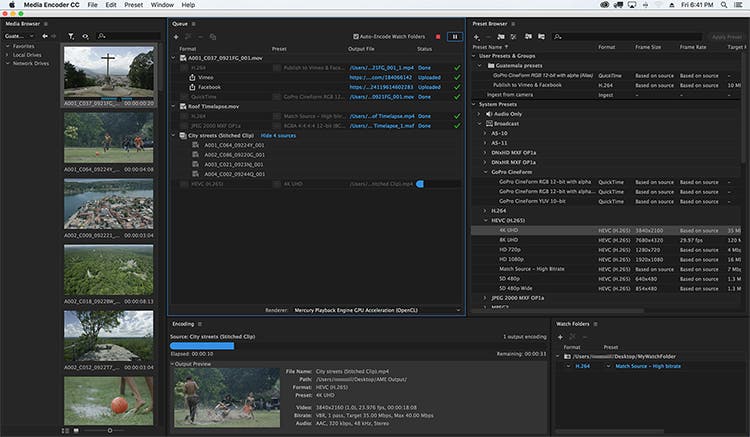
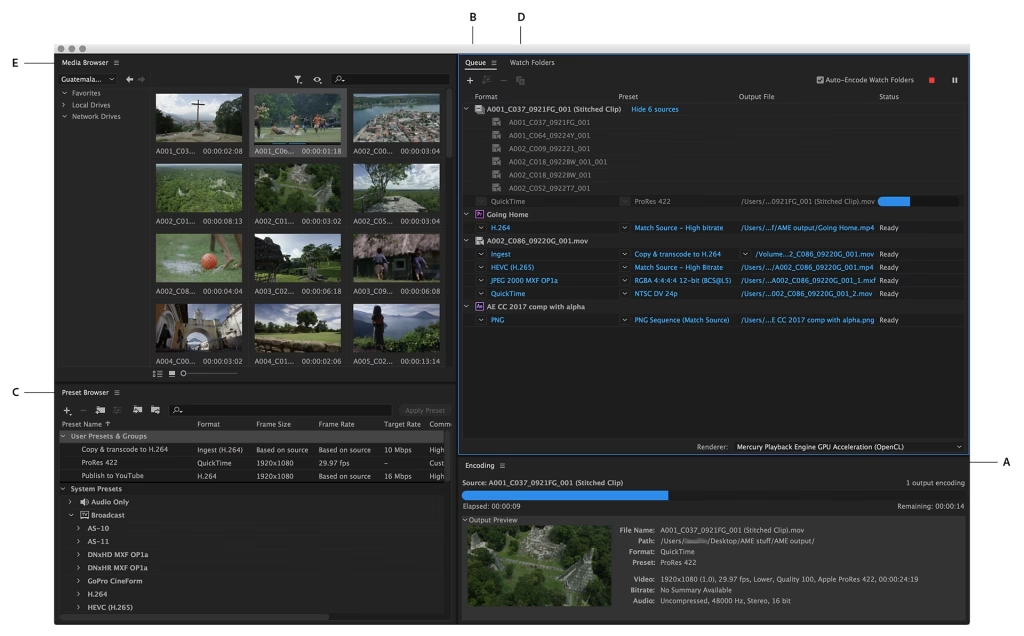
Adobe Media Encoder 26.2 Mac is one of the most reliable media encoding and video exporting applications available for macOS users. Designed to work seamlessly with Adobe Creative Cloud, it helps content creators, video editors, filmmakers, and digital marketers export high-quality videos quickly and efficiently.
Whether you’re editing a YouTube video, creating marketing content, producing online courses, or preparing a professional film project, Adobe Media Encoder simplifies the exporting process with advanced encoding options, batch processing, and broad format compatibility.
Version 26.2 focuses on improving overall stability, performance, and compatibility with the latest versions of macOS while enhancing workflow efficiency for Apple Silicon Macs. If you regularly use Adobe Premiere Pro or After Effects, Media Encoder is an essential companion that saves time and improves productivity.
Key Features of Adobe Media Encoder 26.2 Mac
- Fast Video Encoding
- Adobe Media Encoder is built to encode videos quickly while maintaining excellent image quality. Hardware acceleration on supported Macs helps reduce export times significantly.
- Batch Processing
- One of its strongest features is the ability to queue multiple projects and export them simultaneously. This is ideal for professionals working on large video libraries.
- Multiple Export Formats
- The software supports a wide range of export formats, including:
- MP4 (H.264)
- HEVC (H.265)
- QuickTime MOV
- AVI
- MXF
- GIF
- Audio-only formats
- This flexibility makes it suitable for YouTube, Vimeo, Instagram, TikTok, television broadcasting, and professional production.
- Seamless Adobe Creative Cloud Integration
- Adobe Media Encoder works perfectly with:
- Adobe Premiere Pro
- Adobe After Effects
- Adobe Audition
- Adobe Character Animator
- Projects can be sent directly for encoding without interrupting your editing workflow.
- Background Rendering
- Continue editing in Premiere Pro or After Effects while Media Encoder exports your videos in the background, improving productivity.
- Export Presets
- Choose from dozens of professionally optimized presets for:
- YouTube
- Vimeo
- 4K UHD
- HD Broadcast
- Mobile Devices
- These presets save time and reduce manual configuration.
- Hardware Acceleration
- Support for Apple’s Metal graphics technology improves rendering performance and encoding speed on compatible Mac hardware.
- Custom Encoding Settings
- Advanced users can customize:
- Bitrate
- Resolution
- Frame Rate
- Audio Codec
- Video Codec
- Color Settings
- This level of control is especially useful for professional production environments.
What’s New in Adobe Media Encoder 26.2 Mac
- Adobe Media Encoder 26.2 introduces several improvements designed to enhance reliability and performance.
- Better Apple Silicon Optimization
- The application runs more efficiently on Macs powered by Apple Silicon, delivering smoother exports and improved responsiveness.
- Faster Export Performance
- Rendering and encoding speeds have been optimized for many popular codecs, helping creators finish projects more quickly.
- Improved Stability
- Bug fixes reduce crashes and improve reliability during long rendering sessions.
- Better Creative Cloud Compatibility
- Version 26.2 integrates smoothly with the latest versions of Premiere Pro and After Effects, ensuring a seamless editing workflow.
- Enhanced Media Processing
- Improvements to media handling provide more consistent exports across different file formats and resolutions.
Best Alternatives
- If you’re considering other video encoding applications for macOS, here are several excellent alternatives.
- Apple Compressor
- Designed specifically for Final Cut Pro users, Apple Compressor provides powerful encoding tools optimized for macOS.
- HandBrake
- A free and open-source video transcoder that supports numerous formats and advanced compression settings.
- FFmpeg
- A command-line solution favored by developers and advanced users for highly customizable media processing.
- Shutter Encoder
- A user-friendly encoding application that supports many professional codecs and conversion tools.
Pros and Cons
Pros
- Excellent export quality
- Fast rendering performance
- Batch processing support
- Wide format compatibility
- Seamless Creative Cloud integration
- Optimized for Apple Silicon
- Professional export presets
- Background encoding saves time
Cons
- Requires an Adobe subscription
- Advanced settings may feel overwhelming for beginners
- Performance depends on available system resources
- Best experience requires other Adobe applications
System Requirements
- Before installing Adobe Media Encoder 26.2 Mac, make sure your Mac meets these general requirements.
- Operating System
- macOS Monterey (12) or later recommended
- Processor
- Apple Silicon (M1, M2, M3 series) or a supported Intel processor
- RAM
- Minimum: 16 GB
- Recommended: 32 GB for professional workflows
- Storage
- At least 10 GB of available storage, with additional free space recommended for cache files and exports
- Graphics
- Metal-compatible GPU
- Internet
- Internet connection required for installation, activation, and software updates
How to Install Adobe Media Encoder 26.2 Mac
- Download and install the Adobe Creative Cloud desktop application from Adobe’s official website.
- Sign in with your Adobe account.
- Open the Apps section.
- Locate Adobe Media Encoder.
- Click Install.
- Wait for the installation to complete.
- Launch the application from the Applications folder or Creative Cloud.
Frequently Asked Questions
- Is Adobe Media Encoder 26.2 Mac compatible with Apple Silicon?
- Yes. Version 26.2 is optimized for Apple Silicon Macs, delivering improved performance and faster encoding.
- Can I use Adobe Media Encoder without Premiere Pro?
- Yes. It can encode and convert supported media files independently, although it integrates especially well with Premiere Pro and After Effects.
- Which export formats are supported?
- Adobe Media Encoder supports a wide range of formats, including H.264, HEVC (H.265), QuickTime MOV, AVI, MXF, GIF, and several audio formats.
- Is Adobe Media Encoder suitable for beginners?
- Yes. Built-in export presets make it easy for beginners, while advanced settings provide professionals with complete control over encoding.
Conclusion
Adobe Media Encoder 26.2 Mac is an essential tool for anyone working with video on macOS. Its powerful encoding engine, seamless integration with Adobe Creative Cloud, extensive format support, and optimized performance on Apple Silicon make it a valuable addition to any creative workflow. Whether you’re exporting videos for YouTube, producing commercial projects, or delivering professional media, Adobe Media Encoder offers the speed, reliability, and flexibility needed to handle demanding tasks efficiently.
]]>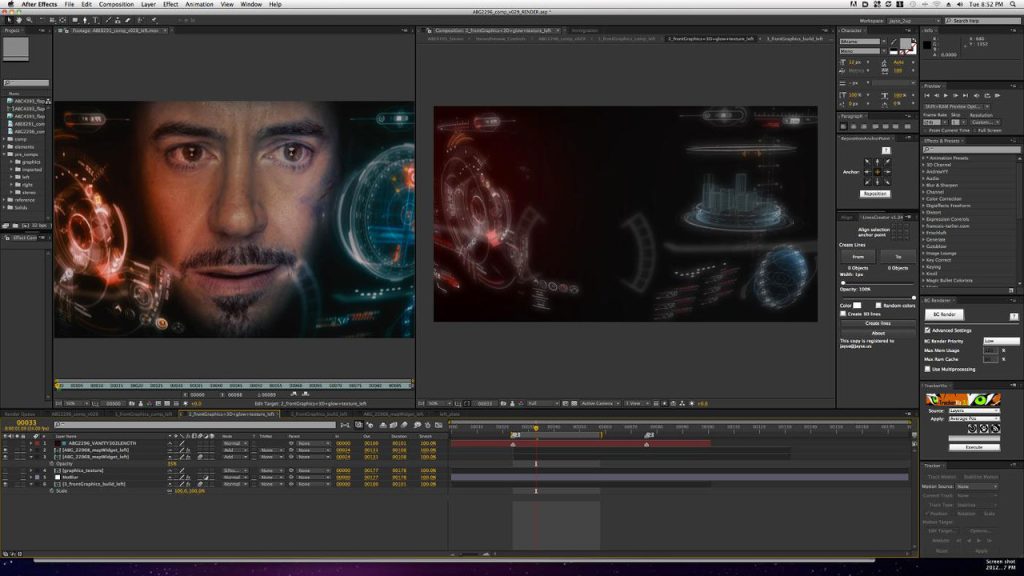
Adobe After Effects 24.0.2 Mac is one of the most powerful motion graphics, animation, and visual effects applications available for macOS. Whether you’re a professional video editor, motion designer, YouTuber, filmmaker, or content creator, this software provides industry-leading tools for creating cinematic intros, animated titles, visual effects, and professional-quality compositions.
Designed to integrate seamlessly with other Adobe Creative Cloud applications, After Effects allows users to combine animation, video editing, compositing, and visual effects into a single workflow. The 24.0.2 release focuses on improving overall performance, stability, and compatibility while addressing bugs reported in earlier versions.
If you’re searching for a reliable motion graphics application for Mac, Adobe After Effects continues to set the industry standard with advanced creative tools and a flexible workflow.
Key Features of Adobe After Effects 24.0.2 Mac
- Professional Motion Graphics
- Create stunning motion graphics for YouTube videos, advertisements, presentations, and social media using powerful animation tools.
- Advanced Visual Effects
- Add cinematic explosions, lightning, smoke, particle effects, green screen compositing, and realistic visual effects with precision.
- Powerful Keyframe Animation
- Animate virtually every property using customizable keyframes and graph editors for smooth motion.
- 3D Workspace
- Design and animate 3D layers directly inside After Effects while combining cameras, lights, and shadows for realistic depth.
- Seamless Adobe Integration
- Work effortlessly with Adobe Premiere Pro, Photoshop, Illustrator, Media Encoder, and Audition to streamline your creative workflow.
- AI-Powered Creative Tools
- Modern Adobe Sensei AI features help automate repetitive tasks such as masking, object selection, and scene refinement, saving valuable editing time.
- Large Plugin Ecosystem
- Expand the software with thousands of third-party plugins for color grading, transitions, typography, particle simulations, and advanced effects.
- Multi-Format Export
- Export projects in multiple formats suitable for YouTube, Instagram, TikTok, presentations, television, and professional filmmaking.
What’s New in Adobe After Effects 24.0.2 Mac
- Although version 24.0.2 is primarily a maintenance update, it introduces several improvements that enhance the editing experience.
- Better Performance
- Projects load faster while timeline responsiveness has been improved, especially on Apple Silicon Macs.
- Improved Stability
- Adobe resolved several bugs that could cause crashes during rendering and project previews.
- Enhanced Compatibility
- Better compatibility with the latest macOS versions and Adobe Creative Cloud applications.
- Faster Rendering
- Rendering performance has been optimized for many effects, reducing export times on supported hardware.
- Workflow Improvements
- Minor interface refinements and background optimizations provide a smoother editing experience.

Pros and Cons
Pros
- Industry-leading motion graphics software
- Excellent performance on modern Macs
- Powerful animation and visual effects tools
- Seamless Creative Cloud integration
- Extensive plugin support
- Regular feature updates
- Suitable for beginners and professionals
Cons
- Subscription required
- Learning curve for new users
- Resource-intensive on older Macs
- Large installation size
System Requirements
- Before installing Adobe After Effects 24.0.2 Mac, ensure your Mac meets these general requirements.
- Operating System
- macOS Monterey (12) or later is recommended.
- Processor
- Apple Silicon (M1, M2, M3 series) or a supported Intel processor.
- RAM
- Minimum: 16 GB
- Recommended: 32 GB or more for complex projects.
- Storage
- At least 15 GB of free disk space, with additional space recommended for cache and project files.
- Graphics
- Metal-compatible GPU for optimal performance.
How to Install Adobe After Effects 24.0.2 Mac
- Download and install the Adobe Creative Cloud desktop application from Adobe.
- Sign in with your Adobe account.
- Locate After Effects in the Creative Cloud Apps section.
- Click Install.
- Wait for the installation to complete.
- Launch After Effects from the Applications folder or Creative Cloud.
Best Alternatives
- If you’re considering other motion graphics or compositing tools, here are some strong alternatives.
- Apple Motion
- A cost-effective motion graphics application optimized for macOS users.
- Blackmagic Fusion
- A node-based compositing application suitable for professional VFX workflows.
- Blender
- A free and open-source 3D creation suite that also supports animation, compositing, and visual effects.
- Apple Final Cut Pro
- Ideal for video editing with integrated motion graphics capabilities.
Frequently Asked Questions
- Is Adobe After Effects 24.0.2 Mac compatible with Apple Silicon?
- Yes. It is optimized to run efficiently on Apple Silicon Macs, including M1, M2, and newer chips.
- Can beginners use Adobe After Effects?
- Yes. While it has a learning curve, there are many tutorials and templates that help new users get started.
- Does Adobe After Effects work offline?
- Yes. After activation, many editing features work offline, though some cloud-based services require an internet connection.
- Is Adobe After Effects suitable for professional video production?
- Absolutely. It is widely used in film, television, advertising, and digital content creation for professional motion graphics and visual effects.
Conclusion
Adobe After Effects 24.0.2 Mac remains one of the most capable motion graphics and visual effects applications available for macOS. With powerful animation tools, professional compositing features, seamless integration with the Adobe Creative Cloud ecosystem, and improved performance in version 24.0.2, it is an excellent choice for video editors, designers, filmmakers, educators, and content creators. Whether you’re producing YouTube videos, social media content, marketing campaigns, or cinematic visual effects, After Effects provides the flexibility and creative control needed to bring your ideas to life.
]]>Download Your File Here Get your file now with just one click.
Fast, easy, and free. No hassles. no waiting. Start downloading today
⇑⇑Click on Download Button⇑⇑
 Download Link is Verified

]]>
Tera Tool is a mobile device repair tool created to offer simple tools for repairing a variety of mobile devices. It supports a number of features for smartphones made by MediaTek, Qualcomm, Xiaomi, Huawei (HiSilicon), and Samsung. Accessing phone data, removing FRP and factory resets, unlocking or locking the bootloader, flashing firmware, backing up/restoring EFS, fixing IMEI, and many more operations are available. With many devices, Tera Tool provides features through ADB Fastboot, ADB, and EDL modes.
Software called Tera Tool was made available to the public for free by GSM-X-TEAM users. It offers a number of capabilities to fix mobile services and is designed to be user-friendly. It has Qualcomm and MediaTek features that are compatible with Xiaomi, Huawei, and Samsung gadgets. You can unlock/lock the bootloader, flash the firmware, remove FRP factory reset, and access data from phones using MediaTek features.
Reading data, removing FRP, unlocking the bootloader, and even avoiding access to the Mi account are all possible with Xiaomi devices. The Huawei features allow users to access phone data, disable FRP, do a factory reset, and unlock the bootloader for a device.
Features key:
Device Function
- MediaTek removes FRP, accesses phone data Flash Firmware, Factory Reset, Backup/Restore NVData, and Unlock Bootloader are all available.
- Qualcomm can access phone data and disable FRP. Reset the factory EFS EDL Mode back and restore.
- Xiaomi Qualcomm Information Reading, FRP Removal, Factory Reset, Mi Account Bypass, Backup/Restore EFS, EFS Wipe, Flashing
- Xiaomi read the information, unlock the bootloader, reset the computer, and disable updates NvData Backup, NvData Wipe Lock Bootloader, Unlock FRP, Restore NvData, and Repair IMEI
- HiSilicon’s Huawei Read Phone Inf, Disable FRP, Reset Device, Temporarily Unlock the Bootloader, Flashing
- Samsung Avoid FRP, Read Information, activate Diagnostic Mode Backup EFS, Fastboot to Fastboot, Bypass FRP, Reboot to Recovery, Wipe EFS, Restore EFS, and Reboot to EDL Mode
MediaTek features:
Services:-
- Obtain the phone number
- Delete FRP
- Delete FRP Method of
- Factory Reset Ext
- Factory Reset Userdata/Cache
- Flash for Samsung
- Factory Reset New Unlock Bootloader Lock Bootloader:-
- Backup/Restore of Flash Firmware:
- Backup, Restore, and Wipe NvData

What’s New
- Added support for the latest MediaTek chipsets.
- Improved device detection speed.
- Enhanced user interface for easier navigation.
- Better compatibility with newer Android versions.
- Optimized performance during device servicing.
- Reduced connection and communication errors.
- Improved stability and reliability.
- Various bug fixes and feature enhancements.
Pros and Cons
Pros
- Supports a wide range of MediaTek devices.
- Simple and user-friendly interface.
- Fast device recognition and processing.
- Regular updates with new features.
- Useful for mobile repair technicians and advanced users.
Cons
- Works only with supported MediaTek devices.
- Some functions may require technical knowledge.
- Driver installation can be challenging for beginners.
- Compatibility may vary depending on device firmware.
- Certain advanced features may not be available on all models.
System Requirements
- Windows 7, 8, 10, or 11 (32-bit or 64-bit)
- Minimum 4 GB RAM (8 GB recommended)
- At least 1 GB of free disk space
- MediaTek USB Drivers installed
- Original USB cable for stable connectivity
- Active internet connection for updates and activation
- MediaTek-powered Android smartphone or tablet
How to Install
- Initially, you must download the ZIP file from the provided URL.
- You should then delete all files from the C: disc (essential).
- Before beginning your installation, make sure your antivirus is off.
- Start the loader file on your PC’s screen after that.
- The loader won’t have to log in as a result of this.
- To access the Tera tool’s main interface, enter your login details here and click the login button.
You then need to install all the necessary drivers have already put them in. - You may omit this action.
- Connect the phone, then try to perform any task.
- Enjoy !!!
FAQs
- What is Tera Tool MediaTek?
- Tera Tool MediaTek is a device servicing utility designed to work with MediaTek-powered smartphones and tablets, offering various maintenance and management functions.
- Is Tera Tool MediaTek free?
- Availability depends on the version and licensing model provided by the developer.
- Which operating systems are supported?
- The tool supports most modern Windows operating systems, including Windows 10 and Windows 11.
- Do I need MediaTek USB drivers?
- Yes, installing the correct MediaTek drivers is essential for proper device communication.
- Can beginners use this tool?
- Yes, but basic knowledge of Android devices and drivers can help avoid setup issues.
Conclusion
Tera Tool MediaTek is a practical solution for users who work with MediaTek-based devices. Its broad device support, improved performance, and user-friendly design make it a valuable utility for device management and servicing. While some technical knowledge may be required for advanced functions, the tool remains a reliable option for both professionals and experienced Android users.
Password: technical world.co
Download Link!
]]>
Almaradi Soft Tool On Samsung smartphones running Android 6.8 to Android 13, the programme provides translation choices with support for Arabic and the ability to analyse localization. Additionally, it allows for Keyport installation, ADB verification, and information reading on the device.
For Samsung smartphones, the software also offers a FRP (Factory Reset Protection) reset option that supports both Test Mode and ADB resets. Additionally, it contains a CSC (Consumer Software Customization) capability that enables the user to approve or disapprove switching from a SIM card to the device.
Additionally, it enables network mode, restarts the device, and sets the FRP through ADB. There are also options to skip the lock screen on LG or Redmi handsets and enable diagnostic procedures to activate and repair any LG Sprint device.
Key Features:
- Samsung phones’ localization function runs on Android 6 through 13. Arabization without a central theme
Examination of localization – Installation of Keyport – Verification of ADB + Information – FRP Samsung Reset FRP Verizon, - Reset FRP ADB CSC With SIM,
- Reset FRP Test Mode,
- and Transform ADB Functions Other Purposes Arabic Other Languages Restart and restart recovery Reboot
- Download Activate network mode Icon for Data Playback Display FTP APN Set the default Diag for FRP ADB.
- Activate Diag LT Redmi: Allow Diag;
- enable Diag ADB LG Features CDMA LG Network Repair the whole LG Sprint,
- excluding the Enable Screen Lock [PORT] LG

What’s New
- Improved support for newer Android devices.
- Enhanced device detection and connection speed.
- Updated user interface for better usability.
- Improved stability during operations.
- Added compatibility with the latest Windows versions.
- Faster processing and reduced errors.
- Security and performance improvements.
- Various bug fixes and optimizations.
Pros and Cons
Pros
- Easy-to-use interface for beginners and professionals.
- Supports a wide range of Android devices.
- Fast and reliable performance.
- Regular updates and improvements.
- Lightweight software with simple installation.
Cons
- Some features may not support all devices.
- Requires proper USB drivers for full functionality.
- Certain operations may need technical knowledge.
- Performance can vary depending on device compatibility.
- Internet access may be required for updates.
System Requirements
- Windows 7, 8, 10, or 11
- Minimum 4 GB RAM (8 GB recommended)
- At least 500 MB of free storage space
- Stable internet connection
- Installed USB drivers for supported devices
- USB data cable for device connectivity
- Administrator privileges on Windows
How Do I Use?
- Get the ZIP file using the following URL as the first step.
- Then, you must unzip each of the files on disc c: (important).
- Afterwards, open the folder by setting up the setup file in accordance with some simple guidelines.
- Launch the “Almaradi SofT ToOLS V1.exe.”
- If you already have drivers installed, you will need to install them all again after that.
- Skip thisstep if it’s still necessary.
- Use the phone’s internet connection to try out any task.
- Enjoy !!!
FAQs
- What is Almaradi Soft Tool?
- Almaradi Soft Tool is a utility designed to help users manage, maintain, and perform various operations on supported mobile devices.
- Is Almaradi Soft Tool free?
- Availability depends on the version and licensing provided by the developer.
- Which operating systems are supported?
- The tool is compatible with most modern Windows operating systems, including Windows 10 and Windows 11.
- Do I need USB drivers?
- Yes, installing the correct USB drivers helps ensure proper communication between the tool and your device.
- Is it suitable for beginners?
- Yes, the tool offers a user-friendly interface, although some advanced functions may require technical experience.
Conclusion
Almaradi Soft Tool is a useful solution for users who need a reliable device management and servicing utility. With its improved compatibility, fast performance, and easy-to-use interface, it can help simplify various maintenance tasks. Before using the tool, ensure that your system meets the requirements and that all necessary drivers are properly installed for the best experience.
Password: technical world.co
Download Link!
]]>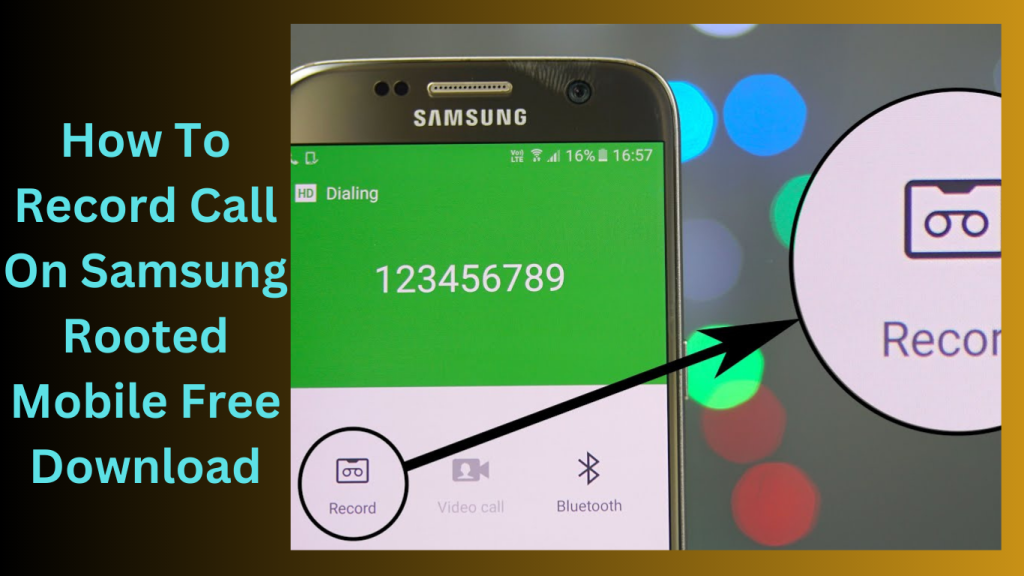
How To Record Call On Samsung Rooted Mobile is one such option made especially for rooted Samsung cell phones. By rooting your smartphone, you obtain administrative access that enables you to install customised modules like Axet’s Call Recorder and change system settings.
Your Samsung mobile may record calls thanks to the integration of the Axet Call Recorder module. It’s crucial to remember that rooting your smartphone has risks and can void your warranty. Without the approval of all individuals involved, recording phone calls is prohibited in several areas. It is crucial that you are aware of your location’s legal duties and mandates for call recording.
KiwiNote+ said:
- It could be difficult to enable native call recording on your Samsung SM-N975F without getting a Thai SIM card.
- Depending on the area and the particular CSC (Consumer Software Customization) code of your device, native call recording functionality might change.
- It’s important to keep an eye out for any upgrades or new advancements that might provide your device better call recording options in the future.
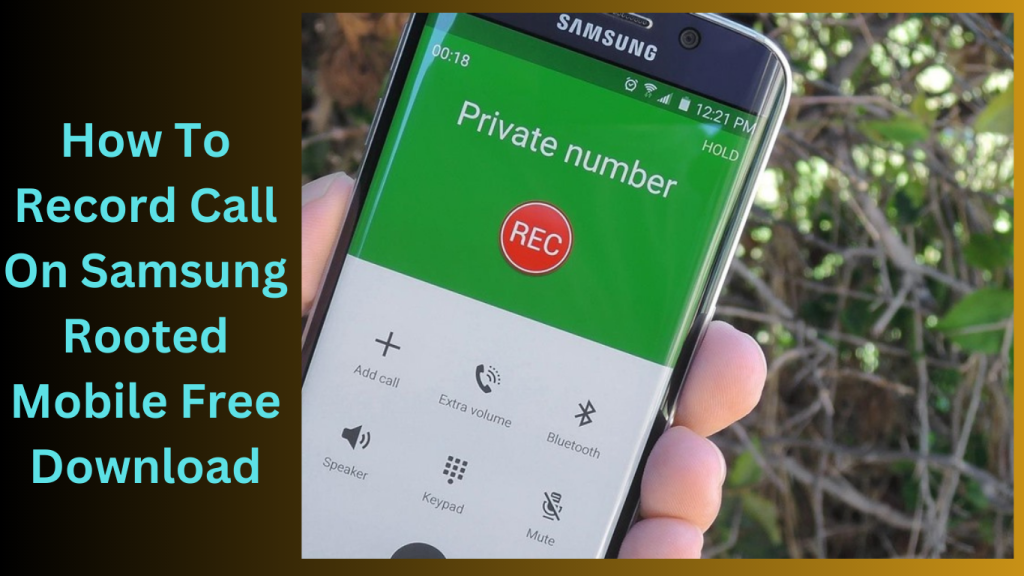
Follow these steps to record your calls:
- Launch the Call Recorder programme.
- Find “Calls Recording,” choose the “Calls Recording” option, and turn it on by checking the corresponding box.
- Making use of call recording
- Congratulations! You’ve been successful in setting up your Samsung Rooted mobile device to record calls.
- Within Call Recorder, you have access to your recordings.
- Within the Call Recorder app, you may access the recorded calls and manage them as necessary.
- Utilise the call recording options that are at your disposal!
What’s New
- Improved call recording quality.
- Better compatibility with newer Samsung devices.
- Enhanced support for recent Android versions.
- Automatic recording options for selected contacts.
- Improved file management and storage controls.
- Enhanced privacy and security settings.
- Faster access to recorded calls.
- Bug fixes and performance improvements.
Pros and Cons
Pros
- Records both incoming and outgoing calls.
- Access to advanced recording features through root permissions.
- Better audio quality compared to many non-root solutions.
- Flexible recording and storage options.
- Supports automatic call recording.
Cons
- Requires rooting the device.
- Rooting may void the device warranty.
- Potential security risks if root access is mismanaged.
- Some banking and secure apps may not work properly on rooted devices.
- Setup can be complicated for beginners.
System Requirements
- Samsung smartphone with root access enabled.
- Android 8.0 or later version.
- Sufficient storage space for call recordings.
- Compatible call recording application.
- Stable system permissions and root management tool.
- Internet connection for updates and cloud backup (optional).
How to Install
- Ensure your Samsung device is properly rooted.
- Download a compatible call recording application that supports rooted devices.
- Enable installation from trusted sources if required.
- Install the application on your Samsung smartphone.
- Open the app and grant all necessary permissions, including root access.
- Configure recording settings according to your preferences.
- Select automatic or manual call recording options.
- Make a test call to verify that recording is working correctly.
- Check the recordings folder to confirm that calls are being saved successfully.
FAQs
- Why is root access required?
- Root access allows call recording apps to access system-level functions that may be restricted on standard Android devices.
- Is call recording legal?
- Call recording laws vary by country and region. Users should check local regulations before recording calls.
- Can recordings be saved automatically?
- Yes, most call recording apps for rooted Samsung devices support automatic recording.
- Will rooting affect device performance?
- Rooting itself does not necessarily affect performance, but improper modifications can cause stability issues.
Conclusion
Recording calls on a rooted Samsung device provides greater control, improved recording quality, and advanced customization options. However, users should carefully consider the risks associated with rooting, including security concerns and warranty implications. With the right setup and application, rooted Samsung devices can offer a reliable and efficient call recording experience.
Password: technical world.co
Download Link!
]]>
Capricorn Tool For Samsung, Tecno, iTel, Infinix, and Realme smartphones, the Capricorn utility V4.1 utility offers a number of functionality, including MDM lock removal, FRP bypass, restarting the device, and checking for updates. New features include removing the installation of Magisk after rooting from the Realme C11 Wireless Test Assistant, bypassing ADB and FRP for Tecno, iTel, and Infinix smartphones running Android 9–12, and fixing UI bugs.
Key Features:
- ADB Bypass Core FRP on Samsung A01
- With the Samsung A32 FRP Bypass,
- ADB Bypass Core FRP on Samsung M01
- FRP Bypass ADB Samsung A32
- Using ADB, the Samsung A03 Core FRP
- M32 FRP Bypass for Samsung
- With the Samsung A02 FRP Bypass,
- M32 5G FRP Bypass ADB Samsung
- M02 FRP Bypass Samsung
- With the Samsung A22 FRP Bypass,
- FRP Bypass ADB Samsung A22
- With the Samsung A31 FRP Bypass,
- ADB Bypass FRP Samsung A03S
- N/A Tecno Reset the FRP
- Companies that use the same branding
Feature Description:
- Bypass MDM ADB (No Root) without need root access to remove MDM lock on
- Android devices Bypass Tecno SPD FRP Itel SPD FRP Bypass support for Tecno smartphones with SPD chipsets running
- Android 9–12 Add support for Intel devices running Android 9–12 with SPD chipsets and Infinix SPD FRP Bypass.
- Support for Infinix devices running Google 9–12 and equipped with SPD chipsets
- Install Magisk upon rooting the capability to root the device and install Magisk.

What’s New
- Improved support for newer device models.
- Faster device detection and connection.
- Enhanced user interface for a better user experience.
- Increased software stability and reliability.
- Optimized performance for quicker operations.
- Better compatibility with the latest Windows versions.
- Enhanced security features.
- Various bug fixes and overall improvements.
Pros and Cons
Pros
- User-friendly and easy-to-navigate interface.
- Supports a wide range of compatible devices.
- Fast performance and efficient operation.
- Regular updates and feature enhancements.
- Lightweight software with simple installation.
Cons
- Some features may not work on all devices.
- Requires correct drivers for proper functionality.
- Advanced features may require technical experience.
- Performance can vary depending on hardware configuration.
- Internet access may be needed for certain functions.
System Requirements
- Windows 7, 8, 10, or 11
- Minimum 4 GB RAM (8 GB recommended)
- At least 1 GB of free disk space
- Stable internet connection for updates
- Compatible USB drivers installed
- USB cable for device connectivity
- Administrator privileges on the computer
How to install
- The first step is to click the link below to download the file.
- Launch the “Capricorn tool by FRPGods.exe.”
- You may omit this action.
- Use the phone’s internet connection to try out any task.
- Enjoy !!!
FAQs
- What is Capricorn Tool?
- Capricorn Tool is a utility designed to help users manage and perform various maintenance and servicing tasks on supported devices.
- Is Capricorn Tool free to use?
- The availability of free and paid versions depends on the developer and the specific release.
- Which operating systems are supported?
- Capricorn Tool is generally compatible with Windows 7, 8, 10, and 11.
- Do I need special drivers?
- Yes, installing the appropriate USB drivers is recommended for proper device communication.
- Is Capricorn Tool suitable for beginners?
- Yes, its simple interface makes it accessible for beginners, although some advanced features may require technical knowledge.
Conclusion
Capricorn Tool is a practical and reliable utility for users looking to manage and maintain supported devices efficiently. With improved compatibility, better performance, and regular updates, it offers a smooth user experience. While some advanced functions may require additional knowledge, the tool remains a valuable option for both casual users and professionals.
Password: technical world.co
Download Link!
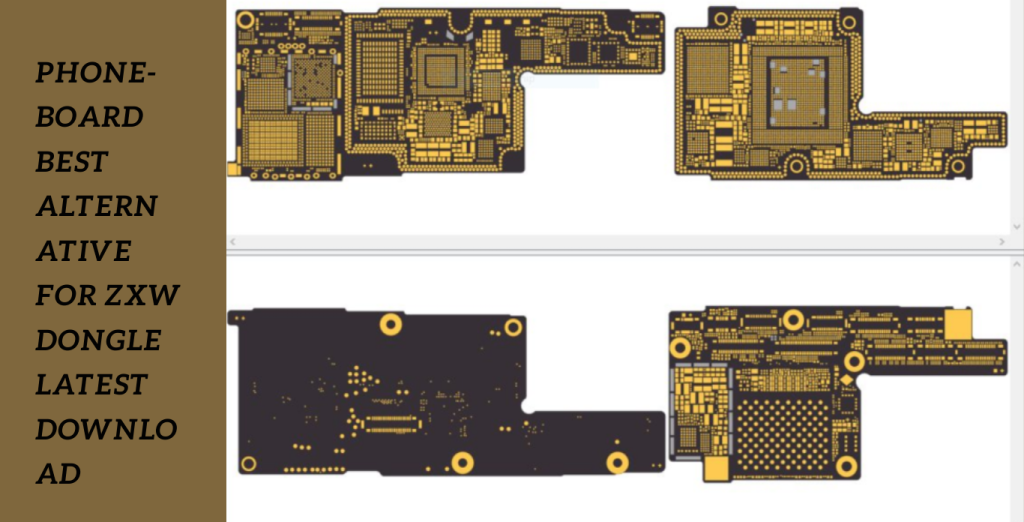
]]>The PhoneBoard GSM team created the outstanding software utility Phoneboard v1.9.0. You may quickly get detailed information on the phone board of your device with the help of this utility. Phoneboard v1.9.0, which was created specifically for Windows platforms, is compatible with all Windows versions, including XP, Vista, Windows 7/8/8.1, and 10, and it supports both 32-bit and 64-bit systems.
Outstanding software solution:
The PhoneBoard GSM team created the outstanding software solution Phoneboard v1.9.0 specifically for Windows systems. It is a priceless tool for analysis, repair, and troubleshooting since it can give thorough information on the phone board of your device. You may download the most recent version of Phoneboard v1.9.0 from the links in this manual, giving you access to all of the program’s cutting-edge features and functionalities.
Smooth user experience:
To get the most recent features and functions this programme has to offer, download Phoneboard v1.9.0 from the area provided below. With Phoneboard v1.9.0, take advantage of the smooth user experience and maximise the potential of detailed phone board information.
Key Features:
- The phone board on your device is covered in great detail by Phoneboard v1.9.0. Details like component locations, chip kinds, circuit pathways, connections, and more are accessible.
- For device examination, repair, and troubleshooting, this detailed information is priceless.
- The programme has an intuitive user interface that makes it simple for both novice and experienced users to explore and make use of its capabilities.
- An easy-to-use interface and well-organized information display provide for a satisfying user experience.
- Phoneboard v1.9.0 is compatible with and meets the system requirements of both 32-bit and 64-bit Windows operating systems, including XP, Vista, Windows 7/8/8.1, and 10.
- For best performance, make sure your machine satisfies the minimal system requirements.
What’s New
- Improved remote device management features.
- Faster and more stable device connectivity.
- Enhanced security with advanced encryption.
- Better support for Android and iOS devices.
- Cloud-based access and synchronization options.
- User-friendly interface with simplified controls.
- Real-time monitoring and device tracking capabilities.
- Improved compatibility with the latest mobile operating systems.
Pros and Cons
Pros
- Easy remote access to mobile devices.
- Improved productivity and device management.
- Supports multiple devices and platforms.
- Enhanced security and data protection.
- User-friendly interface and setup process.
Cons
- Some premium features require paid subscriptions.
- Performance may depend on internet speed.
- Limited functionality in free versions.
- Compatibility issues may occur with older devices.
System Requirements:
- Windows XP, Vista, Windows 7/8/8.1, and Windows 10 (32-bit or 64-bit)
- Processor: 1 GHz minimum or above
- RAM: 1 GB minimum hard drive Space: 200 MB or more of unoccupied space
- Graphics: supporting DirectX 9 or higher for graphics
- Internet accessibility necessary for downloading and updating software
How to Install:
- Download the most recent version of Phoneboard v1.9.0 from the official website or a reliable source.
- Find the installation file that was downloaded to your computer.
- To start the installation procedure, double-click the installation file.
- The installation wizard’s on-screen prompts and instructions should be followed.
- Select the location folder where you wish to install, or go with the installer’s default installation path.
- By selecting “Install” or “Next” as directed, finish the installation procedure.
- Hold off until the installation is complete. Depending on how quickly your system is, this might take a while.
- Thus, To obtain comprehensive details on your device’s features and capabilities, explore Phoneboard v1.9.0’s features and capabilities.
FAQs
- What is a Phoneboard alternative?
- A Phoneboard alternative is software that provides similar features such as mobile device management, remote access, screen viewing, and device control.
- Why should I use a Phoneboard alternative?
- You may need additional features, better performance, stronger security, or broader device compatibility.
- Are these alternatives secure?
- Most reputable alternatives use encryption and authentication methods to ensure secure access and data transfer.
- Do they support both Android and iPhone devices?
- Many modern alternatives support both Android and iOS platforms, although features may vary.
Conclusion
Choosing the best Phoneboard alternative depends on your specific requirements. Modern solutions provide improved security, better performance, and advanced remote management capabilities. By comparing features, pricing, and compatibility, users can find the ideal option for personal or business use.
Password: technicalworld.co
Mirror Link!
]]>
iPhone and Android Team Tools that increase the usefulness and capacities of these devices have become crucial in a world where smartphones and tablets predominate. The iPhone and Android Team DR.LINH Thanh Apple Phong Baria Version Multi Tool represents a significant advancement in this field by providing a full complement of capabilities specifically designed for Apple products with A5-A6 processors.
The Innovation Journey of the Phong Baria Team:
Every significant technical development is the result of a hardworking group of inventors. When it comes to using mobile device tools, the Phong Baria team has continually pushed the envelope. They have improved their methodology and integrated user feedback with each iteration to provide a solution that really meets community requirements.
DR.LINH Thanh Apple Phong Baria Version Multi Tool Unveiling for iPhone and Android:
Version 6.2.1, the most recent release, keeps the Phong Baria team’s reputation for quality workmanship. This multi-tool is made to provide customers who want to optimise their Apple devices with a smooth experience. This tool has you covered whether you’re an enthusiast looking to explore additional functions or a user with technical difficulties.
Key Features:
iPwndfu being run in mode
Users can run iPwndfu in mode with the help of the iPhone and Android Team DR.LINH Thanh Apple Phong Baria Version Multi Tool. This creates possibilities for sophisticated customization and gives consumers unprecedented control over the settings and configurations of their devices.
SSH connection on an iOS device
SSH access is a strong technology that gives users the ability to connect securely to their device. The multi-tool makes this procedure simple so that even those with little technical knowledge may complete it. For individuals who wish to remotely examine their device’s file system and run commands, this functionality is a game-changer.
Data Factory Reset
In some cases, a new beginning is required to tackle ongoing problems. Users may erase the data on their devices with the tool’s factory reset feature while still using it easily. It’s a dependable method for handling problems with performance and bugs that might develop over time.
iServer (*.sisv) repair
Fixing iServer (*.sisv) problems is another prevalent worry that the utility solves. When users experience issues with server connections, this feature is helpful. Users may reestablish smooth connectivity thanks to the multi-tool’s streamlined troubleshooting approach.

What’s New
- Improved support for the latest Android and iPhone models.
- Faster device detection and connection process.
- Enhanced user interface for easier navigation.
- Better compatibility with recent operating system updates.
- Increased stability and performance.
- Improved security and reliability.
- Faster execution of supported functions.
- Various bug fixes and optimizations.
Pros and Cons
Pros
- Supports both Android and iPhone devices.
- Easy-to-use interface for technicians and users.
- Fast device recognition and communication.
- Regular updates with improved compatibility.
- Useful for device management and maintenance tasks.
Cons
- Some features may not support all device models.
- Requires proper driver installation.
- Advanced functions may require technical knowledge.
- Performance can vary depending on device compatibility.
- Certain features may be limited on newer software versions.
System Requirements
- Windows 7, 8, 10, or 11 (64-bit recommended)
- Minimum 4 GB RAM (8 GB recommended)
- At least 1 GB of free storage space
- Stable internet connection
- USB drivers installed for Android and iPhone devices
- Original USB cable for reliable connectivity
- Administrator access on Windows
How to obtain
- It’s simple to get started using the iPhone and Android Team DR.LINH Thanh Apple Phong Baria Version Multi Tool.
- Users with various technological backgrounds can utilise its potential thanks to the official website’s comprehensive installation and usage instructions.
- Devices that are Compatible and Supported
- The multi-tool works with a variety of Apple products with A5-A6 processors. This covers a wide range of iPhone models and offers customers of various device generations an all-inclusive solution.
- User Testimonials and Experiences
- Users from all around the globe have praised the iPhone and Android Team DR.LINH Thanh Apple Phong Baria Version Multi Tool.
FAQs
- Does the tool work with the most recent iPhone models? A: The utility currently primarily supports chip-based devices. In upcoming versions, compatibility with more recent models could be investigated.
- Can I undo the modifications the tool made? A: Yes, there are choices in the programme to undo modifications and return your device to how it was before.
- Is technical knowledge necessary to use the multi-tool? A: Although having some acquaintance with device settings may be advantageous, the tool is intended to be usable by users with different degrees of technical expertise.
- Does the tool need to be connected to the internet in order to work? A: Although the programme itself does not need a continual internet connection, some functions, including downloading updates, could.
- Where can I find the Dr. Linh Thanh Apple Phong Baria Version Multi Tool for iPhone and Android? A: Use the tool and maximise its capabilities at
Conclusion
The DR.LINH Thanh Apple Phong Baria Version Multi Tool for iPhone and Android is a spectacular example of mobile device innovation. It has developed into a useful tool for owners of Apple devices due to its numerous functions, approachable user interface, and capacity to handle different problems. This solution, which gives consumers unprecedented control over their devices, is a testament to the Phong Baria team’s commitment to improving user experiences.
Password: technicalworld.co
Download Link!
]]>
USB Over Network Respecting the security and integrity of hardware and software, as well as using them by any applicable rules and regulations, is crucial. I advise contacting the official support channels offered by the hardware or software provider if you need help with your equipment or if you run into problems.
When utilizing tools or software from third parties, practice caution at all times, and make sure you are aware of any potential hazards and any related legal ramifications. Unauthorized alterations or efforts to get around security mechanisms might have unforeseen effects, violate warranties, or cause problems with the device.
FabulaTech USB over Network Overview:
- A piece of software called USB over Network from Fabula Tech makes it possible to utilize USB devices remotely across a local network or the Internet.
- The Server and the Client are the two halves of the program You can connect remotely to these devices and share them with others.
- You must install the Client component of the program on the machines where you wish to access the distant USB devices.
- You may connect to the shared USB devices from your computer by utilizing the Client.
Features:
- Regardless of the kind, it allows remote access to these devices.
- Multiple client devices can connect to and use USB devices at the same time thanks to the program’s ability to share USB ports on the server machine.
- SSL security: To provide a program’s program secureion between client and server computers and to safeguard data sent over networks, Secure Sockets Layer (SSL) encryption is used.
- Password protection: The programme enables users to create passwords for remote access, enhancing connection security and preventing unauthorized access.
- When a specific USB device has to be shared back to the server, this capability may be helpful.

What’s New
- USB Over Network technology has evolved significantly in recent years.
- Modern solutions now offer faster data transfer speeds, improved security features, better remote access capabilities, and enhanced compatibility with Windows, macOS, and Linux systems.
- Cloud integration and advanced encryption have also made remote USB device sharing more reliable and secure.
Pros and Cons
Pros
- Access USB devices remotely from anywhere.
- Reduces the need for physical connections.
- Saves hardware and maintenance costs.
- Supports multiple users and devices.
- Easy to manage and configure.
Cons
- Performance depends on network speed and stability.
- Security risks may arise if not properly configured.
- Some specialized USB devices may have compatibility issues.
- Network interruptions can affect device accessibility.
How to Use:
- Go to the FabulaTech website. To reach their website quickly, just type “FabulaTech USB over Network” into a search engine.
- Go to the “Downloads” or “Products” section of the website.
- Search for the USB over the Network program using the website’s built-in search tool or in the product list.
- Click the download link or button next to the USB over the Network program programsecurity after you’ve located it.
- Select the version that matches your requirements.
- After choosing the proper version, the download ought to begin instantly. If it doesn’t, you might have to click a link or button to start the download.
- The size of the programme and the speed of your internet connection will determine how long it takes to download.
- Locate the downloaded file on your computer and launch the installer when the download is complete.
- To finish the installation procedure, adhere to the installer’s on-screen instructions.
FAQs
- What is USB Over Network?
- USB Over Network is a technology that allows users to access and share USB devices over a local network or the internet.
- Which devices can be shared?
- Printers, scanners, storage drives, webcams, dongles, and many other USB devices can be shared.
- Is USB Over Network secure?
- Yes, most modern solutions use encryption and authentication features to protect data and devices.
- Can I use it over the internet?
- Yes, many USB Over Network applications support remote access through the internet.
Conclusion
USB Over Network is a practical solution for businesses and individuals who need remote access to USB devices. With improved security, better performance, and broad compatibility, it offers flexibility and convenience. However, users should ensure a stable network connection and proper security settings to achieve the best results.
Password: technical world. securityco
Download Link!
]]>