
Where Cards Fall is a visually captivating and emotionally driven puzzle-adventure game that blends storytelling with thoughtful, atmospheric gameplay. Developed by The Game Band, this award-winning title takes players on a reflective journey through the memories of adolescence, young adulthood, and the transitions that shape who we become.
At its core, the game revolves around building and collapsing houses of cards to navigate dream-like environments. Each puzzle represents moments from the protagonist’s life, symbolizing challenges, relationships, fears, and personal growth. Instead of traditional dialogue, the game relies on stunning art, expressive animations, and ambient soundscapes to tell a deeply relatable story of self-discovery.
Where Cards Fall stands out for its minimalist design, emotional depth, and unique puzzle mechanics that encourage players to think creatively while connecting with the narrative on a personal level. It’s not just a game—it’s a heartfelt experience about growing up, finding your place, and learning to stand tall even when everything feels like it’s falling apart.
Key Features:
- Creative Card-Building Puzzle Mechanics: Build and collapse houses of cards to solve spatial puzzles. Each structure you create helps the character navigate through beautifully designed levels.
- Emotionally Driven Storytelling: The game explores themes of growing up, relationships, self-discovery, and the emotional challenges of transitioning into adulthood—told without dialogue, using visuals and atmosphere instead.
- Stunning Artistic Design: Featuring a dreamy, stylized environment, soft color palettes, and charming character animations, the game creates a visually soothing and immersive world.
- Atmospheric Soundtrack: A calming and emotionally rich audio experience enhances each level, helping convey the mood and depth of the story.
- Over 50 Thoughtful Puzzles: Each puzzle represents a memory or moment in the protagonist’s life, blending narrative and gameplay in a meaningful way.
- Unique Coming-of-Age Experience: The game focuses on personal growth, emotional reflection, and the challenges of adulthood, making it relatable and impactful.
- Minimalist UI & Intuitive Controls: Simple, clean controls let players focus on exploration, creativity, and problem-solving.
- Cross-Platform Availability: Originally released on Apple Arcade, the game is now available on PC and Nintendo Switch, offering a broader experience across devices.

System Requirements:
- OS: Windows 10 (64-bit)
- Processor: Intel Core i3 or equivalent
- Memory: 4 GB RAM
- Graphics: Intel HD Graphics 520 / NVIDIA GeForce GTX 660 or equivalent
- DirectX: Version 11
- Storage: 5 GB of available space
How to Install:
- Go to your Library.
- Select Where Cards Fall.
- Click Install.
Learn more about Shadow Defender Final’s features in our guide.
]]>
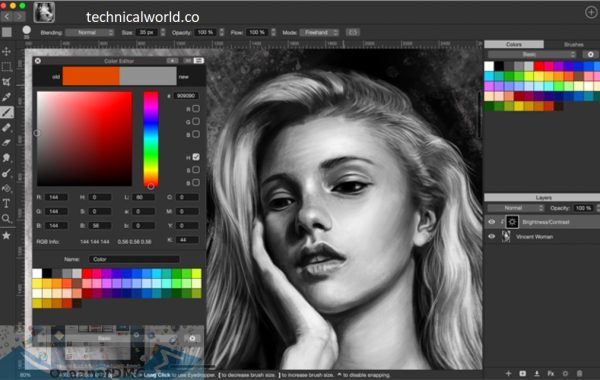
Artstudio Pro is a professional digital painting and photo editing application designed primarily for iPad, iPhone, and Mac users. It provides a complete set of tools for drawing, painting, sketching, and image editing—all within a single app. Think of it as a portable art studio that travels with you wherever creativity strikes.
At its core, Artstudio Pro combines raster-based painting tools with advanced image editing features. You can create detailed illustrations, concept art, matte paintings, and even edit high-resolution photographs. The app supports PSD files, making it compatible with industry workflows and allowing seamless collaboration with artists who use desktop software.
Key Features:
- Advanced Brush Engine: Artstudio Pro comes with a highly customizable brush engine that supports realistic textures and natural stroke behavior. Users can modify brush size, opacity, flow, spacing, and dynamics to create unique brushes tailored to their personal style. The engine supports pressure sensitivity and tilt, making brush strokes feel organic and responsive, especially when using Apple Pencil.
- Professional Layer System: The app supports unlimited layers, layer groups, clipping masks, and layer masks. Advanced blending modes such as Multiply, Overlay, Soft Light, and Color Burn allow artists to create depth, lighting effects, and complex compositions. Layers remain smooth and responsive even on large canvases.
- High-Performance Canvas Handling: Artstudio Pro is built using Apple’s Metal technology, ensuring exceptional performance even with high-resolution canvases and multiple layers. Artists can work on large projects without lag, making it suitable for print-quality artwork and detailed illustrations.
- Apple Pencil Optimization: Full Apple Pencil support is one of Artstudio Pro’s strongest features. It includes pressure sensitivity, tilt detection, palm rejection, and customizable stylus settings. This allows for precise control and a natural drawing experience similar to traditional tools.
- PSD File Compatibility: Artstudio Pro supports Photoshop (PSD) files, enabling seamless workflow integration with desktop software. Artists can open, edit, and export PSD files without losing layers or quality, making collaboration easy.
- Photo Editing Tools: Beyond digital painting, Artstudio Pro includes professional photo editing capabilities. Users can adjust brightness, contrast, curves, levels, hue, saturation, and apply non-destructive filters. This makes it a versatile tool for artists and photographers alike.
- Color Management and Precision: The app supports RGB, CMYK, and LAB color modes, ensuring accurate color reproduction for both digital and print work. Advanced color pickers, palettes, gradients, and fill tools help maintain consistency across projects.
- Drawing Aids and Guides: Artstudio Pro includes symmetry tools, perspective grids, rulers, and guides. These features are especially useful for technical drawings, architectural sketches, concept art, and character design where precision is essential.
How to install:
- Open the Mac App Store: Click on the App Store icon from the Dock or Applications folder.
- Search for Artstudio Pro: Enter Artstudio Pro in the search bar.
- Choose the Official App: Select the app from the search results to open its product page.
- Buy and Download: Click the Buy button and confirm the purchase with your Apple ID.
- Complete Installation: The app will download and install automatically on your Mac.
- Open Artstudio Pro: After installation, launch the app from the Applications folder or Launchpad.
Learn more about Shadow Defender Final’s features in our guide.