
To protect user data following a device reset, Android devices must include a security feature called SamFw FRP Tool 5.4 However, there are times when consumers run into problems because they forget their Google login information or because they buy used devices that have FRP turned on. FRP bypass programs like SamFW FRP Tool 5.4 may offer solutions in these circumstances.
In today’s fast-paced digital world, where information and technology continue to advance, staying up to date with the latest tools and software is crucial. This article delves into the SamFw FRP Tool and its latest features, which aim to simplify and enhance the user experience. Let’s explore what’s new in this tool and how it can benefit you.
Bypassing FRP lock barriers:
Bypassing FRP lock barriers, FRP bypass tools help users recover access to their devices. SamFW FRP Tool, including its most recent version 5.4, offers a streamlined procedure for carrying out factory resets and removing FRP locks via Test mode and supports a variety of Samsung Android versions (9, 10, 11, 12, and 13).
May fix FRP-related issues:
Users may be able to fix FRP-related problems by installing SamFW Tool 5.4 and regaining access to their Samsung devices without entering their Google account credentials. This utility makes the FRP bypass procedure simple, enabling users to carry out factory resets and get rid of FRP locks with ease.
What is the SamFw FRP Tool?
SamFw FRP Tool, also known as Samsung Firmware Remove Protection Tool, is a software application designed to unlock Samsung devices, specifically those locked with Factory Reset Protection (FRP). FRP is a security feature that requires the user to verify their identity before they can access the device after a factory reset. SamFw FRP Tool is a valuable solution for individuals who have forgotten their Google account credentials or purchased a second-hand Samsung device.
New Features of SamFw FRP Tool:
Enhanced Device Compatibility
One of the most significant updates in SamFw FRP Tool is the expanded device compatibility. The tool now supports a wider range of Samsung devices, including the latest models. This means that more users can benefit from the tool’s functionality and unlock their devices hassle-free.
User-Friendly Interface
The new version of SamFw FRP Tool boasts a user-friendly interface, making it easier for both novice and experienced users to navigate the software. The intuitive design ensures that you can quickly access the tool’s features and complete the unlocking process efficiently.
Improved Unlocking Speed
In the world of technology, speed matters. The latest update of the ToSamFw FRP Tool offers improved unlocking speed, reducing the time it takes to unlock your Samsung device. This enhancement ensures a faster and more efficient experience for the user.
Enhanced Security
Security is a top priority, and the new features of the SamFw FRP Tool reflect this. The tool now offers advanced security protocols to protect your data during the unlocking process. You can trust that your information is safe and secure.
Key Features:
- On Android devices, this feature enables the removal of the Factory Reset Protection (FRP) lock.
- Supports a broad range of Android device types and versions, including Samsung smartphones running various Android releases.
- Users may conduct a factory reset on their smartphone to restore it to its default configuration.
- User-Friendly Interface, Provides a clear and simple-to-use interface for efficient operation and navigation.
- Support for Test Mode, Some programmes let you go into Test mode, which makes the FRP removal process easier.
- Supports many Android versions, including Android 9, 10, 11, 12, and 13, to provide compatibility with a range of device setups.
- Supports users in removing the FRP lock without the need for authentic Google account credentials.

System Requirements:
- The utility could work with the Windows, Mac, or Linux operating systems. For information on the precise operating systems supported, consult the tool’s manual.
- Processor: It is required to have a suitable processor with enough processing capability. Most tools need a CPU with at least two cores.
- Memory (RAM): The tool can need at least 2GB of RAM or more, which is the average minimum.
- Storage Space: The FRP bypass utility must be installed and executed on a computer with enough free storage space on the hard disc. The precise amount of area needed might change.
- In order to connect with the device, confirm that your computer has functional USB ports.
- Internet connection: To download the FRP bypass program or to access online information and updates, you may need to have access to the internet.
How to Install:
- Get the tool here: Downloading the FRP bypass program requires going to the official website or a reliable source.
- Make sure the version you’re downloading is appropriate for your device and operating system.
- To extract the files, find the downloaded file and use a program like WinRAR or 7-Zip. The installation-related files will be created in a folder as a result.
- Launching the Installer Find the installation file by opening the extracted folder. Click it twice to launch the installation.
- The installation wizard’s on-screen prompts and instructions should be followed.
- Accept the Licence Agreement, If prompted, read and agree to the license agreement.
- Before starting the installation, it’s crucial to read the terms and conditions.
- Select Installation Location, Select the desired destination folder.
Conclusion:
In conclusion, the new features of the SamFw FRP Tool bring exciting enhancements to the table. With improved device compatibility, a user-friendly interface, faster unlocking speed, and enhanced security, this tool is a must-have for anyone looking to unlock their Samsung device. Say goodbye to FRP-related headaches and get access to your device now.
Unique FAQs
- FAQ 1: Is the SamFw FRP Tool free to use?
- No, the SamFw FRP Tool is not a free tool. You may need to purchase a license or unlock credits to use it.
- FAQ 2: Is the unlocking process with the the SamFw FRP Tool safe for my device?
- Yes, SamFw FRP Tool prioritizes user data security and employs advanced security measures to protect your device during the unlocking process.
- FAQ 3: Can I use the SamFw FRP Tool for all Samsung devices?
- The tool is compatible with a wide range of Samsung devices, but it’s essential to check the supported models on the official website.
- FAQ 4: What if I encounter issues with SamFw FRP Tool?
- If you face any problems while using the tool, you can reach out to their customer support for assistance.
- FAQ 5: Are there any alternatives to the SamFw FRP Tool?
- Yes, there are alternative tools available for unlocking Samsung devices, but the freeSamFw FRP Tool is known for its reliability and user-friendly features.
Get Access Now:
Mirror Link!
]]>Since technology is always changing, it is crucial to use the most recent hardware and applications. Users may take use of this powerful Windows tool’s power to boost device performance and get over iCloud limitations using GSM ADJAA RAMDISK V2.6.1.
Harness Maximum Device Performance:
A cutting-edge Windows programme called GSM ADJAA RAMDISK V2.6.1 enables users to maximise the performance of their gadgets. It is a priceless tool for obtaining top performance and getting around iCloud obstacles because to its user-friendly UI and robust capabilities.
iCloud Bypassing Made Simple with GSM ADJAA RAMDISK:
Users may get beyond iCloud limits and maximise the functionality of their devices using GSM ADJAA RAMDISK V2.6.1. This software offers a simple method for releasing iCloud locks, enabling users to easily retrieve their data and reclaim control of their devices.
Improved performance and user experience:
GSM ADJAA RAMDISK V2.6.1 features a user-friendly interface that streamlines the optimisation process and was created with user comfort in mind. Moreover, Users may quickly navigate through the tool’s capabilities and adjust settings to their liking, making it simple to unlock optimum performance.
Key Features:
- Bypassing iCloud limits and taking back control of your smartphone with ease will let you access your data with ease.
- With effective optimisation features, maximise the performance of your device.
- Boost the device’s speed, responsiveness, and all-around performance.
- Users can easily use the tool and adjust settings to suit their tastes thanks to its user-friendly interface. Enjoy a hassle-free and seamless optimisation process.
- GSM ADJAA RAMDISK V2.6.1 is made to work with a variety of devices, assuring compatibility with different models and software releases.
- Keep abreast with the most recent developments in technology and hardware. The utility is kept compatible with new device releases and software changes by routine updates.

System Requirements:
- (Compatible with Windows XP, Vista, 7, 8, and 10) Windows operating system
- sufficient computer storage to accommodate the installation
- an uninterrupted internet connection to download the tool and any updates
- Models of compatible devices that GSM supports RAMDISK ADJAA V2.6.1
How to Install:
- Download the application: Make sure you download it from a trusted and respected source.
- System requirements: Review the system requirements listed by the programme developer before moving forward with the installation. Ensure that your machine satisfies all requirements for the programme to work correctly.
- Run the Installer: Moreover, To launch the installer, find the downloaded installation package on your computer and double-click it. If asked, provide the required authorizations to continue.
- Follow the Installation Wizard’s In-Screen Instructions: The installation procedure normally entails following the installation wizard’s in-screen instructions. Choose the desired installation parameters, such as the installation directory, after carefully reading each step.
- Accept Licence Agreement: A licence agreement can be shown to you during installation. Read the terms and conditions, and if you accept them, click “I accept” to go on.
- Wait for Installation: Moreover, It will take some time for the installation procedure to be finished. The progress of the installation may be shown via progress bars or indicators. Be patient and refrain from interfering with the procedure.
Password: technicalworld.co
Mirror Link!
]]>
iKey Prime If you are having trouble with iCloud activation, I suggest using the official Apple procedures or getting in touch with a professional. Please feel free to ask any more questions you may have or request help with any other topics, and I will do my best to answer them.
As it is crucial to prioritise the security and legality of your activities when dealing with iCloud activation, I cannot advise or advocate the usage of any specific iCloud activation lock removal tool, including iKey Prime.
iKey Prime v2.5 | Added Latest iOS | Bypass Activation Lock:
I advise contacting Apple or an authorised service provider for help if you find yourself locked out of an iCloud-locked device. They can assist you in resolving any activation lock problems you may run across because they have the knowledge and authorised tools.
To maintain the security and integrity of your equipment and data, it’s crucial to employ authorised techniques and adhere to regulatory requirements. Please feel free to ask any further questions you may have, and I will do my best to assist you.
Features:
- According to iKey Prime, it is apparently feasible to get past the iCloud activation lock screen with or without a SIM card.
- Repair for baseband issues: The tool enables users to fix baseband issues on iOS devices..
- In order to use this programme to bypass the iCloud activation lock, you must first join up, according to the instructions.
- comprehensive bypass and Signal: The utility claims to provide a comprehensive bypass solution as well as the ability to restart the signal after the bypass.
- It’s possible that iKey Prime won’t support devices with SIM locks. comprehensive bypass and Signal: The utility claims to provide a comprehensive bypass solution as well as the ability to restart the signal after the bypass.
What’s New:
- Support for iPhone models 5S and above with MEID and GSM capabilities: The tool is currently compatible with a number of iPhone models, including those with MEID and GSM capabilities in the 5S generation and higher.
- Support for iPad models introduced in 2013 and after: iKeyPrime is currently extending its support to include certain iPad models made in 2013 and later, particularly WiFi and Cellular devices.
- Support is available for iOS 12.0 to iOS 16.4: The utility is compatible with a broad range of iOS versions, including iOS 12.0 and the most recent iOS 16.4.
- Compatibility with Winra1n (Windows) and Palera1n (Linux/Mac): Thanks to iKeyPrime’s compatibility with both Winra1n and Palera1, it is now possible to use it on both the Windows and Linux/Mac operating systems.
- Variety of jailbreak tools, such as Winra1n for iOS, are compatible with iKeyPrime depending on the operating system.

How To Use:
- By obtaining the setup file from a reliable site and saving it to your Windows PC, you may download iKeyPrime.
- Install the programme: Run the setup file to install iKeyPrime on your Windows PC, then adhere to the on-screen instructions.
- Connect your jailbroken iPhone: Use a USB connection to link your jailbroken iPhone to your PC. Before continue, make sure your iPhone has been jailbroken.
- To determine if the iKeyPrime tool is compatible with your device, open the tool and select the check button.Depending on the operating system, different applications are available, such as Winra1n for Windows, Palera1n for Linux, and Palera1n for Mac.
- serial number, if possible In the appropriate area, type the serial number of your iPhone. This information is necessary to continue the bypass process.
- After inputting your serial number, click Start when you’re ready to start the bypass process. Then, iKeyPrime will take the necessary steps to remove the iCloud activation lock from your iPhone.
Password: technicalworld.co
Download Link!
]]>Both public and commercial organisations need to have safe, Organizational information sutilizingOrganisations may guarantee the confidentiality and integrity of their data by utilprocessurity engineering and software engineering technologies coupled with a clear SRS Tool. We will discuss the significance of safe IS development in this post, as well as the part security engineering and software engineering play in accomplishing this objective.

The SRS-Process for the Development of IS:
Organizations should use disciplined practices to produce secure and economical IS. Incorporating software engineering and security engineering approaches, this procedure includes industry best practises and standards. Organizations can satisfy worldwide evaluation standards for information security products by using the Common Criteria (ISO/IEC 15408) paradigm. Additionally, Protection Profiles (PP) are used in the procedure.
Tools for SRS Development:
The SRS tool, developed to expedite the creation of the security requirement specification, is a crucial part of the SRS process. The program offers an intuitive user interface for establishing security policies, recording security requirements, and verifying compliance with the Common Criteria and pertinent Protection Profiles. Employing the SRS organizations to effectively design and maintain their SRS, allowing them to build strong and secure IS.
Key Features:
- Security Goals The SRS describes the security objectives and targets that the system or application should hit.
- It establishes the framework for the security measures that will be used and specifies the degree of protection that is sought.
- Threat Assessment The SRS contains a thorough assessment of the threats and dangers that the system may encounter.
- It discusses methods to successfully reduce these risks and pinpoints potential weaknesses.
- The SRS outlines the security procedures and controls that will be put in place to safeguard the system and its assets.
- This comprises authentication procedures, audit trails, and other security elements together with access control techniques.
- Compliance Requirements The SRS defines any applicable compliance rules and guidelines that the system is required to follow.
- This guarantees that the system complies with legal requirements.

System Requirements:
- Suitable word processing software or a specific requirements management solution can serve as the documentation platform.
- Platforms or systems that enable seamless collaboration and version control are available.
- Threat programs, vulnerability assessments, and risk analysis tools are all included in the category of security analysis tools.
- Access to pertinent compliance standards and recommendations.
- Access to SMEs, Working with security and software engineering professionals.
- System owners, programmers, security experts, and end users are all stakeholders.
- Environment for Hardware and Software Development: SRS development requires certain hardware and software.
- Organizational Policies and Procedures, Knowledge of organizational information security policies and development processes.
How to Install:
- Choose the documentation platform.
- Install the platform (word processing organizational or requirements management application) for your documents.
- If necessary, set up collaboration and version control
- Learn the capabilities and functions of the documentation platform.
- Explain the SRS’s technical world structure (sections, headers, and subheadings).
- Start compiling the SRS’s documentation, which should include information on security goals, threat assessments, security measures, legal compliance standards, incident response protocols, and other topics.
- Consult with stakeholders and subject-matter experts to review and validate the SRS.
- Ensure accuracy and completeness by making the required changes in response to criticism.
- To the appropriate stakeholders, distribute the completed SRS.
- Create procedures for upkeep and SRS revisions as necessary.
Password: technical world. co
Mirror Link!
]]>Looking for the OPPO ColorOS Upgrade Tool‘s most recent version? You’re in the proper location! Regardless of the model you own, you can quickly upgrade the firmware on your Oppo handset with this robust tool. Users with several Oppo smartphones will find the ColorOS Upgrade Tool to be a practical choice because it is made to work with a variety of Oppo devices.

Update all of your device’s firmware:
With just one application, you can update all of your device’s firmware, saving you the effort of looking for particular updates for each one individually. Download the most recent version of the ColorOS Upgrade Tool right away to keep your Oppo devices up to date and access new features. Don’t pass up the improved functionality and performance it provides to your Oppo experience. Start using the ColorOS.
Upgrading your Oppo smartphone:
The most recent version of the OPPO ColorOS Upgrade Tool makes upgrading your Oppo smartphone simple. Users of Oppo smartphones should have this utility since it is compatible with a variety of Oppo products, allowing you to upgrade the firmware on your device regardless of its model. This solution makes the procedure simpler whether you possess one or more Oppo smartphones by enabling you to update them all through a single application.
Keep current with the newest additions and features:
Spend less time looking for individual firmware upgrades using the ColorOS Upgrade Tool. By downloading the most recent version of the ColorOS Upgrade Tool, you can keep current with the newest additions and features. Discover how easy it is to maintain the performance of your Oppo devices with only a few clicks. Upgrade with confidence your Oppo device.
Key Features:
- Quick and simple software updates It’s simple and convenient to update the software on your Oppo smartphone.
- Upgrade numerous Oppo cellphones simultaneously with only one click, saving time and effort. Simultaneous Multi-Device Upgrade.
- User-Friendly Interface The tool offers an intuitive interface that is user-friendly and makes it simple to update software.
- Enhanced Performance After upgrading the software, you should notice an improvement in the device’s usability and performance.
- Fixing issues and boosting device stability with firmware updates results in a more dependable and seamless user experience.

System Requirements:
- Windows XP/Vista/7/8/10 (32-bit or 64-bit) as the operating system
- Processor: at least an Intel Pentium 4
- 2 GB or more of RAM
- Disc space on the hard drive: 200 MB available
- Internet connection: For downloading firmware updates and tool updates, a dependable internet connection is advised.
- OnePlus Device Suitable Oppo device with the installed drivers
How to Install:
- From the official website or another reliable source, get the most recent version of the ColorOS Upgrade Tool.
- To start installing, double-click the setup or installer file.
- The installer’s on-screen instructions should be followed. Choose the installation location, go over and agree to the terms and conditions, and, if requested, pick any extra options.
- Launch the ColorOS Upgrade Tool by double-clicking its desktop shortcut when the installation is finished or by choosing it from the Start menu.
- With the aid of a USB connection that is compatible, join your Oppo gadget to your computer.
- Make sure your Oppo gadget is turned on and functioning properly.
- Your connected Oppo device should be instantly detected by the ColorOS Upgrade Tool. If not, you might want to try reconnecting the device or installing the correct USB drivers for your particular device.
- To upgrade the firmware on your Oppo device or carry out any other required tasks, according to the tool’s on-screen instructions.
- After the procedure is finished, carefully unplug your Oppo device from the computer.
Password: technical world.co
Mirror Link!
]]>The Nokia Bootloader Unlock Tool by Techmesto is available if you need assistance unlocking the bootloader on your Nokia smartphone. Hence, For unlocking the bootloader on Nokia handsets, this tool offers a simple and effective option. We will take you step-by-step through the procedure in this thorough tutorial.
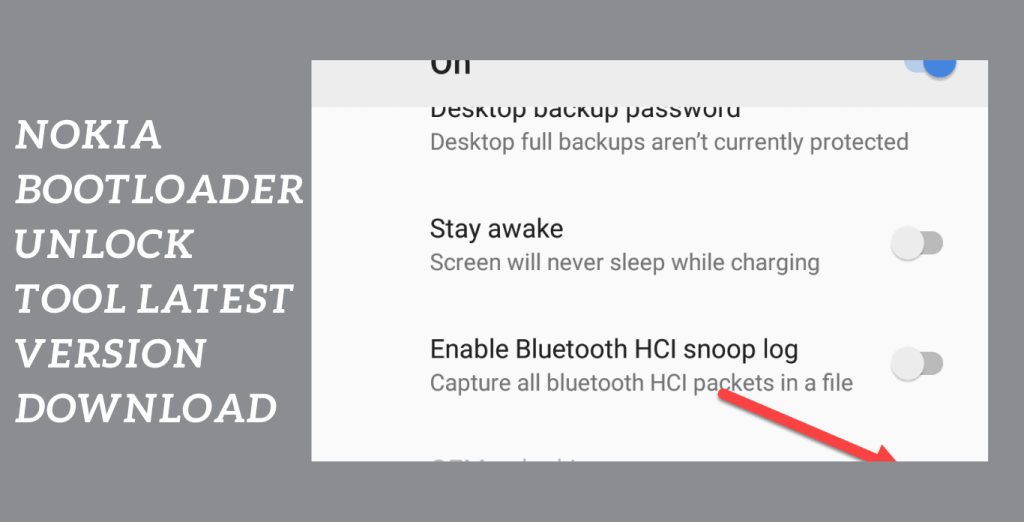
Why Lock the Bootloader?
Gaining complete control over your Nokia smartphone requires unlocking the bootloader. It opens up a world of opportunities, letting you flash custom ROMs, install custom recoveries, and experiment with different system tweaks. Hence, You may customize your smartphone, improve its performance, and add new features by unlocking the bootloader.
How to use the Nokia Bootloader Unlock Tool:
- Install the tool: For the most recent version of Techmesto, go to the company’s website.
- the unlocking tool for the Nokia bootloader. Make sure you obtain it from an unbiased and trustworthy source.
- Go to “Settings” and choose “About Phone” on your Nokia smartphone to enable developer options. For Developer Options to be enabled, find the “Build Number” and press it seven times.
- Turn OEM Unlocking on by finding the “OEM unlocking” toggle in Developer Options and turning it on. Your device’s bootloader may now be unlocked thanks to this.
- Connect your Device: Hence, Using a USB cord, link your Nokia smartphone to your computer.
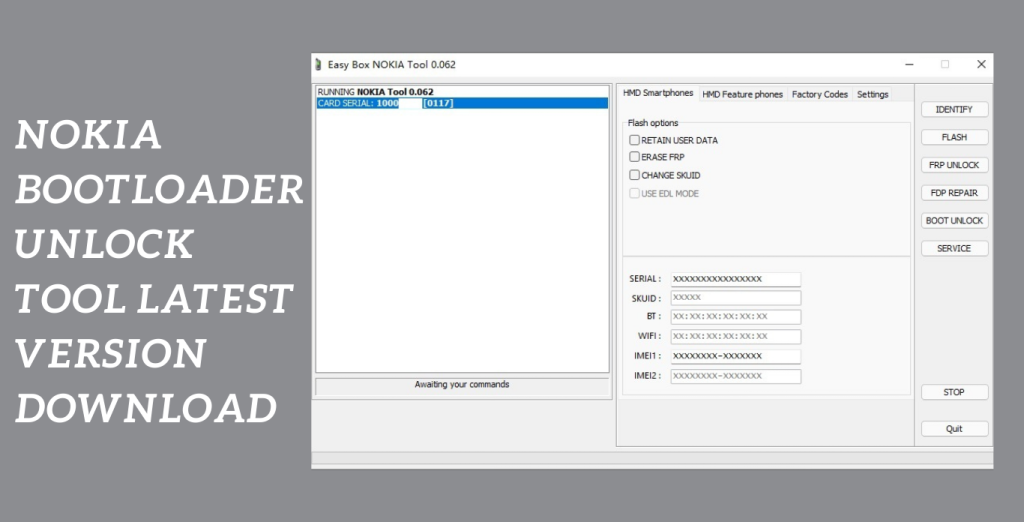
- Activate the tool: Utilise your computer’s Nokia Bootloader Unlock Tool. To start the bootloader unlocking procedure, adhere to the instructions displayed on the screen.
- Adhere to the directions: The program’s screen will display comprehensive instructions. To continue with unlocking, carefully read and abide by them.
Key Features:
- Bootloader Unlocking: The tool makes it possible to take complete control of your Nokia smartphone by unlocking the bootloader.
- Unlocking the bootloader is made simple and effective with the Nokia Bootloader Unlock Tool, which doesn’t require a technical background or a long list of instructions.
- Complete Guide: The tool includes a complete guide that leads you through each step of the bootloader unlocking procedure, assuring a hassle-free experience.
- Enhanced Device Control: Installing custom recoveries, flashing custom ROMs, and exploring system customizations are all made possible by unlocking the bootloader, Hence, which gives you more control over and customization choices for your Nokia smartphone.
- Official supplier: Techmesto, a reputable supplier renowned for its knowledge in customizing Nokia devices, offers the Nokia Bootloader Unlock Tool.
System Requirements:
- Operating System: Windows, including versions 7, 8, and 10, or any other compatible operating systems as indicated by the utility.
- Intel Core i3 or later suggested as the processor.
- a minimum of 4 GB of RAM.
- Storage: The tool installation and related files will require enough free disc space.
- USB To connect your Nokia smartphone to the computer, there is a USB port available.
- Nokia Cellphones: The tool was created to function with Nokia cellphones. Check to see if the tool is compatible with the model of your Nokia.
How to Install:
- Hence, Get the instrument here: To obtain the setup file for the Nokia Bootloader Unlock Tool, go to the Techmesto website or another reputable website.
- Make sure you download it from an unbiased, reputable source.
- Hence, Find the setup file: After the download is finished, go to the directory where the setup file is located on your computer.
- If you didn’t specify a different place, it’s often in the “Downloads” folder.
- Execute the setup file: Hence, The installation procedure may be started by double-clicking the setup file.
- To give the required rights when requested by User Account Control (UAC), click “Yes”.
- Through the installation procedure, the installation wizard will direct you.
- Hence, Pick the appropriate installation choices, such as the installation location and license agreement, and then read and approve it if asked.
Password: technical world.co
Mirror Link!
]]>Devices with design locks are the target audience for the iReverse MTP Bypass Tool. There are several ways to install the FRP bypass app if you possess a device with FRP (Factory Reset Protection). To access lock settings and applications, you must first enter the settings menu, dial pad menu or other alternatives like YouTube.
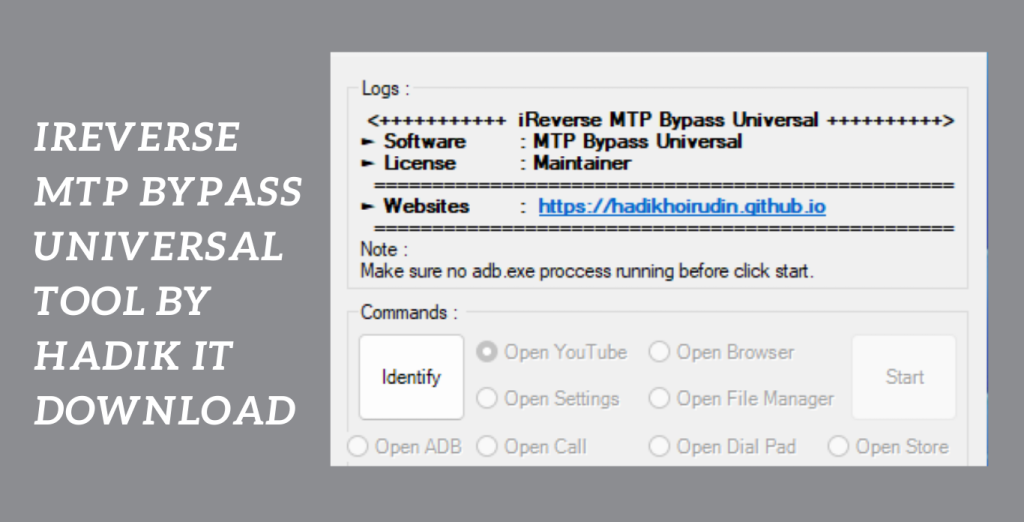
May quickly and easily reach the settings menu:
with MTP (Media Transfer Protocol) mode, you may quickly and easily reach the settings menu or all menus with this strong tool, allowing you to remove FRP from your smartphone. Make sure your machine has a suitable operating system before running the program.
Easy way to unlock FRP devices:
There has never been a more easy way to unlock FRP devices. Investigate your options to easily restore control of your device. Contact your device’s manufacturer’s official support channels for further information or assistance with FRP bypass techniques, or go to trustworthy technical forums and groups.
Key Features:
- Devices with Factory Reset Protection may be unlocked using the iReverse MTP Bypass Tool, which is a dependable option for consumers who are dealing with FRP locks.
- Specifically Designed for Devices with Design Locks: This tool is made to work with devices that have design locks, guaranteeing compatibility and efficiency for a variety of devices.
- Multiple means of access: The iReverse MTP Bypass Tool gives you access to several ways to unlock programs and settings, including YouTube, the dial pad menu, and the settings menu.
- Quick and Simple FRP Removal: Using the MTP (Media Transfer Protocol) mode, you may quickly and simply remove FRP from your smartphone, giving you back complete control over the device.
- User-Friendly Interface: The tool has an intuitive interface that makes it easy to use.
System Requirements:
- Operating System: Windows, including versions 7, 8, and 10, or any other compatible operating systems as indicated by the utility.
- Intel Core i3 or later suggested as the processor.
- RAM: a minimum of 4 GB of RAM.
- Storage: The tool installation and related files will require enough free disc space.
- An Internet connection might be essential to download the tool or any required updates.
How to Install:
- Install the tool: To obtain the iReverse MTP Bypass Tool setup file, go to the legitimate website or an authorized source.
- Verify that you download it from a reputable, safe source.
- Unless you specify a different location, it is often in the “Downloads” folder.
- Thus, Activate the setup file: To begin the installation procedure, double-click the setup file. Click “Yes” to approve the required rights if User Account Control (UAC) asks you to.
- The Installation Wizard’s instructions: The installation wizard will walk you through the procedure.
- Read the license agreement if asked, accept it, and select the installation choices you want.
Password: technical world.co
Mirror Link!
]]>The most recent version of the iPhBypass Tool has just been published and is brimming with modifications and enhancements. The activation lock on iPhone and iPad devices may now be bypassed using this application, which has been shown program locks to be reliable. More specifically, let’s look at the most recent changes to this page:

Continuous Improvements to the Activation Lock Bypass:
With the iPhBypass Tool v2.0.0.88, users may benefit from an improved and simplified activation lock bypass process. The program havelocks been improved to allow simpler bypassing and to make dealing with activation locks on iOS devices less annoying.
Continually Update on New Features:
To enhance user experience, the iPhBypass Tool’s most recent version has additional features incorporated. As a result of these modifications, customers will have access to a bypassing solution. a more efficient and effective method of getting around the iCloud activation barrier. To get the most out of your iPhone or iPad, keep up with the most recent features.
Activation Lock Bypass Method that Is Reliable:
A reliable technique for getting around the activation lock on iPhone and iPad devices is the iPhBypass Tool. To help customers recover access to their devices, it provides a dependable solution to the aggravation brought on by a forgotten Apple ID or passcode.
Key Features:
- To get over the iCloud activation lock on iPhone and iPad devices, you may use the program license, which offers a dependable and efficient technique.
- Even if users have forgotten their Apple ID or passcode, they may still access their devices.
- Uncomplicated Bypass Procedure: The iPhBypass Tool v2.0.0.88 provides a simple and intuitive bypass procedure.
- It makes the process of removing the activation lock simpler so that users with different levels of technical expertise may utilise it.
- The bypassing procedure will be simpler and more streamlined for users.
- Dependable and Trusted Approach The iPhBypass Tool has made a name for itself as a trustworthy and dependable way to get around the iCloud activation barrier.

System Requirements:
- Operating system: The Windows 7, 8, or 10 operating systems, as well as the iPhBypass Tool, are all compatible.
- For optimum performance, RAM should be 4 GB or above.
- Storage Space Check that you have enough free disc space to download and install the iPhBypass Tool and any necessary files.
- Connecting your iPhone or iPad to the computer requires a USB port, which must be available.
How to Install:
- Get the instrument here: To obtain the iPhBypass Tool v2.0.0.88 setup file, go to the official source or a reputable website.
- Make sure you download it from an unbiased, reputable source.
- Find the setup file: After the download finishes, go to the directory where the setup file is located on your computer. If you didn’t specify another location, this is often the “Downloads” folder.
- Execute the setup file: The installation procedure may start by double-clickingAdherence the setup file.
- To give the required rights when requested by User Account Control (UAC), click “Yes”.
- license to the installation wizard: Through the installation procedure, the installation wizard will direct you.
- Pick the installation choices, such as the installation location, and read and accept the technical world agreement.
Password: technical world. co
Mirror Link!
]]>Looking for a trustworthy and cost-free smartphone repair tool? Choose ROM2Box Tool by ROMProvider.COM without a second thought. This sophisticated tool can fix a variety of devices without requiring any identification. ROM2Box is your one-stop shop with support for QCOM, Mediatek, and Spreadtrum devices, including well-known models from Oppo, Vivo, Xiaomi, and Realme.
Restore Download Functionality:
The ability of ROM2Box to restore download functionality to phones is one of its unique characteristics. This utility enables easy device recovery if you’ve had firmware problems, boot loops, or other software flaws. ROM2Box guarantees that you may quickly get your smartphone back up and running by offering a smooth repair experience.
Difficulties of smartphone repair with ROM2Box:
You may forget about the difficulties of smartphone repair with ROM2Box. You may easily repair your gadget thanks to the process’s simplification provided by this user-friendly app. Additionally, you won’t have to invest a thing because ROM2Box is free. Take charge of your smartphone repairs right now and wave goodbye to pricey repair providers.
Fix your smartphone:
Now that you have ROM2Box, you may easily fix your smartphone without having to deal with complicated verification procedures. Moreover, Join the community of happy customers who have profited from the strength and adaptability of ROM2Box by putting your trust in the knowledge of ROMProvider.COM. Let ROM2Box be your go-to smartphone repair partner and stop letting software problems hold you back.
Key Features:
- Comprehensive Smartphone Repair: ROM2Box includes a variety of repair features that let you take care of a variety of software-related problems with your smartphone.
- Support for a Variety of Chipsets: The utility works with cellphones made by QCOM,
- Mediatek, and Spreadtrum, guaranteeing a wide range of device compatibility.
- Repair for Download-Disabled Phones: Moreover, ROM2Box is an essential resource for resolving software-related issues because it specializes in fixing phones with download limitations.
- User-Friendly Interface: Even non-technical people may easily repair smartphones using ROM2Box’s intuitive and user-friendly interface.
- Free Alternative: ROM2Box is a free option that offers an inexpensive replacement for pricey repair services.
- Wide Brand Compatibility: ROM2Box Tool works with phones from well-known manufacturers like Oppo, Vivo, Xiaomi, and Realme, guaranteeing compatibility with a variety of gadgets.

System Requirements:
- Windows XP/Vista/7/8/10 (32-bit or 64-bit) as the operating system
- Intel Pentium 4 or a comparable processor
- RAM at least 2 GB
- Disc space on the hard drive: 200 MB available
- USB 2.0 or later ports
- Internet connectivity is necessary to obtain updates and use online features.
How to Install:
- From a reliable source or the official ROMProvider.COM website, get the ROM2Box setup file.
- Find the setup file that was downloaded to your computer.
- The setup file must be double-clicked to begin the installation procedure.
- The installer’s on-screen instructions should be followed.
- On your computer, select the place where ROM2Box should be installed.
- Moreover, Choose any extra choices or settings that suit your preferences.
- To start the installation, click the “Install” or “Next” button.
- Hold off until the installation is finished. It could take a while.
- After the installation is complete, you could be asked to start ROM2Box right away. If not,
- you may manually start the program from the Start menu or desktop shortcut.
- Moreover, You might need to authorize ROM2Box the first time you use it.
Password: technical world.co
Mirror Link!
]]>A robust program called SnakeBite iOS 14 MDM Bypass Tool is made to quickly unlock MDM (Mobile Device Management) locks from devices that support iOS 14. SnakeBite provides a hassle-free solution whether you need to recover control over your device or have bought a previously owned device with lingering MDM limitations.

Ease of use and simplicity:
The ease of use and simplicity of SnakeBite are two of its most notable qualities. For those looking to overcome MDM locks without incurring additional costs, SnakeBite is a cost-effective option because it doesn’t require registration or purchase, unlike other solutions on the market. You may retake complete command and access to your iOS 14 iPhone with only a few easy actions.
Enable a variety of options:
You may enable a variety of options for your device by using the SnakeBite iOS 14 MDM Bypass Tool. SnakeBite gives you the flexibility you need to install new programs, access password-protected settings, or modify your device as you choose.
Utilize the program even though sensibly:
Despite the fact that SnakeBite provides a practical answer, it’s crucial to utilize the program sensibly and within any applicable local laws. When using the tool, make sure you have the required authorizations and adhere to all applicable rules and regulations.
Key Features:
- SnakeBite is an expert in unlocking MDM locks from iOS 14-compatible devices.
- It successfully gets beyond Mobile Device Management limitations and gives you complete control over your device.
- Simple Approach: SnakeBite provides a hassle-free method for getting through MDM locks., Unlike many other MDM bypass programmes, SnakeBite does not demand any payment or registration. It offers a reasonably priced choice for people who want to get rid of MDM locks without incurring any further costs.

System Requirements:
- Storage Space: To install and use SnakeBite, be sure that your computer’s hard drive has at least 100 MB of free disc space.
- Internet connection: SnakeBite may be used without an active internet connection. However, connectivity to the internet might help obtain any required updates or other materials.
- iOS Device: SnakeBite was created especially to get through MDM locks on iOS 14-compliant devices.
How to Install:
- Make sure you download the file that is appropriate for your operating system.
- The “Downloads” folder or the place you choose during the download is often where you may find it.
- Launching the Installer To launch the installer, double-click on the setup file. If User Account Control (UAC) asks you to confirm the installation, click “Yes” to proceed.
- You will be led through the installation procedure by the installation wizard.
- To start the installation process, click the “Install” or “Next” button. On your computer, the installer will extract the required files and install the SnakeBite iOS 14 MDM Bypass Tool.
- Click it to launch SnakeBite. To start the tool, double-click the icon.
- Using a suitable USB cord, join your iOS 14 device to your computer.
Password: technical world. co
Mirror Link!
]]>