To protect user data following a device reset, Android devices must include a security feature called SamFw FRP Tool 5.4 However, there are times when consumers run into problems because they forget their Google login information or because they buy used devices that have FRP turned on. FRP bypass programs like SamFW FRP Tool 5.4 may offer solutions in these circumstances.
In today’s fast-paced digital world, where information and technology continue to advance, staying up to date with the latest tools and software is crucial. This article delves into the SamFw FRP Tool and its latest features, which aim to simplify and enhance the user experience. Let’s explore what’s new in this tool and how it can benefit you.
Bypassing FRP lock barriers:
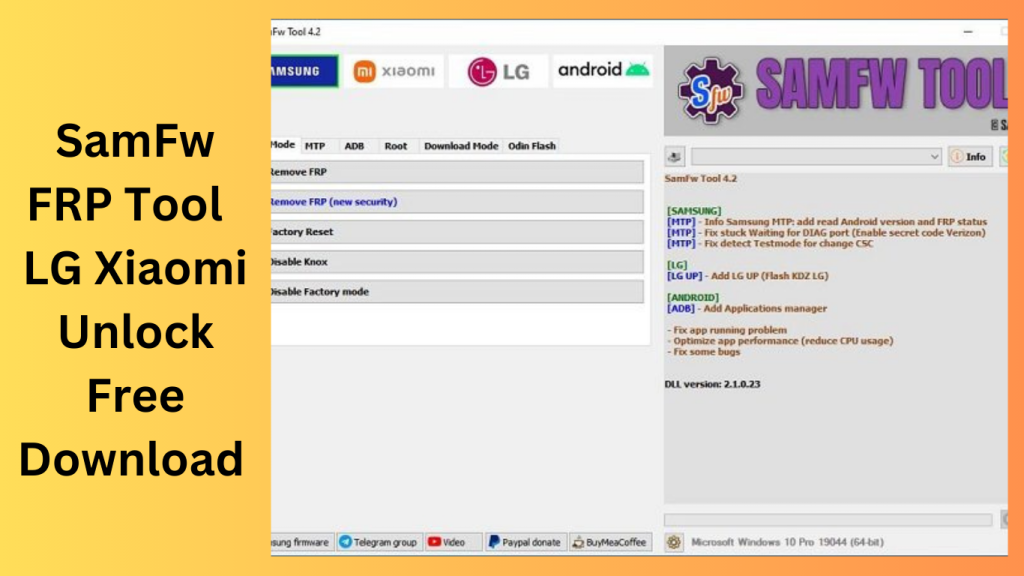
Bypassing FRP lock barriers, FRP bypass tools help users recover access to their devices. SamFW FRP Tool, including its most recent version 5.4, offers a streamlined procedure for carrying out factory resets and removing FRP locks via Test mode and supports a variety of Samsung Android versions (9, 10, 11, 12, and 13).
May fix FRP-related issues:
Users may be able to fix FRP-related problems by installing SamFW Tool 5.4 and regaining access to their Samsung devices without entering their Google account credentials. This utility makes the FRP bypass procedure simple, enabling users to carry out factory resets and get rid of FRP locks with ease.
What is the SamFw FRP Tool?
SamFw FRP Tool, also known as Samsung Firmware Remove Protection Tool, is a software application designed to unlock Samsung devices, specifically those locked with Factory Reset Protection (FRP). FRP is a security feature that requires the user to verify their identity before they can access the device after a factory reset. SamFw FRP Tool is a valuable solution for individuals who have forgotten their Google account credentials or purchased a second-hand Samsung device.
New Features of SamFw FRP Tool:
Enhanced Device Compatibility
One of the most significant updates in SamFw FRP Tool is the expanded device compatibility. The tool now supports a wider range of Samsung devices, including the latest models. This means that more users can benefit from the tool’s functionality and unlock their devices hassle-free.
User-Friendly Interface
The new version of SamFw FRP Tool boasts a user-friendly interface, making it easier for both novice and experienced users to navigate the software. The intuitive design ensures that you can quickly access the tool’s features and complete the unlocking process efficiently.
Improved Unlocking Speed
In the world of technology, speed matters. The latest update of the ToSamFw FRP Tool offers improved unlocking speed, reducing the time it takes to unlock your Samsung device. This enhancement ensures a faster and more efficient experience for the user.
Enhanced Security
Security is a top priority, and the new features of the SamFw FRP Tool reflect this. The tool now offers advanced security protocols to protect your data during the unlocking process. You can trust that your information is safe and secure.
Key Features:
- On Android devices, this feature enables the removal of the Factory Reset Protection (FRP) lock.
- Supports a broad range of Android device types and versions, including Samsung smartphones running various Android releases.
- Users may conduct a factory reset on their smartphone to restore it to its default configuration.
- User-Friendly Interface, Provides a clear and simple-to-use interface for efficient operation and navigation.
- Support for Test Mode, Some programmes let you go into Test mode, which makes the FRP removal process easier.
- Supports many Android versions, including Android 9, 10, 11, 12, and 13, to provide compatibility with a range of device setups.
- Supports users in removing the FRP lock without the need for authentic Google account credentials.
System Requirements:
- The utility could work with the Windows, Mac, or Linux operating systems. For information on the precise operating systems supported, consult the tool’s manual.
- Processor: It is required to have a suitable processor with enough processing capability. Most tools need a CPU with at least two cores.
- Memory (RAM): The tool can need at least 2GB of RAM or more, which is the average minimum.
- Storage Space: The FRP bypass utility must be installed and executed on a computer with enough free storage space on the hard disc. The precise amount of area needed might change.
- In order to connect with the device, confirm that your computer has functional USB ports.
- Internet connection: To download the FRP bypass program or to access online information and updates, you may need to have access to the internet.
How to Install:
- Get the tool here: Downloading the FRP bypass program requires going to the official website or a reliable source.
- Make sure the version you’re downloading is appropriate for your device and operating system.
- To extract the files, find the downloaded file and use a program like WinRAR or 7-Zip. The installation-related files will be created in a folder as a result.
- Launching the Installer Find the installation file by opening the extracted folder. Click it twice to launch the installation.
- The installation wizard’s on-screen prompts and instructions should be followed.
- Accept the Licence Agreement, If prompted, read and agree to the license agreement.
- Before starting the installation, it’s crucial to read the terms and conditions.
- Select Installation Location, Select the desired destination folder.
Conclusion:
In conclusion, the new features of the SamFw FRP Tool bring exciting enhancements to the table. With improved device compatibility, a user-friendly interface, faster unlocking speed, and enhanced security, this tool is a must-have for anyone looking to unlock their Samsung device. Say goodbye to FRP-related headaches and get access to your device now.
Unique FAQs
- FAQ 1: Is the SamFw FRP Tool free to use?
- No, the SamFw FRP Tool is not a free tool. You may need to purchase a license or unlock credits to use it.
- FAQ 2: Is the unlocking process with the the SamFw FRP Tool safe for my device?
- Yes, SamFw FRP Tool prioritizes user data security and employs advanced security measures to protect your device during the unlocking process.
- FAQ 3: Can I use the SamFw FRP Tool for all Samsung devices?
- The tool is compatible with a wide range of Samsung devices, but it’s essential to check the supported models on the official website.
- FAQ 4: What if I encounter issues with SamFw FRP Tool?
- If you face any problems while using the tool, you can reach out to their customer support for assistance.
- FAQ 5: Are there any alternatives to the SamFw FRP Tool?
- Yes, there are alternative tools available for unlocking Samsung devices, but the freeSamFw FRP Tool is known for its reliability and user-friendly features.
Get Access Now:
Mirror Link!
]]>Xiaomi Fire Tool, commonly referred to as Mi Account Fastboot To EDL Flashing Tool, is an effective repair tool created especially for Xiaomi smartphones. All Xiaomi phone models currently on the market are fully compatible with this tool. Even inexperienced users may quickly explore and use its features because to its user-friendly interface. The Xiaomi Fire Tool 2.9 is a crucial tool for fixing Xiaomi phones since it has a number of repair features, such as firmware flashing, Mi account unlocking, and FRP lock removal.

Repair tool for Xiaomi smartphones:
The Mi Account Fastboot To EDL Flashing Tool, also known as Xiaomi Fire Tool 2.9, is a crucial repair tool for Xiaomi smartphones. It offers a complete answer for varied repair needs thanks to its broad compatibility, user-friendly interface, and functions including firmware flashing, Mi account unlocking, and FRP lock removal. Download Xiaomi Fire Tool 2.0 right away to fully realise your ability to easily fix Xiaomi phones.
Xiaomi Fire Tool 2.9: How to Use It:
The procedure of using Xiaomi Fire Tool 2.9 is simple. To make use of its mending skills, take the following actions:
- Xiaomi Fire Tool 2.9 may be downloaded and installed from the official website or another trustworthy source.
- Fire up the programme on your PC.
- Using a USB cord that is compatible, join your Xiaomi phone to the computer.
- On your Xiaomi phone, click to Settings > About phone > MIUI version, and then touch on it seven times to enable USB debugging. Then, turn on USB debugging by going to Settings > Additional settings > Developer options.
- Choose the required repair procedure from the list of options in the tool, such as firmware flashing, Mi account unlocking, or FRP lock removal.
- To finish the chosen repair, according to the Xiaomi Fire Tool 2.9’s on-screen instructions.
Key Features:
- It is designed to work with all of the Xiaomi phones that are currently available.
- No matter the model or version, this tool can handle a range of repair needs.
Thanks to its simple and intuitive user interface, it provides both new and experienced users with a hassle-free experience. - The tool’s functionality is easily accessible by users because to its straightforward design.
The firmware flashing function of the programme allows users to install or upgrade firmware on Xiaomi phones. - This makes it easier to repair software-related issues, enhance device performance, and stay up to speed with new firmware upgrades.
It provides a reliable method for opening Mi accounts. Unlocking a Mi Account. - Users can regain access using this feature.

System Requirements:
- Operating system: You can choose from Windows 10, Windows 8.1, Windows 8, or Windows 7.
- Processor: An Intel Core i3 or above is suggested.
- RAM: at least 4 GB, however 8 GB or more is recommended.
- 100 MB or more of available disc space for storage.
- Xiaomi smartphones have USB 2.9 or USB 3.0 ports available for connection.
How to Install:
- Download the setup file from a reliable source or the company’s website.
- Locate the downloaded setup file on your computer and double-click it to start the installation process.
- The installer will start and display the installation wizard. Follow the on-screen instructions to finish the installation.
- If prompted, read and accept the terms and conditions of the licence agreement.
- You can install the software in either the default place or a specific folder that you choose.
- To continue, select “Next”.
- Select the extra parts or options to install if the installation process provides them.
- Should it not, select “Next.”
- After reading the description of the installation choices, click “Install” to begin the installation process.
Password: technicalworld.co
Mirror Link!
]]>