Adobe Photoshop is a powerful and widely acclaimed image editing software. In this article, we will explore the latest version of Adobe Photoshop, its features, system requirements, and how to download and install it on your Windows system.
Introduction to Adobe Photoshop:
Adobe Photoshop is the latest iteration of the world’s most popular image editing software. It’s known for its versatile tools, exceptional editing capabilities, and support for various creative projects, from photo retouching to graphic design. This version comes with several new features and enhancements that promise to make your creative process even more seamless.
Features and Updates in Adobe Photoshop:
The version of Adobe Photoshop brings a host of exciting features, including:
Enhanced Performance
Adobe has optimized the program for faster performance, ensuring that it runs smoothly on Windows.
Sky Replacement Tool
This feature allows you to easily replace and enhance the sky in your photos, adding dramatic effects to your images.
Object Selection Tool
The object selection tool has been improved, making it easier to select and edit specific elements in your images.
Neural Filters
Neural Filters enable you to experiment with creative filters that use AI technology for stunning results.
Advanced Warping
The new Warp mode lets you precisely reshape your images with greater flexibility and accuracy.
System Requirements:
Before you download Adobe Photoshop, make sure your system meets the following requirements:
- Operating System: Windows 10 or later (64-bit)
- RAM: 8GB or more
- Storage: 4GB of available hard-disk space
- Processor: Intel or AMD processor with 64-bit support
- Graphics: NVIDIA GeForce GTX 1660 or equivalent
How to Install:
You can download Adobe Photoshop from the official Adobe website. Follow these steps:
- Visit the Adobe website and navigate to the Photoshop product page.
- Click on the “Download” button.
- Sign in or create an Adobe ID.
- Choose your subscription plan and payment method.
- Once you’ve completed the purchase, the download will begin automatically.
Installation Process:
After downloading the installer, follow these steps to install Adobe Photoshop on your Windows system:
- Run the downloaded installer.
- Follow the on-screen instructions, including selecting the installation location.
- The installation process may take a few minutes.
- Once completed, Adobe Photoshop is ready to use.
Activating Adobe Photoshop:
Upon installation, you will need to activate Photoshop with your Adobe ID and product key. Follow the prompts to complete the activation process.
User Interface and Navigation:
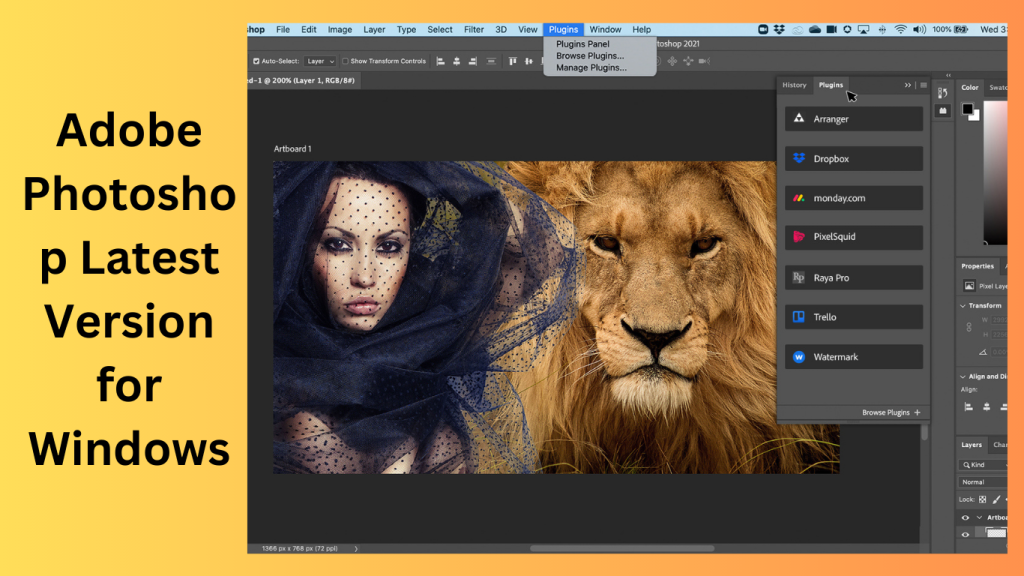
Adobe Photoshop retains its familiar user-friendly interface. The workspace includes tools, panels, and menus that make it easy to navigate and access various functions.
Key Tools and Functions:
Adobe Photoshop offers a wide array of tools and functions for image editing. Some of the key tools include the Brush tool, Selection tools, and the Pen tool.
Image Editing and Manipulation:
You can use Photoshop to enhance photos, remove imperfections, and adjust colors. The version has new features to make these tasks more efficient.
Working with Layers
Photoshop’s layer system allows you to organize and edit different elements of your project independently. Layers are a fundamental part of Photoshop’s functionality.
Filters and Effects
Adobe Photoshop provides an extensive collection of filters and effects that can be applied to your images, allowing for creative experimentation.
Exporting and Saving Projects:
You can save and export your projects in various formats, including JPEG, PNG, and PSD, depending on your needs.
Pros and Cons
Pros:
- Exceptional image editing capabilities
- A wide range of features and tools
- Enhanced performance
- Support for creative projects
- Frequent updates and improvements
Cons:
- Subscription-based pricing may not be suitable for all users
Frequently Asked Questions (FAQs)
- Is Adobe Photoshop compatible with Windows 7? No, is only compatible with Windows 10 and later (64-bit).
- What is the cost of an subscription? The cost varies depending on your plan; Adobe offers different subscription options.
- Can I use Adobe Photoshop offline? Yes, Adobe Photoshop can be used offline once it’s installed and activated.
- Are there any free alternatives to Adobe Photoshop? Yes, there are free alternatives like GIMP and Photopea, but they may not offer all the features of Photoshop.
- What are the minimum system requirements for Photoshop? You need at least 8GB of RAM, Windows 10 (64-bit), and an Intel or AMD processor, among other specifications.
Conclusion:
Adobe Photoshop for Windows is a powerful and versatile tool for image editing and creative design. With its latest features and optimizations, it continues to be a top choice for professionals and enthusiasts alike. Ensure your system meets the requirements and get access now to unlock the full potential of this software.
Learn more about Shadow Defender Final’s features in our guide.
]]>
Swinsian is one of those rare applications that doesn’t scream for attention but quietly earns respect the more you use it. At its core, Swinsian is a lightweight, powerful music player designed exclusively for macOS users who value control over their music libraries. In a world dominated by streaming services and cloud-based playlists, Swinsian feels almost rebellious—it puts your local music collection back in the driver’s seat. No forced subscriptions, no algorithmic recommendations hijacking your listening habits, just you and your music.
What makes Swinsian particularly appealing is its laser focus. It doesn’t try to be a social network, a podcast hub, or a streaming platform. Instead, it excels at one thing: managing and playing your music files efficiently and beautifully. If you’ve ever felt frustrated by bloated media players that take ages to load or clutter your screen with unnecessary features, Swinsian feels like a breath of fresh air. It launches fast, stays responsive, and respects your system resources.
Swinsian is especially popular among audiophiles, collectors, DJs, and long-time Mac users who still maintain large local libraries in formats like MP3, AAC, FLAC, ALAC, and WAV. It’s built for people who care about metadata accuracy, gapless playback, keyboard shortcuts, and workflow efficiency. Think of it as the spiritual successor to the classic iTunes experience—before streaming took over and simplicity was replaced by complexity.
Key Features:
- Key features are the heart and soul of any product, tool, platform, or piece of software. Strip everything else away—branding, marketing, buzzwords—and what you’re left with are the features that actually do the work. These are the elements that solve problems, save time, reduce frustration, and ultimately determine whether users stay or walk away. When people talk about a product being “good” or “bad,” they’re usually reacting to its key features, even if they don’t say it out loud.
- At a practical level, key features define what a product can do and how well it does it. They translate ideas into action. Without strong features, even the most beautifully designed product feels empty—like a sports car with no engine. On the flip side, a product with well-thought-out features can succeed even with minimal marketing because users naturally recommend tools that genuinely help them.
- What makes features “key” isn’t the number of options available but their relevance. A single feature that solves a major pain point can be more valuable than twenty flashy ones nobody uses. This is where many products fail—they chase trends instead of listening to real user needs. Key features should feel inevitable, almost obvious, once you experience them. They should make users think, “Of course it works this way. Why wouldn’t it?”
- In this article, we’ll break down key features from every angle—functional, performance-based, design-driven, and future-focused. Whether you’re a user trying to evaluate a product or a creator designing one, understanding key features helps you cut through the noise and focus on what truly matters.

System Requirements:
- Operating System: Specifies supported OS versions to ensure compatibility and security.
- Processor (CPU): Determines how quickly tasks are processed. Faster CPUs improve responsiveness.
- Memory (RAM): Affects multitasking and handling of large files or libraries.
- Storage Space: Ensures enough room for installation, data files, and updates.
- Graphics (if applicable): Important for visually intensive applications.
- Additional Dependencies: Frameworks, libraries, or system permissions required for full functionality.
How to install:
- Open your preferred web browser.
- Visit the official Swinsian website.
- Locate the Download button and click it.
- The installer file (usually a will begin downloading to your Mac.
Learn more about Shadow Defender Final’s features in our guide.
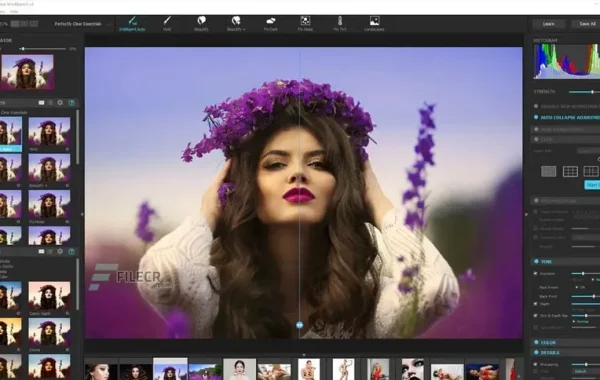
Perfectly Clear WorkBench is a standalone photo editing application that focuses on automatic image correction and enhancement. It is built on EyeQ Imaging’s patented AI-driven technology, which analyzes photos the same way the human eye does. Instead of relying on generic presets, the software applies intelligent adjustments based on lighting, color, contrast, and facial recognition.
At its core, Perfectly Clear WorkBench is designed to remove the complexity from photo editing. You don’t need to be an expert in curves, layers, or masks to achieve professional-quality results. With just a few clicks, images can be corrected for exposure, clarity, sharpness, skin tone, and color balance.
What sets Perfectly Clear WorkBench apart is its balance between automation and control. While it excels at one-click enhancements, it also allows users to fine-tune results manually. This makes it suitable for both beginners who want quick improvements and professionals who demand precision.
Key Features:
- AI-Powered Automatic Corrections: The software uses artificial intelligence to analyze each photo individually. It identifies issues such as poor lighting, dull colors, or uneven skin tones and applies corrections automatically. This intelligent approach ensures that each image receives customized enhancements rather than one-size-fits-all adjustments.
- Advanced Face Detection and Portrait Enhancement: One of the standout features of Perfectly Clear WorkBench is its facial recognition technology. The software detects faces in images and applies targeted enhancements such as
- Batch Processing for High Productivity: Perfectly Clear WorkBench allows users to process hundreds or even thousands of images at once. This batch processing feature is especially valuable for photographers, studios, and e-commerce businesses that need consistent results across large image sets.
- Presets and Custom Profiles: The software includes a wide range of built-in presets designed for different photography styles and conditions. Users can also create and save custom presets, ensuring consistent branding and visual style across projects.
- High-Quality Image Output: Perfectly Clear WorkBench supports high-resolution image processing without compromising quality. Whether you’re working with RAW files or high-resolution JPEGs, the software preserves detail while enhancing clarity and sharpness.
System Requirements for macOS:
- Operating System: macOS 10.14 (Mojave) or later
- Processor: Intel-based Mac
- RAM: 8 GB
- Hard Disk Space: 2 GB of available storage
- Display Resolution: 1280 × 800
- Graphics: Integrated GPU with Metal support
How to Install:
- Download the macOS Version: Go to the official website and download the macOS installer for Perfectly Clear WorkBench.
- Open the DMG File: After downloading, open the file from your Downloads folder.
- Install the Application: Drag the Perfectly Clear WorkBench icon into the Applications folder as instructed.
- Grant Permissions: If macOS security prompts appear, allow the app to run from System Settings > Privacy & Security.
- Launch the Software: Open Perfectly Clear WorkBench from the Applications folder.
- Activate the License: Sign in or enter your license key to activate the software.
Learn more about Shadow Defender Final’s features in our guide.

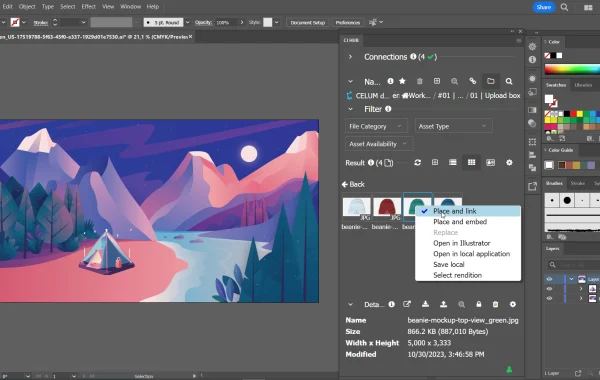
Adobe Illustrator is a professional vector graphics design software developed by Adobe Inc. Unlike basic drawing apps or photo editors, Illustrator is built specifically for creating scalable artwork. That means anything you design—logos, icons, illustrations, typography, infographics—can be resized infinitely without losing quality. Sounds magical, right? That’s the power of vector graphics.
At its core, Illustrator uses mathematical paths instead of pixels. Every line, curve, and shape is defined by points and equations. So when you zoom in, nothing gets blurry. When you scale up, nothing breaks. This makes Illustrator the go-to choice for brand identities, logos, packaging designs, and anything that needs to look flawless everywhere.
Key Features:
- Vector-Based Drawing Engine: At the heart of Adobe Illustrator is its powerful vector-based drawing system. Unlike raster-based software that relies on pixels, Illustrator uses mathematical paths to create artwork. This means designs can be scaled infinitely without losing quality. Whether you’re creating a tiny app icon or a massive billboard, the artwork stays sharp and clean. This feature alone makes Illustrator indispensable for logos, branding, and illustrations that must adapt to different sizes and formats.
- Pen Tool for Precision Control: The Pen Tool is one of Illustrator’s most iconic and powerful features. It allows designers to draw custom paths with extreme precision using anchor points and Bézier curves. While it has a learning curve, mastering the Pen Tool unlocks full creative control. From smooth curves to complex shapes, it enables designers to create artwork that simply isn’t possible with freehand drawing tools.
- Advanced Shape and Drawing Tools: Illustrator offers a wide range of shape tools such as rectangles, ellipses, polygons, and stars. These basic shapes can be combined, subtracted, or merged using tools like the Pathfinder and Shape Builder. This makes constructing complex designs fast and intuitive. Instead of drawing everything from scratch, designers can build sophisticated graphics by intelligently combining simple elements.
- Typography and Text Management: Typography in Adobe Illustrator goes far beyond basic text placement. The software provides precise control over kerning, leading, tracking, and alignment. It supports OpenType features, variable fonts, ligatures, and glyphs, allowing designers to treat text as a visual design element rather than just readable content. Text can also be converted into outlines, enabling custom manipulation for logos and artistic typography.
- Color Management and Gradients: Illustrator offers professional-grade color control, including RGB, CMYK, Pantone, and global color swatches. Designers can create smooth gradients, complex color blends, and even gradient meshes for realistic shading. Global colors make it easy to update brand colors across an entire project with a single change, ensuring consistency and saving time.
- Multiple Artboards in a Single Document: One of Illustrator’s most practical features is the ability to use multiple artboards within a single file. Designers can create variations of a logo, multiple screen sizes for UI designs, or entire branding systems in one document. This streamlines workflows and keeps related assets organized and accessible.
- Layers and Non-Destructive Editing: Illustrator’s layer system allows designers to organize artwork logically, lock elements, hide sections, and work non-destructively. This is especially useful for complex illustrations and multi-component designs. Layers make collaboration easier and reduce the risk of accidental changes.
- Wide File Format Support: Adobe Illustrator supports a broad range of file formats, including AI, EPS, PDF, SVG, PNG, and JPEG. This makes it easy to export designs for print, web, mobile apps, or further editing in other Adobe tools. SVG support is particularly important for modern web and UI design.
System Requirements (macOS):
- Operating System: macOS 12 (Monterey) or later
- Processor: Multicore Intel processor or Apple Silicon (M1, M2, and later supported)
- RAM: 8 GB minimum (16 GB or more recommended)
- Hard Disk Space: 2 GB of available disk space (additional space required during installation)
- Display Resolution: 1024 × 768 display (Retina display recommended)
- GPU: GPU acceleration supported on compatible systems
How to install:
- Ensure your operating system is up to date
- Disable antivirus software temporarily if needed
- Restart your system and try again
- Use Adobe’s official troubleshooting tools from their support site
Learn more about Shadow Defender Final’s features in our guide.