Learn about the LU A6 Windows Bypass Tool, the newest addition to our vast arsenal of bypass tools. For individuals who are annoyed by lost Apple IDs or passcodes that prevent access to their devices, this potent tool enables you to get beyond the activation lock on iPhone and iPad devices.

Uncomplicated Activation Lock Bypass for iPhone and iPad:
You can now get past the activation barrier on a number of iOS devices, including various iPhone and iPad models, with the LU A6 Windows iCloud Bypass Tool. A lost password will no longer cause you to be locked out of your device, causing annoyance.
Windows’ streamlined iCloud bypass:
This bypass utility was created exclusively for Windows operating systems, ensuring compatibility and a positive user experience. You may recover access to your iPhone or iPad by using the LU A6 Windows iCloud Bypass Tool without engaging in difficult technological processes or requiring a great deal of expertise.
Get the Most Out of Your iOS Device:
With the help of the LU A6 Windows iCloud Bypass Tool, you may use your iOS device to its fullest extent without being constrained by activation lock restrictions. Thus, Appreciate how easy it is to access your files, apps, and other functions.
Key Features:
- Accessible even if the Apple ID or passcode is lost thanks to the tool’s ability to get beyond the iCloud activation lock on iPhone and iPad devices.
- Windows Compatibility: The LU A6 Windows iCloud Bypass Tool is particularly for Windows operating systems, assuring flawless compatibility
- Streamlined Bypass Process: With the help of this tool, users may go around the activation lock quickly and easily without needing to know a lot of technical jargon or to go through arduous training.
- Users with different technological backgrounds participate. the procedure is simple.
- Using it Thus, users unlock their iPhones and iPads to unleash their full potential. Obtain access to features, applications, and files that are restrict.

System Requirements:
- Windows (compatible with Windows 7, 8, or 10 versions) is the operating system.
- Intel Core i3 or above is the recommended processor.
- Memory: 4 GB or more.
- Storage Space: Thus, Before download and install iCloud Bypass Tool, make sure you have enough free disc space.
How to Install:
- Get the instrument here: Download and install file from a reputable website or the official source.
- Make sure you download it from an unbiased, reputable source.
- Find the setup file: After the download finish, go to the directory. Where the setup file is located on your computer.
- If you didn’t specify another location, this is often the “Downloads” folder.
- To give the required rights when requested by User Account Control (UAC), click “Yes”.
- adhere to the installation wizard: Through the installation procedure, the installation wizard will direct you.
- Thus, Pick the preferred installation choices, such as reading and accepting the licence agreement if necessary.
Password: technicalworld.co
Mirror Link!
]]>Discover the CM2SP2 Diag Helper Tool download, a strong and cost-free utility made to help with fixing and resetting devices that use SPD (Spreadtrum) chipsets. The difficulties users may encounter may be effectively resolved with the help of this tool, which is particularly helpful in diagnosing and troubleshooting devices encountering problems in DIAG/SVC modes.

Enhanced Security with Simple Reset and Data Erasure:
To reset codes or remove user data for increased security, utilize the Diag Helper program program, which is part of CM2SP2. It is quick and easy to use. Due to this, sensitive data saved on the device is protected and kept private.
A Free Solution with No Dongle Needed:
The additional benefit of not requiring a dongle for use comes with the CM2SP2 download, which differs from many other utilities of a similar nature. The features of the program can therefore be utilized by users.
Key Features:
- Downloading CM2SP2 for free gives users access to all of its robust features and functionalities.
- Diag Helper Tool: The Diag Helper Tool v1.07 is bundled with CM2SP2 and helps users resolve and reset issues with devices using SPD (Spreadtrum) chipsets.
- In DIAG/SVC modes, double-clicking in particular, aids in problem diagnosis and resolution.
- Data Erasure and Reset Codes: The Diag Helper Tool gives users the ability to reset codes and remove user data, boosting device security and privacy.
- Sensitive data is safeguarded by this feature, which assures.
- Solution Without a Dongle: CM2SP2 doesn’t require a dongle to use, in contrast to other utilities of a similar kind.
- A cost-effective option, the tool’s functionality may be accessed and used by users without the need for extra gear.
- CM2SP2 is especially compatible with SPD Chipset Support.

System Requirements:
- Operating system Windows 7, 8, and 10 operating systems, as well as CM2SP2, are normally compatible with the Diag Helper Tool.
- For slick performance, an Intel Core i3 processor or above is recommended.
- For optimum performance, RAM should be 4 GB or above.
- Storage Make sure you have enough free disc space to download and install CM2SP2 and any necessary files.
- When connecting a device to a computer for diagnostic and troubleshooting purposes, a USB port must be present.
How to Install:
- Get the application Download the CM2SP2 setup file from the official website or another reputable source.
- Make sure you download it from an unbiased, reputable source.
- Find the setup file After the download is finished, go to the directory where the setup file is located on your computer.
- If you didn’t specify another location, this is often the “Downloads” folder.
- Execute the installer The installer may be launched by double clicking the setup file (which ends in.exe).
- To give the required rights when requested by User Account Control (UAC), click “Yes”.
- adhere to the installation wizard Through the installation procedure, the installation wizard will direct you.
- Pick the installation choices you want, such as the installation location, and read and accept the license agreement if one is shown.
Password: technical world.co
Mirror Link!
]]>The Infinix Hot 12 Play FRP File is here to assist you if you’re seeking for a quick and simple way to get around the FRP (Factory Reset Protection) Google Account verification lock on your Infinix Hot 12 Play handset. You can quickly unlock Google verification with the SPD Research Download tool.

Download the FRP file for the Infinix Hot 12:
Download the Infinix Hot 12 Play X6816C (SPD Pac) FRP File from a reliable website. Make sure the file you download is compatible with the model of your particular device. After the download is finished, use a file extractor to open the FRP file and view its contents as WinRAR or 7-Zip, which are extraction programs.
SPD Research Download Tool will be launched:
Locate the executable file on your computer, then launch the SPD Research Download utility. Run the application as an administrator to guarantee correct operation. Install the SPD Research Download Tool on your computer by downloading and installing it. To get the best performance out of the tool, make sure you have the most recent version.
Key Features:
- Google Account verification lock may be removed with only one click using the FRP Bypass method.
- Tool for downloading SPD Research Specifically created for use with the SPD Research Download tool.
- Easy and Quick Fix Recover access to your device quickly and without a lot of hassle.
- reputable source From a trustworthy and respected source, obtain the FRP File.
- Instructions in plain English For a successful FRP bypass technique, simple to follow guidelines.
- No additional costs are necessary, making this a free solution that is also economical.
- Solution That Is Quick and Simple Quickly recover access to your device without the need for protracted procedures.
- The Infinix Hot 12 Play X6816C is compatible with specific to the Infinix Hot 12 Play X6816C model.

System Requirements:
- For the FRP File to work, you must have an X6816C handset, therefore make sure you have that model.
- Computer The following specs are required for your device:
- Windows is a supported operating system for the SPD Research Download tool.
- AMD or Intel processors are available.
- RAM 2GB or more is the minimum.
- Storage Enough free space to install and store the SPD Research Download utility.
- Preparing an appropriate USB cord will allow you to connect your Infinix Hot 12 Play smartphone to your PC and perform the FRP bypass.
How to Install:
- The necessary files to download are the Infinix Hot 12 Play X6816C (SPD Pac) FRP File from a reputable supplier.
- Extraction of the FRP File Contents To extract the contents of the downloaded FRP File, use a file extraction program like WinRAR or 7-Zip.
- You’ll get the files you need for the bypass procedure as a result of this.
- The FRP file loads To do this, use the “Load Packet” or a similar option in the SPD Research Download tool, and then choose the FRP file you extracted earlier.
Password: technical world.co
Mirror Link!
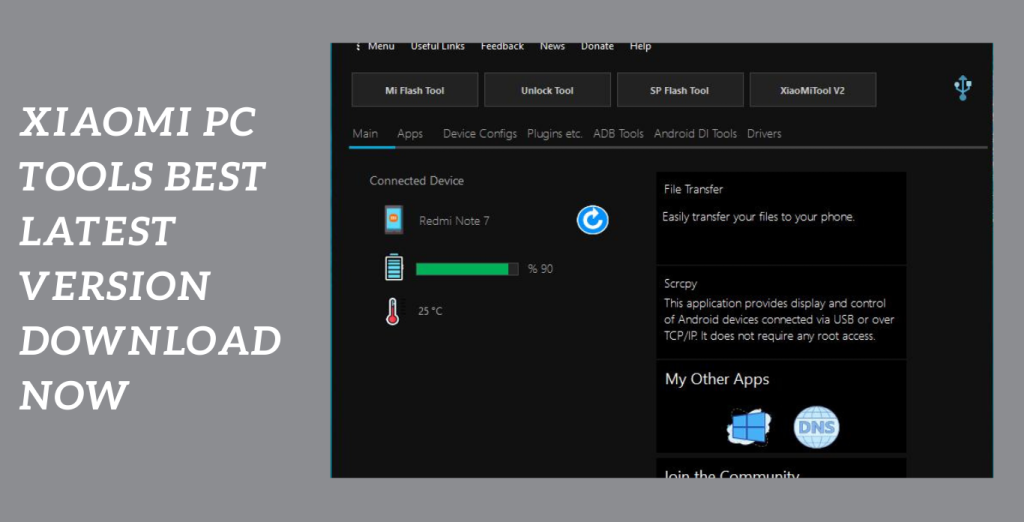
]]>A complete solution for simply controlling your Xiaomi and Redmi smart devices is provided by Xiaomi PC Tools. You may backup and restore contacts, music, movies, images, and other important items saved on your device’s storage with its most recent version. Tasks are made easier by this official English program, which also offers a smooth user interface. In this post, we’ll examine Mi PC Suite’s main features and how they make seamless file transfers.
File Transfer, Backup, and recovery:
Mi PC Suite enables you to transfer, backup, and recover crucial files from your smartphone. No matter what type of data you have—photos, music, videos, or contacts—you can make sure it is securely saved and easily retrievable. Additionally, the program can allow for efficient file transfers between your PC and mobile device.
Screencasting and screenshots:
They are both possible with Mi PC Suite when using a smartphone or tablet. With the help of this function, you may view your device’s interface on a larger display in a larger and more useful manner. Additionally, you may easily capture significant details or moments by taking screenshots of each window.
Internet Sharing:
Mi PC Suite offers options for sharing your computer’s internet connection with other devices. With this capability, you easily access the internet on your Xiaomi or Redmi smart smartphone without having to root it.
Key Features:
- Internet sharing: Without the necessity for rooting, you may connect your Xiaomi or Redmi device to the internet through your PC. Using the internet connection on your PC.
- Device administration: Mi PC Suite provides a user-friendly interface made especially for Xiaomi and Redmi device administration. The Mi PC Suite UI makes it simple to update the system software and firmware on your device.
- Mi PC Suite gives efficient file transfer between your PC and smart device first priority. You may transfer files to and from your device quickly and effortlessly with a smooth and simplified approach.
- Internet sharing: Without the necessity for rooting, you may connect your Xiaomi or Redmi device to the internet through your PC.
- Device administration: Mi PC Suite provides a user-friendly interface made especially for Xiaomi and Redmi device administration. The Mi PC Suite UI makes it simple to update the system software and firmware on your device.
- Mi PC Suite gives efficient file transfer between your PC and smart device priority. You may transfer files to and from your device quickly and effortlessly with a smooth and simplified approach.
System Requirements:
- Operating System: 32-bit or 64-bit versions of Windows 7, 8, 8.1, or 10.
- Processor: Intel Pentium 4 or more (or similar).
- RAM: For optimum performance, you should have a minimum of 2 GB (4 GB is suggested).
- Storage: The installation of the application requires at least 500 MB of free disc space.
- Display: A screen resolution of at least 1024×768 pixels is advised.
- USB Port: A working USB port is required to connect your Xiaomi or Redmi handset to a computer.
- Internet connection: Downloading the program and getting updates both require a live internet connection.
How to Install:
- The installation package for your Windows operating system may be downloaded by going to the official Mi PC Suite website or another reliable source.
- To launch the installer, find the downloaded installation package file and double-click it.
- Click the “OK” or “Next” button after selecting the required language (for instance, English) from the list of alternatives.
- Carefully read the license agreement. Select the tick confirming your agreement with the conditions.
- acceptance. To continue, click the “Next” or “Install” button.
- By choosing the “Browse” option, you can choose a different folder or maintain the default position. Once you’ve decided, press “Next” or “Install” to continue.
- The installation procedure will now start with the installer. It can take a short while to finish.
Password: technical world.co
Mirror Link!
]]>Android Novo Tools intends to help customers unlock Samsung mobile devices’ Factory Reset Protection (FRP) protections. Users who want to go around FRP and unlock their locked devices must have it.

Get Android Novo Tools for FRP Removal:
To find reliable places where you may get the most recent version of Android Novo Tools for FRP removal, try searching for terms like “Android Novo Tools FRP latest version download.” This will enable you to locate trustworthy search results that provide access to the most recent tool version.
Compatibility with Samsung Devices:
Samsung mobile devices can be used with several Android Novo Tools features thanks to this compatibility. Samsung smartphones running Android version 5. x.x to 12. x.x are supported for FRP unlocking. Users may remove FRP with the help of this comprehensive range, which includes a sizable number of Samsung devices.
Key Features:
- Factory Reset Protection (FRP) Lock Removal For removing FRP locks on Samsung mobile devices, turn to Android Novo Tools. With the use of this function, users may unlock their locked devices by getting around the FRP lock.
- This broad compatibility guarantees that FRP removal will work with a sizable proportion of Samsung devices.
- Easy-to-utilise Interface Android Novo Tools is a user-friendly interface that both inexperienced and seasoned users may utilize. Users may remove FRP with the help of the step-by-step instructions and straightforward design.
- Because of their adaptability, users can handle a variety of FRP-related difficulties.
- Savings in Time and Effort By using Android Novo Tools, users may significantly save the time and effort they would otherwise spend looking up complicated solutions or getting in touch with customer support.
- By streamlining the FRP removal procedure, the gadget offers a prompt and effective resolution.

System Requirements:
- Windows (ideally Windows 10, Windows 8.1, Windows 8, or Windows 7) as the operating system.
- Intel Core i3 or newer processor.
- 4GB or more of RAM.
- Storage A minimum of 10GB of unoccupied disc space.
- USB 2.0 or USB 3.0 port.
- Internet connection required for getting the required tool updates and firmware packages.
How to Install:
- To obtain the Android Novo Tools setup file, look for a reliable source. Make sure you are downloading the most recent version that is compatible with both your Windows computer and your Samsung mobile.
- Using a file extraction program like WinRAR or 7-Zip, find the downloaded file when the download is complete and extract its contents to a folder on your computer.
- Search for the installation setup file (often with a.exe extension) in the extracted folder by opening it.
- The installation wizard will walk you through the installation procedure; just follow the on-screen instructions. To continue with the installation, according to the on-screen directions by accepting the license agreement and selecting the installation directory.
- Thus To connect your Samsung mobile device to your computer, use a suitable USB cable.
- Open the app: Find the icon in the Start menu or on your desktop. To start the tool, double-click the icon.
- To begin the FRP removal procedure on your Samsung smartphone, run the tool and then adhere to the instructions provided. Depending on the capabilities and interface of the programme, the precise procedures may change.
Password: technical world. co
]]>The ultimate Rockchip tool, RKDev Tool v2.84, provides unrivalled efficiency and flexibility in handling Rockchip devices. This robust programunrivaled is a must-have for everyone using a Rockchip device because it is made to make software administration jobs simpler. RKDev Tool provides users with the tools they need to undertake a variety of software-related tasks with ease thanks to its extensive feature set. Let’s examine the main characteristics and how they may help you.
Preferred method:
The preferred method for Rockchip device administration is RKDev Tool v2.84. Its comprehensive features, approachable user interface, and effective operations enable users to execute software-related activities with ease. As you maintain and optimize your Rockchip device, take advantage of the RKDev Tool’s simplicity and versatility.
Exercise caution and follow proper guidelines:
RKDev Tool is a reliable and efficient tool, It’s essential to exercise caution and follow proper guidelines when performing any software modifications or operations on your Rockchip device. Always back up your data and ensure you have a clear understanding of the process before proceeding.
Key Features:
- Rockchip devices may simply have their firmware flashed using the RKDev Tool.
- This utility offers a smooth and dependable flashing operation, regardless of whether you need to upgrade to the newest firmware version or return your device to its initial configuration.
- The tool has a built-in device detection capability that allows it to automatically recognize connected Rockchip devices.
- This saves you time and effort by eliminating the necessity for manual device selection.
- RKDev Tool’s batch operations feature enables you to carry out tasks concurrently on several Rockchip devices.
- Professionals or people managing several devices would find this functionality very helpful as it simplifies the management process.
- You may quickly upgrade or downgrade the Rockchip’s firmware using the RKDev Tool.

System Requirements:
- Operating System: Windows operating systems, including Windows 7, Windows 8, and Windows 10, are compatible with the RKDev Tool. Make sure that one of these supported versions is installed on your computer.
- CPU: Your computer should have a suitable CPU with a minimum speed of 1 GHz or greater, such as an Intel or AMD model.
- RAM: For optimal performance while using the RKDev Tool, at least 2 GB of RAM is advised. However, having more RAM could improve the speed of the tool as a whole.
- Storage Space: Ensure that there is enough free space on your computer to fit the installation of RKDev Tool v2.84 and any necessary files. Depending on the individual version and any other components, a different amount of space can be needed.
How to Install:
- To download the RKDev Tool v2.84 installation package to your computer, go to a reliable source or the official website.
- After the download is complete, go to the directory or place on your computer where the installation package was saved.
- Using a file extraction program like WinRAR or 7-Zip, extract the installation package’s contents to the appropriate location on your computer, if it is compressed (for example, ZIP).
- Launching the Installer To begin the installation procedure, double-click on the extracted installation package file. Your operating system might ask you to confirm your action.
- Take the Installation Wizard’s advice: You will be led through the installation procedure by the installation wizard.
- Read and, if asked, agree technical world the terms and conditions. Additionally, you can see select a place for the RKDev Tool v2.84 installation.
- Launching the Installation: To start the installation process, click the “Install” or “Next” button. Your computer will now begin installing RKDev Tool v2.84.
Password: technical world. co
Mirror Link!
]]>The most recent version of this potent tool, BMB Tool Pro V7.0, is now freely downloadable. This adaptable programme, which was created for Windows PCs, offers a variety of features to help customers solve different Android software problems. Users may circumvent authentication, FRP (Factory Reset Protection), bootloaders, flashing Qualcomm devices into EDL (Emergency Download) mode, and many more features with only one click.

Unleash the full power:
Utilise BMB Tool Pro V7.0 to unleash the full power of your Android device. Take control of your device’s performance and wave goodbye to software-related irritations. By using this effective tool, you can easily bypass FRP, unlock bootloaders, flash Qualcomm devices, and more with only one click.
Use Properly:
Be aware that even though BMB Tool Pro V7.0 is a useful tool for fixing Android software, it is still important to use it properly and abide by all applicable rules and laws regulating device alterations.
Key Features:
- BMB Tool Pro V7.0 comes with a tonne of capabilities, making it a useful tool for fixing Android applications.
- This utility offers a comprehensive answer to a range of software-related issues, from avoiding FRP to unlocking bootloaders and carrying out Qualcomm device flashes into EDL mode.
- BMB Tool Pro V7.0 is compatible with MTK (MediaTek) and Qualcomm mobile devices.
- This utility ensures broad compatibility with a variety of Android devices, regardless of whether you possess a Qualcomm-powered smartphone or an MTK-based handset.
- One-Click Fixes: BMB Tool Pro V7.0’s user-friendly interface streamlines the software repair procedure.
- With only one click, users may fix several software problems with Android, including bootloader unlocking and FRP bypass. The troubleshooting procedure is streamlined as a result.

System Requirements:
- Operating System: Windows operating systems, including Windows 7, Windows 8, and Windows 10, are compatible with BMB Tool Pro V7.0. Make sure that one of these supported versions is installed on your computer.
- CPU: Your computer should have a suitable CPU with a minimum speed of 1 GHz or greater, such as an Intel or AMD model.
- RAM: For optimum performance while using it, at least 2 GB of RAM is advised. However, having more RAM could improve the speed of the tool as a whole.
- Storage Space: Check to see if your computer has enough free space for installing BMB Tool Pro V7.0. It’s a good idea to set aside a respectable amount of room because the tool’s size may vary.
How to Install:
- The installation package for it may be downloaded by going to a reliable source or the official website.
- After the download is complete, go to the directory or place on your computer where the installation package save.
- Launching the Installer To begin the installation procedure, double-click on the extracted installation package file. Your operating system might ask you to confirm your action.
- Take the Installation Wizard’s advice: You will be led through the installation procedure by the installation wizard.
- Launching the Installation: To start the installation process, click the “Install” or “Next” button. Your computer will now begin installing .
- Finished with the installation: Hold off until the installation is complete. It could take a little while.
- Launch it: After installation, you may open from the Start menu, programmes folder, or by finding its shortcut on your desktop.
Password: technicalworld.co
Mirror Link!
]]>