
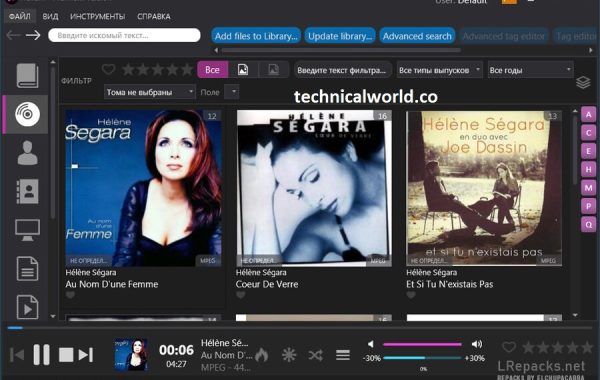
Helium Music Manager is a music management software designed to help users organize, catalog, and play their music collections efficiently. It offers features like tag editing, audio playback, playlist creation, and support for a wide range of audio formats. It can also fetch album art, lyrics, and other metadata to enhance your music library.
Key Features:
- Music Library Management: Organize and manage large music collections with ease, supporting various audio formats.
- Tag Editing: Edit tags such as artist, album, genre, year, and more to keep your library well-organized.
- Audio Playback: Built-in audio player supports playback with customizable playlists and crossfading.
- Automatic Tagging: Retrieve missing metadata, album art, and lyrics automatically from online databases.
- Playlist Creation: Create and manage playlists with drag-and-drop functionality and smart playlist support.
- Music Discovery: Explore music by artist, genre, or mood using powerful search and filtering tools.
- Duplicate Finder: Identify and manage duplicate tracks in your collection to save space.
- Audio Format Conversion: Convert audio files between different formats like MP3, FLAC, WAV, and more.
System Requirements:
- Operating System: Windows 11, 10, 8.1, 8, 7 (both 32-bit and 64-bit supported)
- Processor: Minimum: 1 GHz or faster processor
- RAM: Minimum: 512 MB (1 GB or more recommended for large libraries)
- Hard Disk Space: At least 100 MB free space for installation
How to Install:
- Download the Installer: Go to the official Helium Music Manager website or a trusted source. Download the latest version of the Helium Music Manager setup file.
- Run the Installer: Locate the downloaded setup file (usually in your Downloads folder). Double-click the file to launch the installation wizard.
- Start Installation: When the installer opens, click “Next” to continue.
- Accept License Agreement: Read the license terms. Select “I accept the agreement” and click “Next.”
- Choose Installation Location: Select the folder where you want to install Helium Music Manager. You can use the default folder or click “Browse” to choose another location.
Learn more about Shadow Defender Final’s features in our guide.
]]>
Drive SnapShot is a lightweight disk imaging and backup software for Windows. It allows you to create exact disk image backups of your system, including the operating system, installed programs, data, and system settings. The standout feature is that it can create backups while Windows is running, without needing to reboot or interrupt your work.
Key Features:
- Live Backup: Creates disk images while Windows is running, without closing applications.
- Complete Backup: Captures the full system including OS, programs, and files.
- Small and Portable: The program is tiny in size (about 1 MB) and doesn’t require installation.
- Fast Recovery: Restore your entire system or just selected files from the disk image.
- Compatibility: Supports FAT16, FAT32, NTFS, and all Windows file systems.
- Virtual Drive Mounting: Disk images can be mounted as virtual drives, allowing you to browse and recover individual files.
- Command Line Support: Useful for automation and advanced users.
System Requirements:
- Operating System: Windows 11, 10, 8, 7, Vista, XP, Windows Server versions
- RAM: 1 GB minimum (2 GB or more recommended)
- Hard Disk Space: Enough free space to store backup images
- Processor: Intel/AMD 1 GHz or higher
How to Use Drive SnapShot:
- Download the program from the official website.
- Run the executable file (no installation needed).
- Choose Backup: Select the disk/partition you want to back up.
- Save Image: Choose the location to store the backup file.
- Restore: In case of system failure, boot into Windows PE or use another working system to restore the backup.
Conclusion:
Drive SnapShot is an efficient and powerful disk imaging tool ideal for both personal and professional use. Its ability to create live backups without interrupting system operation makes it a great solution for IT professionals, businesses, and home users who want reliable data protection.
Learn more about Shadow Defender Final’s features in our guide.
]]>
StableBit CloudDrive is a virtual drive software that lets you create secure, encrypted drives on your PC and store the data either locally or in the cloud. It acts like a real hard drive on Windows but uses cloud storage services (like Google Drive, OneDrive, Dropbox, Amazon S3, etc.) or local storage as the backend.
- Expand your storage without buying new physical drives.
- Encrypt and protect sensitive files.
- Use cloud storage as if it were a real hard drive.
- Stream files directly from the cloud without fully downloading them.
Key Features:
- Cloud Integration – Supports Google Drive, OneDrive, Dropbox, Amazon S3, Microsoft Azure, and more.
- Full Drive Encryption – Uses military-grade AES-256 encryption for maximum security.
- Local Disk Emulation – Appears as a normal hard drive in Windows Explorer.
- Streaming Technology – Access files instantly without downloading the whole file.
- Intelligent Caching – Keeps frequently accessed files on your local drive for speed.
- Offline Access – Cached files remain available even without internet.
- Expandable Storage – Add more space as your cloud account grows.
- Background Uploads – Files upload silently while you work.
System Requirements:
- Operating System: Windows 11, 10, 8.1, 8, 7 (64-bit only)
- RAM: 2 GB minimum (4 GB recommended for caching)
- Disk Space: At least 200 MB for installation (plus space for caching)
- Processor: Dual-core processor or better
- Internet: Stable connection for cloud drives
How to Install StableBit CloudDrive:
- Download StableBit CloudDrive from the official website.
- Run the Installer.
- Follow the Setup Wizard – Accept the license, choose an install location, and click Next.
- Finish & Launch – The software will appear in your taskbar and Windows Explorer.
- Activate – Enter your license key (trial version available for 30 days).
Learn more about Shadow Defender Final’s features in our guide.
]]>
Mirror Data Backup is a backup method or software approach that creates an exact, real-time copy (or mirror) of your data from one storage location to another. This ensures that all files and folders are continuously synchronized, providing a duplicate that reflects any changes made to the original data immediately or at scheduled intervals.
Key Aspects of Mirror Data Backup:
- Real-Time Synchronization: Changes made to files in the source location are automatically replicated to the backup location.
- Exact Copy: The backup is a one-to-one copy of the source data, preserving file structure, names, and content.
- Data Protection: Helps protect against data loss due to hardware failure, accidental deletion, or corruption.
- Easy Access: Since the backup is a mirror, files can be accessed directly from the backup location without needing restoration.
- Common Use Cases: Ideal for critical business data, system drives, or environments requiring minimal downtime.
System Requirements:
- Operating System: Windows (Windows 11, 10, 8, 7), macOS, or Linux depending on the software
- Processor: At least a 1 GHz processor or better; modern multi-core processors recommended for faster processing
- RAM: Minimum 1 GB RAM; 2 GB or more recommended for better performance during large backups
- Storage: Sufficient free disk space for both source and backup locations; ideally, backup storage should be equal to or larger than the data being mirrored
- Network: For network or cloud-based mirror backups, a stable and reasonably fast network connection is required
- Additional: Administrator privileges for installation and operation. For cloud backups, internet access and appropriate bandwidth. Support for external drives or NAS devices if backing up to such locations
How to install:
- Download the Installer: Visit the official website of the mirror backup software you want to use. Download the appropriate installer file (usually a .exe) for your operating system.
- Run the Installer: Locate the downloaded file (commonly in your Downloads folder). Double-click the installer file to start the installation wizard.
- Allow Installation: If prompted by User Account Control (UAC), click “Yes” to allow the installer to make system changes.
- Accept License Agreement: Read the license terms carefully. Accept the agreement and click “Next” or “Accept” to proceed.
- Choose Installation Location: The installer will suggest a default folder. You can accept it or browse to select a different folder. Click “Next.”
- Select Installation Options: Choose any additional options such as creating desktop shortcuts or enabling automatic updates. Click “Next.”
- Begin Installation: Click “Install” to start copying files and installing the software.
- Complete Installation: Wait for the process to finish. Click “Finish” to exit the installer.
Learn more about Shadow Defender Final’s features in our guide.

Ashampoo Backup Pro is a professional and user-friendly backup software designed to help individuals and businesses securely back up their important data. It offers robust features to protect files, folders, partitions, or entire drives against data loss due to system crashes, hardware failures, malware, or accidental deletion.
Key aspects of Ashampoo Backup Pro include:
- Comprehensive Backup Options: Users can back up specific files, folders, or complete system partitions and drives. It supports both full and incremental backups, saving time and storage space.
- Automated Scheduling: Backups can be scheduled to run automatically at convenient times, ensuring data protection without manual intervention.
- Advanced Compression and Encryption: The software compresses backup files to save disk space and uses strong encryption to keep data secure.
- Recovery Tools: It offers easy restoration options, including the ability to create bootable rescue media to recover systems that won’t start.
- User-Friendly Interface: Designed for both beginners and advanced users, the interface guides users through backup creation and recovery processes with ease.
- Cloud and External Storage Support: Supports backing up data to various destinations, including external drives, network drives, and cloud storage services.
Key Features of Ashampoo Backup Pro:
- Full and Incremental Backups: Efficiently back up entire drives, partitions, or specific files and folders with options for full or incremental backups to save time and storage.
- Automatic Backup Scheduling: Set up automatic backups on a daily, weekly, or monthly basis to ensure your data is always protected without manual effort.
- Strong Encryption: Protect your backup data with AES-256 encryption for enhanced security and privacy.
- Compression: Compress backup files to reduce storage space without compromising data integrity.
- Backup to Multiple Destinations: Save backups to local drives, external hard drives, network locations, or cloud storage services.
- Bootable Rescue Media: Create bootable USB or CD/DVD rescue media to restore your system even if Windows fails to start.
- Easy Recovery: Restore individual files, folders, or entire systems quickly and easily with a straightforward recovery interface.
- Support for Multiple File Systems: Compatible with NTFS, FAT32, and other common file systems.
- User-Friendly Interface: Intuitive design suitable for both beginners and advanced users with step-by-step guidance.
- Integrity Checks: Verify backup integrity to ensure data can be reliably restored.
System Requirements for Ashampoo Backup Pro:
- Operating System: Windows 11, Windows 10, Windows 8, Windows 7 (both 32-bit and 64-bit versions supported)
- Processor: 1 GHz or faster processor
- RAM: Minimum 1 GB RAM (2 GB or more recommended for better performance)
- Hard Disk Space: At least 250 MB of free disk space for installation (additional space required for backups)
- Display: 1024 x 768 screen resolution or higher
How to install:
- Download the Installer: Visit the official Ashampoo website or a trusted source to download the Ashampoo Backup Pro installation file (usually a .exe file).
- Run the Installer: Locate the downloaded file (commonly in your Downloads folder). Double-click the installer file to launch the setup wizard.
- Allow Installation: If prompted by User Account Control (UAC), click “Yes” to allow the installer to make changes to your computer.
- Select Language: Choose your preferred language if the installer prompts you.
- Accept License Agreement: Read the license terms. Check the box to accept the terms and click “Next” or “Accept” to proceed.
- Choose Installation Location: The installer will suggest a default folder. You can accept the default or click “Browse” to select a different folder. Click “Next” to continue.
- Select Additional Options: You may be offered options such as creating a desktop shortcut or enabling automatic updates. Choose your preferences and click “Next.”
- Start Installation: Click “Install” to begin the installation process. Wait for the installer to copy files and complete the setup.
- Complete Installation: Once installation is finished, you may be prompted to launch Ashampoo Backup Pro immediately. Click “Finish” to exit the installer.
- Activate the Software: Open Ashampoo Backup Pro. Enter your activation key if you have one, or use the trial version if available.
Learn more about Shadow Defender Final’s features in our guide.