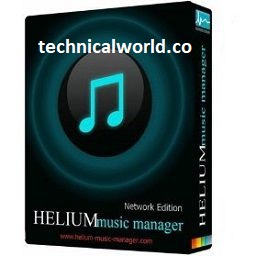
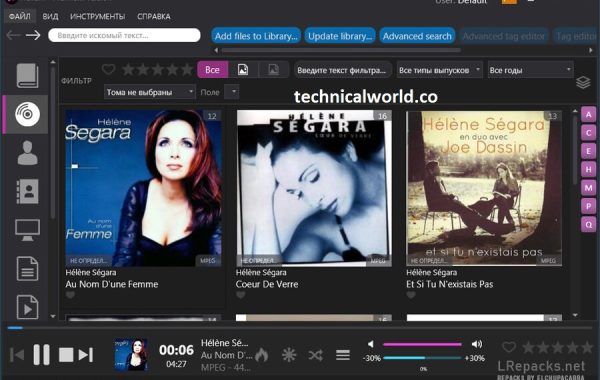
Helium Music Manager is a music management software designed to help users organize, catalog, and play their music collections efficiently. It offers features like tag editing, audio playback, playlist creation, and support for a wide range of audio formats. It can also fetch album art, lyrics, and other metadata to enhance your music library.
Key Features:
- Music Library Management: Organize and manage large music collections with ease, supporting various audio formats.
- Tag Editing: Edit tags such as artist, album, genre, year, and more to keep your library well-organized.
- Audio Playback: Built-in audio player supports playback with customizable playlists and crossfading.
- Automatic Tagging: Retrieve missing metadata, album art, and lyrics automatically from online databases.
- Playlist Creation: Create and manage playlists with drag-and-drop functionality and smart playlist support.
- Music Discovery: Explore music by artist, genre, or mood using powerful search and filtering tools.
- Duplicate Finder: Identify and manage duplicate tracks in your collection to save space.
- Audio Format Conversion: Convert audio files between different formats like MP3, FLAC, WAV, and more.
System Requirements:
- Operating System: Windows 11, 10, 8.1, 8, 7 (both 32-bit and 64-bit supported)
- Processor: Minimum: 1 GHz or faster processor
- RAM: Minimum: 512 MB (1 GB or more recommended for large libraries)
- Hard Disk Space: At least 100 MB free space for installation
How to Install:
- Download the Installer: Go to the official Helium Music Manager website or a trusted source. Download the latest version of the Helium Music Manager setup file.
- Run the Installer: Locate the downloaded setup file (usually in your Downloads folder). Double-click the file to launch the installation wizard.
- Start Installation: When the installer opens, click “Next” to continue.
- Accept License Agreement: Read the license terms. Select “I accept the agreement” and click “Next.”
- Choose Installation Location: Select the folder where you want to install Helium Music Manager. You can use the default folder or click “Browse” to choose another location.
Learn more about Shadow Defender Final’s features in our guide.
]]>
Synapse Audio is a music software company known for developing high-quality digital audio workstations (DAWs) and virtual instruments. Their products are designed for music production, sound design, and audio editing, catering to both professional musicians and hobbyists.
Key Features:
- Orion Studio: A powerful DAW featuring multi-track recording, sequencing, mixing, and advanced audio editing tools.
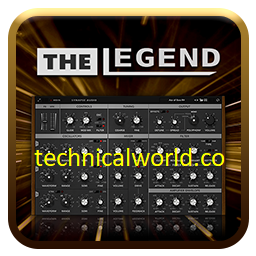
- The Legend: A virtual analog synthesizer emulating classic analog synth sounds with modern features.
- Obsession: A high-quality virtual analog synthesizer with rich sound design capabilities.
- DUNE Series: A range of advanced synthesizers known for their complex sound engines and versatility.
Discover more related articles in our technicalworld:
System Requirements:
- Operating System: macOS 10.12 (Sierra) or later
- Processor: Intel Core i5 or Apple Silicon (M1/M2)
- RAM: Minimum 4 GB (8 GB or more recommended)
- Storage: At least 500 MB free disk space
- Audio Hardware: Core Audio compatible device recommended
- Display: 1280 x 720 resolution or higher
- Additional: AU or VST compatible DAW required for plugin use
How to Install:
- Download the Installer: Visit the official Synapse Audio website or the platform where you purchased the software. Download the correct installer for your operating system (Windows .exe or macOS .dmg).
- Close Other Applications: Exit any running DAWs or audio software to prevent conflicts.
- Run the Installer: Locate the downloaded file in your Downloads folder. Double-click to launch the installer.
- Allow Installation: If prompted by User Account Control (Windows) or macOS security warnings, click “Yes” or “Allow.”
- Accept License Agreement: Read and accept the license terms. Click “Next” or “Continue.”
Learn more about Shadow Defender Final’s features in our guide.
]]>
Mp3tag is a popular and powerful metadata editor for audio files. It allows users to easily edit tags of audio formats such as MP3, FLAC, AAC, and many others. Mp3tag is widely used for organizing music libraries by editing song information like title, artist, album, genre, and cover art, either manually or through online databases.
Key Features:
- Batch Tag Editing: Edit tags for multiple files simultaneously.
- Support for Various Formats: Works with MP3, FLAC, AAC, M4A, OGG, WMA, WAV, and more.
- Online Database Integration: Fetch metadata from sources like Discogs, MusicBrainz, and Amazon.
- Custom Tag Fields: Add and edit custom metadata fields.
- Rename Files: Rename audio files based on tag information using flexible patterns.
- Export Data: Export tag information in different formats such as CSV, HTML, or XML.
- User-Friendly Interface: Intuitive and easy to navigate, suitable for beginners and advanced users.
Discover more related articles in our technicalworld:
System Requirements:
- Operating System: Windows 7, Windows 8, Windows 10, Windows 11 (32-bit and 64-bit supported)
- Processor: 1 GHz processor or faster
- RAM: Minimum 512 MB (1 GB or more recommended)
- Storage: Around 10 MB free disk space for installation
How to Install:
- Download the Installer: Visit the official Mp3tag. Click the download link to get the latest version of Mp3tag.
- Run the Installer: Locate the downloaded file (usually in your Downloads folder). Double-click the installer file to launch it.
- Allow Installation: If prompted by User Account Control (UAC), click “Yes” to allow the installer to make changes.
- Accept License Agreement: Read the license terms. Select “I accept the agreement” and click “Next.”
- Choose Installation Location: Use the default folder or browse to select a different directory. Click “Next.”
Learn more about Shadow Defender Final’s features in our guide.
]]>
n-Track Studio Suite is a comprehensive digital audio workstation (DAW) designed for music recording, editing, mixing, and production. It offers a wide range of tools and effects for musicians, producers, and audio engineers, allowing them to create professional-quality music on their computers or mobile devices.
Key Features of n-Track Studio Suite:
- Multi-Track Recording: Record multiple audio and MIDI tracks simultaneously.
- Audio Editing: Edit waveforms, apply effects, and use powerful editing tools.
- Virtual Instruments: Includes built-in instruments and supports third-party VST plugins.
- Mixing Console: Advanced mixer with automation, EQ, reverb, and other effects.
- MIDI Editing: Comprehensive MIDI editor for precise control over virtual instruments.
- Loop Library: Access to a variety of loops and samples for music creation.
- Cross-Platform: Available on Windows, macOS, iOS, and Android.
- Collaboration: Share projects and collaborate with other users online.
Discover more related articles in our technicalworld:
System Requirements:
- Operating System: macOS 10.12 (Sierra) or later
- Processor: Intel Core i3 or Apple Silicon (M1/M2)
- RAM: Minimum 4 GB (8 GB or more recommended)
- Storage: At least 500 MB free disk space for installation
- Audio Hardware: Core Audio compatible device recommended
- Display: 1280 x 800 resolution or higher
How to install:
- Download the Installer: Visit the official n-Track website or a trusted software distributor. Download the appropriate installer for your operating system (Windows .exe or macOS .dmg).
- Close Other Applications: Exit any running programs to avoid conflicts during installation.
- Run the Installer: Locate the downloaded installer file in your Downloads folder. Double-click the file to start the installation wizard.
- Allow Installation: If prompted by User Account Control (Windows) or macOS security prompts, click “Yes” or “Allow.”
- Accept License Agreement: Read and agree to the license terms. Click “Next” or “Continue.”
Learn more about Shadow Defender Final’s features in our guide.
]]>
Helium Streamer Premium is a software application designed to stream audio from your Android device to other devices such as computers, smart TVs, or speakers over a local network. It provides high-quality, low-latency audio streaming, making it ideal for users who want to enjoy their mobile music library on larger or more powerful sound systems without physical connections.
Key Features of Helium Streamer Premium:
- High-Quality Audio Streaming: Stream music with minimal latency and high fidelity.
- Multi-Device Support: Connect and stream to multiple devices simultaneously.
- User-Friendly Interface: Easy setup and control from your Android device.
- Supports Various Audio Formats: Compatible with popular audio formats stored on your device.
- Network Streaming: Works over Wi-Fi or Ethernet within your local network.
- Background Streaming: Continue streaming while using other apps or when the screen is off.
Discover more related articles in our technicalworld:
System Requirements:
- Operating System: Android 5.0 (Lollipop) or later
- Processor: ARM or ARM64 processor compatible with Android
- RAM: At least 1 GB RAM (2 GB or more recommended for smooth streaming)
- Storage: Minimal space required for app installation (under 50 MB)
- Network: Wi-Fi or Ethernet connection for streaming within the local network
How to Install:
- Download from Google Play Store: Open the Google Play Store app on your Android device. Search for “Helium Streamer Premium.” Purchase and download the app.
- Install the App: The app will automatically install after download.
- Launch Helium Streamer: Open the app from your app drawer or home screen.
- Set Up Streaming: Follow the on-screen instructions to configure streaming settings. Ensure your Android device and receiving devices are connected to the same Wi-Fi or network.
- Connect Receiving Devices: On your PC, smart TV, or other devices, open a compatible media player or streaming app that supports DLNA/UPnP or network audio streaming. Select your Android device as the audio source.
Learn more about Shadow Defender Final’s features in our guide.
]]>