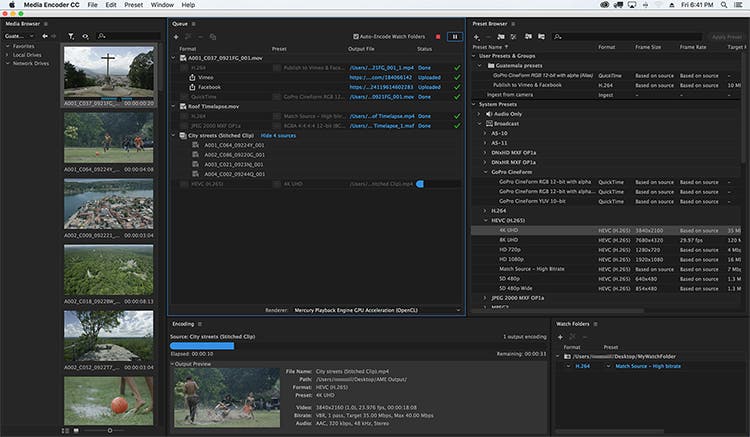
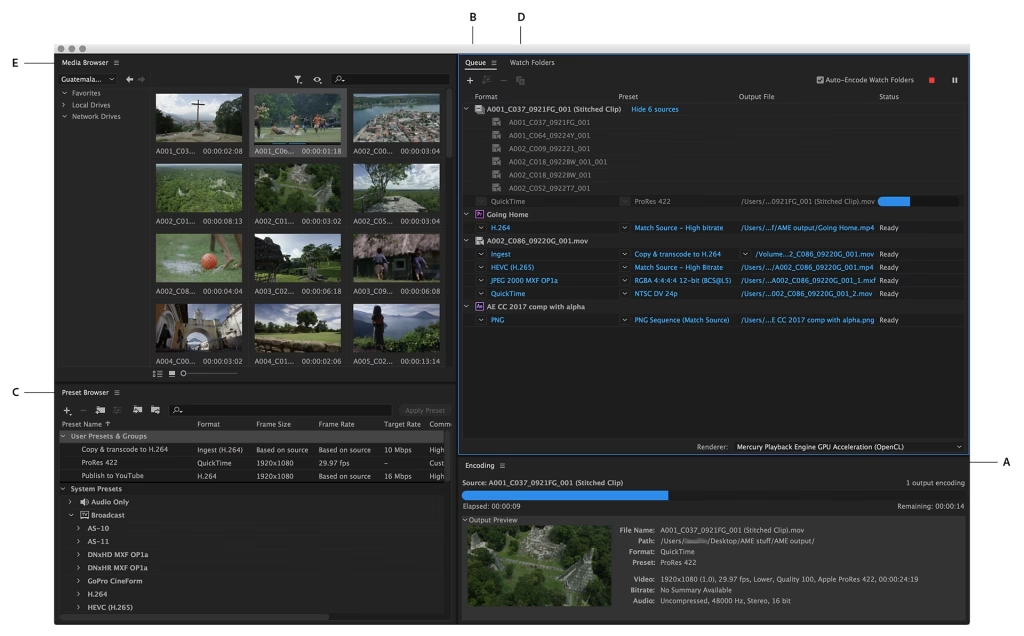
Adobe Media Encoder 26.2 Mac is one of the most reliable media encoding and video exporting applications available for macOS users. Designed to work seamlessly with Adobe Creative Cloud, it helps content creators, video editors, filmmakers, and digital marketers export high-quality videos quickly and efficiently.
Whether you’re editing a YouTube video, creating marketing content, producing online courses, or preparing a professional film project, Adobe Media Encoder simplifies the exporting process with advanced encoding options, batch processing, and broad format compatibility.
Version 26.2 focuses on improving overall stability, performance, and compatibility with the latest versions of macOS while enhancing workflow efficiency for Apple Silicon Macs. If you regularly use Adobe Premiere Pro or After Effects, Media Encoder is an essential companion that saves time and improves productivity.
Key Features of Adobe Media Encoder 26.2 Mac
- Fast Video Encoding
- Adobe Media Encoder is built to encode videos quickly while maintaining excellent image quality. Hardware acceleration on supported Macs helps reduce export times significantly.
- Batch Processing
- One of its strongest features is the ability to queue multiple projects and export them simultaneously. This is ideal for professionals working on large video libraries.
- Multiple Export Formats
- The software supports a wide range of export formats, including:
- MP4 (H.264)
- HEVC (H.265)
- QuickTime MOV
- AVI
- MXF
- GIF
- Audio-only formats
- This flexibility makes it suitable for YouTube, Vimeo, Instagram, TikTok, television broadcasting, and professional production.
- Seamless Adobe Creative Cloud Integration
- Adobe Media Encoder works perfectly with:
- Adobe Premiere Pro
- Adobe After Effects
- Adobe Audition
- Adobe Character Animator
- Projects can be sent directly for encoding without interrupting your editing workflow.
- Background Rendering
- Continue editing in Premiere Pro or After Effects while Media Encoder exports your videos in the background, improving productivity.
- Export Presets
- Choose from dozens of professionally optimized presets for:
- YouTube
- Vimeo
- 4K UHD
- HD Broadcast
- Mobile Devices
- These presets save time and reduce manual configuration.
- Hardware Acceleration
- Support for Apple’s Metal graphics technology improves rendering performance and encoding speed on compatible Mac hardware.
- Custom Encoding Settings
- Advanced users can customize:
- Bitrate
- Resolution
- Frame Rate
- Audio Codec
- Video Codec
- Color Settings
- This level of control is especially useful for professional production environments.
What’s New in Adobe Media Encoder 26.2 Mac
- Adobe Media Encoder 26.2 introduces several improvements designed to enhance reliability and performance.
- Better Apple Silicon Optimization
- The application runs more efficiently on Macs powered by Apple Silicon, delivering smoother exports and improved responsiveness.
- Faster Export Performance
- Rendering and encoding speeds have been optimized for many popular codecs, helping creators finish projects more quickly.
- Improved Stability
- Bug fixes reduce crashes and improve reliability during long rendering sessions.
- Better Creative Cloud Compatibility
- Version 26.2 integrates smoothly with the latest versions of Premiere Pro and After Effects, ensuring a seamless editing workflow.
- Enhanced Media Processing
- Improvements to media handling provide more consistent exports across different file formats and resolutions.
Best Alternatives
- If you’re considering other video encoding applications for macOS, here are several excellent alternatives.
- Apple Compressor
- Designed specifically for Final Cut Pro users, Apple Compressor provides powerful encoding tools optimized for macOS.
- HandBrake
- A free and open-source video transcoder that supports numerous formats and advanced compression settings.
- FFmpeg
- A command-line solution favored by developers and advanced users for highly customizable media processing.
- Shutter Encoder
- A user-friendly encoding application that supports many professional codecs and conversion tools.
Pros and Cons
Pros
- Excellent export quality
- Fast rendering performance
- Batch processing support
- Wide format compatibility
- Seamless Creative Cloud integration
- Optimized for Apple Silicon
- Professional export presets
- Background encoding saves time
Cons
- Requires an Adobe subscription
- Advanced settings may feel overwhelming for beginners
- Performance depends on available system resources
- Best experience requires other Adobe applications
System Requirements
- Before installing Adobe Media Encoder 26.2 Mac, make sure your Mac meets these general requirements.
- Operating System
- macOS Monterey (12) or later recommended
- Processor
- Apple Silicon (M1, M2, M3 series) or a supported Intel processor
- RAM
- Minimum: 16 GB
- Recommended: 32 GB for professional workflows
- Storage
- At least 10 GB of available storage, with additional free space recommended for cache files and exports
- Graphics
- Metal-compatible GPU
- Internet
- Internet connection required for installation, activation, and software updates
How to Install Adobe Media Encoder 26.2 Mac
- Download and install the Adobe Creative Cloud desktop application from Adobe’s official website.
- Sign in with your Adobe account.
- Open the Apps section.
- Locate Adobe Media Encoder.
- Click Install.
- Wait for the installation to complete.
- Launch the application from the Applications folder or Creative Cloud.
Frequently Asked Questions
- Is Adobe Media Encoder 26.2 Mac compatible with Apple Silicon?
- Yes. Version 26.2 is optimized for Apple Silicon Macs, delivering improved performance and faster encoding.
- Can I use Adobe Media Encoder without Premiere Pro?
- Yes. It can encode and convert supported media files independently, although it integrates especially well with Premiere Pro and After Effects.
- Which export formats are supported?
- Adobe Media Encoder supports a wide range of formats, including H.264, HEVC (H.265), QuickTime MOV, AVI, MXF, GIF, and several audio formats.
- Is Adobe Media Encoder suitable for beginners?
- Yes. Built-in export presets make it easy for beginners, while advanced settings provide professionals with complete control over encoding.
Conclusion
Adobe Media Encoder 26.2 Mac is an essential tool for anyone working with video on macOS. Its powerful encoding engine, seamless integration with Adobe Creative Cloud, extensive format support, and optimized performance on Apple Silicon make it a valuable addition to any creative workflow. Whether you’re exporting videos for YouTube, producing commercial projects, or delivering professional media, Adobe Media Encoder offers the speed, reliability, and flexibility needed to handle demanding tasks efficiently.
]]>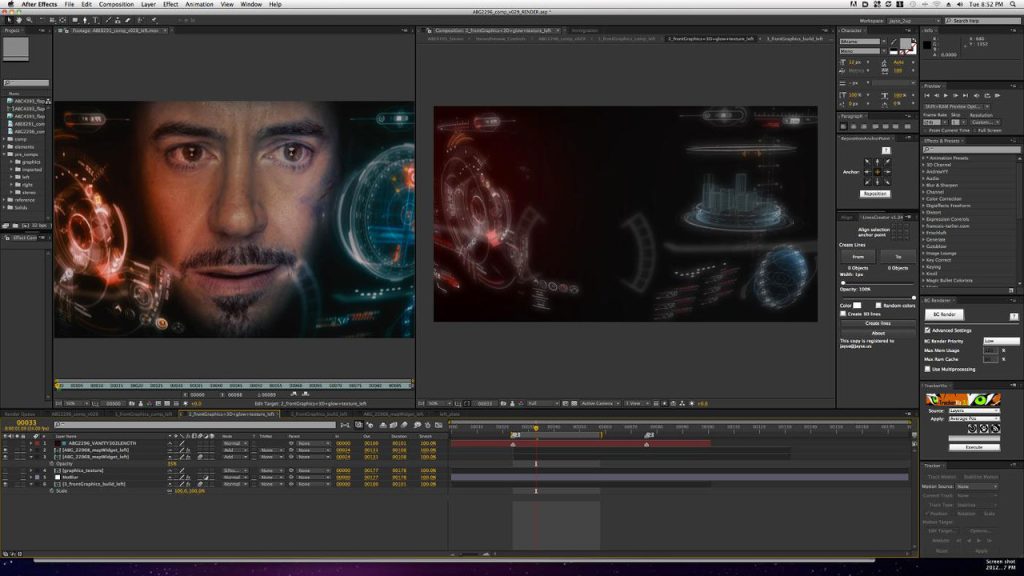
Adobe After Effects 24.0.2 Mac is one of the most powerful motion graphics, animation, and visual effects applications available for macOS. Whether you’re a professional video editor, motion designer, YouTuber, filmmaker, or content creator, this software provides industry-leading tools for creating cinematic intros, animated titles, visual effects, and professional-quality compositions.
Designed to integrate seamlessly with other Adobe Creative Cloud applications, After Effects allows users to combine animation, video editing, compositing, and visual effects into a single workflow. The 24.0.2 release focuses on improving overall performance, stability, and compatibility while addressing bugs reported in earlier versions.
If you’re searching for a reliable motion graphics application for Mac, Adobe After Effects continues to set the industry standard with advanced creative tools and a flexible workflow.
Key Features of Adobe After Effects 24.0.2 Mac
- Professional Motion Graphics
- Create stunning motion graphics for YouTube videos, advertisements, presentations, and social media using powerful animation tools.
- Advanced Visual Effects
- Add cinematic explosions, lightning, smoke, particle effects, green screen compositing, and realistic visual effects with precision.
- Powerful Keyframe Animation
- Animate virtually every property using customizable keyframes and graph editors for smooth motion.
- 3D Workspace
- Design and animate 3D layers directly inside After Effects while combining cameras, lights, and shadows for realistic depth.
- Seamless Adobe Integration
- Work effortlessly with Adobe Premiere Pro, Photoshop, Illustrator, Media Encoder, and Audition to streamline your creative workflow.
- AI-Powered Creative Tools
- Modern Adobe Sensei AI features help automate repetitive tasks such as masking, object selection, and scene refinement, saving valuable editing time.
- Large Plugin Ecosystem
- Expand the software with thousands of third-party plugins for color grading, transitions, typography, particle simulations, and advanced effects.
- Multi-Format Export
- Export projects in multiple formats suitable for YouTube, Instagram, TikTok, presentations, television, and professional filmmaking.
What’s New in Adobe After Effects 24.0.2 Mac
- Although version 24.0.2 is primarily a maintenance update, it introduces several improvements that enhance the editing experience.
- Better Performance
- Projects load faster while timeline responsiveness has been improved, especially on Apple Silicon Macs.
- Improved Stability
- Adobe resolved several bugs that could cause crashes during rendering and project previews.
- Enhanced Compatibility
- Better compatibility with the latest macOS versions and Adobe Creative Cloud applications.
- Faster Rendering
- Rendering performance has been optimized for many effects, reducing export times on supported hardware.
- Workflow Improvements
- Minor interface refinements and background optimizations provide a smoother editing experience.

Pros and Cons
Pros
- Industry-leading motion graphics software
- Excellent performance on modern Macs
- Powerful animation and visual effects tools
- Seamless Creative Cloud integration
- Extensive plugin support
- Regular feature updates
- Suitable for beginners and professionals
Cons
- Subscription required
- Learning curve for new users
- Resource-intensive on older Macs
- Large installation size
System Requirements
- Before installing Adobe After Effects 24.0.2 Mac, ensure your Mac meets these general requirements.
- Operating System
- macOS Monterey (12) or later is recommended.
- Processor
- Apple Silicon (M1, M2, M3 series) or a supported Intel processor.
- RAM
- Minimum: 16 GB
- Recommended: 32 GB or more for complex projects.
- Storage
- At least 15 GB of free disk space, with additional space recommended for cache and project files.
- Graphics
- Metal-compatible GPU for optimal performance.
How to Install Adobe After Effects 24.0.2 Mac
- Download and install the Adobe Creative Cloud desktop application from Adobe.
- Sign in with your Adobe account.
- Locate After Effects in the Creative Cloud Apps section.
- Click Install.
- Wait for the installation to complete.
- Launch After Effects from the Applications folder or Creative Cloud.
Best Alternatives
- If you’re considering other motion graphics or compositing tools, here are some strong alternatives.
- Apple Motion
- A cost-effective motion graphics application optimized for macOS users.
- Blackmagic Fusion
- A node-based compositing application suitable for professional VFX workflows.
- Blender
- A free and open-source 3D creation suite that also supports animation, compositing, and visual effects.
- Apple Final Cut Pro
- Ideal for video editing with integrated motion graphics capabilities.
Frequently Asked Questions
- Is Adobe After Effects 24.0.2 Mac compatible with Apple Silicon?
- Yes. It is optimized to run efficiently on Apple Silicon Macs, including M1, M2, and newer chips.
- Can beginners use Adobe After Effects?
- Yes. While it has a learning curve, there are many tutorials and templates that help new users get started.
- Does Adobe After Effects work offline?
- Yes. After activation, many editing features work offline, though some cloud-based services require an internet connection.
- Is Adobe After Effects suitable for professional video production?
- Absolutely. It is widely used in film, television, advertising, and digital content creation for professional motion graphics and visual effects.
Conclusion
Adobe After Effects 24.0.2 Mac remains one of the most capable motion graphics and visual effects applications available for macOS. With powerful animation tools, professional compositing features, seamless integration with the Adobe Creative Cloud ecosystem, and improved performance in version 24.0.2, it is an excellent choice for video editors, designers, filmmakers, educators, and content creators. Whether you’re producing YouTube videos, social media content, marketing campaigns, or cinematic visual effects, After Effects provides the flexibility and creative control needed to bring your ideas to life.
]]>
Realme Flash Tool is an official firmware flashing software developed by Realme. It allows users to flash stock firmware on Realme smartphones. This tool is useful for fixing bricked phones, boot loops, system crashes, and performance issues. Unlike other third-party flashing tools, Realme Flash Tool is specifically optimized for Realme devices, ensuring a higher success rate.
Key Features:
- Official Tool for Realme Devices: Since it is developed by Realme, it ensures 100% compatibility with Realme devices.
- Flashes Stock Firmware: This tool helps in flashing official firmware on Realme smartphones, restoring them to their factory state.
- Fixes Boot Loops & Software Issues: If your device is stuck in a boot loop or is bricked, this tool can recover it by flashing the official firmware.
- User-Friendly Interface: It comes with a simple and easy-to-use interface, making it suitable for both beginners and professionals.
System Requirements:
Minimum System Requirements:
- Operating System: Windows 7, 8, 10, or 11 (64-bit)
- Processor: Intel or AMD, 1.5GHz or higher
- RAM: At least 4GB
- Storage: Minimum 5GB of free space
- USB Port: At least one working USB 2.0 or 3.0 port
- Internet Connection: Required for downloading firmware
Recommended System Requirements:
- OS: Windows 10 or 11 (64-bit)
- Processor: Intel Core i3/i5/i7 or AMD Ryzen (2.0GHz or higher)
- RAM: 8GB or more for faster performance
- Storage: SSD with at least 10GB free space
- USB Port: USB 3.0 for better data transfer speed
How to Download:
- Visit the official Realme website or a trusted source.
- Look for the latest Realme Flash Tool version.
- Click the download link to get the setup file.
- Save it in a folder on your PC for installation.
Get Access Now:
Download Link
]]>
SFT Dongle is a powerful tool widely used by mobile repair technicians for unlocking, flashing, and repairing smartphones. It provides advanced solutions for fixing software-related issues in various smartphone brands, including Samsung, Xiaomi, Oppo, Vivo, and more.
With smartphones becoming more complex, tools like SFT Dongle make it easier to reset, unlock, and flash firmware without relying on official service centers. Whether you need to remove FRP locks, repair IMEI numbers, or update firmware, SFT Dongle has all the necessary features.
Key Features:
- Multi-Brand Support: Samsung, Xiaomi, Oppo, Vivo, Huawei, Realme, Tecno, Infinix
- Flashing and Unlocking Capabilities: Flash stock firmware to repair system crashes or boot loops. Unlock carrier-locked devices for network freedom. Remove software restrictions imposed by manufacturers.
- FRP (Factory Reset Protection) Bypass: Factory Reset Protection (FRP) is a security feature in Android devices that prevents unauthorized access after a reset. SFT Dongle helps bypass FRP locks, allowing users to regain access to their devices.
- IMEI Repair and Network Unlocking: IMEI issues can cause problems like “No Service” or “Invalid IMEI.” SFT Dongle enables users to repair IMEI numbers and restore network functionality.
- User-Friendly Interface: Unlike complex mobile repair tools, SFT Dongle has an easy-to-use interface, making it accessible for both beginners and professionals.
Minimum System Requirements:
- Operating System: Windows 7, 8, 10, or 11 (32-bit & 64-bit)
- Processor: Intel or AMD, 1.5GHz or higher
- RAM: At least 4GB
- Storage: Minimum 2GB of free space
- USB Ports: At least one functional USB 2.0 or 3.0 port
- Internet Connection: Required for updates and online functions
- Drivers: Must install appropriate drivers for the device being serviced
How to Install:
- Ensure you download the correct version that matches your Windows operating system.
- Disable Windows Defender and any third-party antivirus temporarily.
- You can re-enable it after installation is complete.
- MTK (MediaTek) USB Driver (For MTK devices)
- Qualcomm USB Driver (For Qualcomm-based devices)
- SPD (Spreadtrum) USB Driver (For Spreadtrum chipsets)
- ADB & Fastboot Drivers (For general Android device connections)
Get Access Now:
Download Link!
]]>