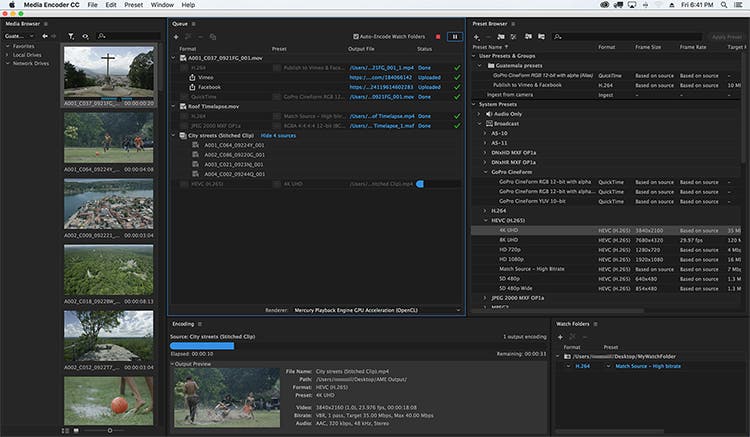
Adobe Media Encoder 26.2 Mac is one of the most reliable media encoding and video exporting applications available for macOS users. Designed to work seamlessly with Adobe Creative Cloud, it helps content creators, video editors, filmmakers, and digital marketers export high-quality videos quickly and efficiently.
Whether you’re editing a YouTube video, creating marketing content, producing online courses, or preparing a professional film project, Adobe Media Encoder simplifies the exporting process with advanced encoding options, batch processing, and broad format compatibility.
Version 26.2 focuses on improving overall stability, performance, and compatibility with the latest versions of macOS while enhancing workflow efficiency for Apple Silicon Macs. If you regularly use Adobe Premiere Pro or After Effects, Media Encoder is an essential companion that saves time and improves productivity.
Key Features of Adobe Media Encoder 26.2 Mac
- Fast Video Encoding
- Adobe Media Encoder is built to encode videos quickly while maintaining excellent image quality. Hardware acceleration on supported Macs helps reduce export times significantly.
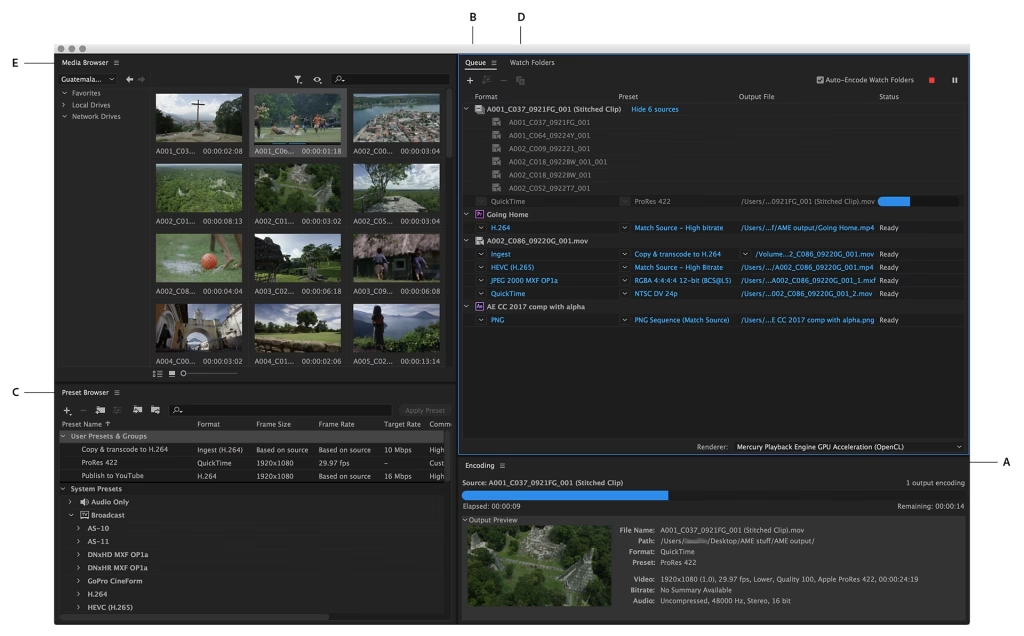
- Batch Processing
- One of its strongest features is the ability to queue multiple projects and export them simultaneously. This is ideal for professionals working on large video libraries.
- Multiple Export Formats
- The software supports a wide range of export formats, including:
- MP4 (H.264)
- HEVC (H.265)
- QuickTime MOV
- AVI
- MXF
- GIF
- Audio-only formats
- This flexibility makes it suitable for YouTube, Vimeo, Instagram, TikTok, television broadcasting, and professional production.
- Seamless Adobe Creative Cloud Integration
- Adobe Media Encoder works perfectly with:
- Adobe Premiere Pro
- Adobe After Effects
- Adobe Audition
- Adobe Character Animator
- Projects can be sent directly for encoding without interrupting your editing workflow.
- Background Rendering
- Continue editing in Premiere Pro or After Effects while Media Encoder exports your videos in the background, improving productivity.
- Export Presets
- Choose from dozens of professionally optimized presets for:
- YouTube
- Vimeo
- 4K UHD
- HD Broadcast
- Mobile Devices
- These presets save time and reduce manual configuration.
- Hardware Acceleration
- Support for Apple’s Metal graphics technology improves rendering performance and encoding speed on compatible Mac hardware.
- Custom Encoding Settings
- Advanced users can customize:
- Bitrate
- Resolution
- Frame Rate
- Audio Codec
- Video Codec
- Color Settings
- This level of control is especially useful for professional production environments.
What’s New in Adobe Media Encoder 26.2 Mac
- Adobe Media Encoder 26.2 introduces several improvements designed to enhance reliability and performance.
- Better Apple Silicon Optimization
- The application runs more efficiently on Macs powered by Apple Silicon, delivering smoother exports and improved responsiveness.
- Faster Export Performance
- Rendering and encoding speeds have been optimized for many popular codecs, helping creators finish projects more quickly.
- Improved Stability
- Bug fixes reduce crashes and improve reliability during long rendering sessions.
- Better Creative Cloud Compatibility
- Version 26.2 integrates smoothly with the latest versions of Premiere Pro and After Effects, ensuring a seamless editing workflow.
- Enhanced Media Processing
- Improvements to media handling provide more consistent exports across different file formats and resolutions.
Best Alternatives
- If you’re considering other video encoding applications for macOS, here are several excellent alternatives.
- Apple Compressor
- Designed specifically for Final Cut Pro users, Apple Compressor provides powerful encoding tools optimized for macOS.
- HandBrake
- A free and open-source video transcoder that supports numerous formats and advanced compression settings.
- FFmpeg
- A command-line solution favored by developers and advanced users for highly customizable media processing.
- Shutter Encoder
- A user-friendly encoding application that supports many professional codecs and conversion tools.
Pros and Cons
Pros
- Excellent export quality
- Fast rendering performance
- Batch processing support
- Wide format compatibility
- Seamless Creative Cloud integration
- Optimized for Apple Silicon
- Professional export presets
- Background encoding saves time
Cons
- Requires an Adobe subscription
- Advanced settings may feel overwhelming for beginners
- Performance depends on available system resources
- Best experience requires other Adobe applications
System Requirements
- Before installing Adobe Media Encoder 26.2 Mac, make sure your Mac meets these general requirements.
- Operating System
- macOS Monterey (12) or later recommended
- Processor
- Apple Silicon (M1, M2, M3 series) or a supported Intel processor
- RAM
- Minimum: 16 GB
- Recommended: 32 GB for professional workflows
- Storage
- At least 10 GB of available storage, with additional free space recommended for cache files and exports
- Graphics
- Metal-compatible GPU
- Internet
- Internet connection required for installation, activation, and software updates
How to Install Adobe Media Encoder 26.2 Mac
- Download and install the Adobe Creative Cloud desktop application from Adobe’s official website.
- Sign in with your Adobe account.
- Open the Apps section.
- Locate Adobe Media Encoder.
- Click Install.
- Wait for the installation to complete.
- Launch the application from the Applications folder or Creative Cloud.
Frequently Asked Questions
- Is Adobe Media Encoder 26.2 Mac compatible with Apple Silicon?
- Yes. Version 26.2 is optimized for Apple Silicon Macs, delivering improved performance and faster encoding.
- Can I use Adobe Media Encoder without Premiere Pro?
- Yes. It can encode and convert supported media files independently, although it integrates especially well with Premiere Pro and After Effects.
- Which export formats are supported?
- Adobe Media Encoder supports a wide range of formats, including H.264, HEVC (H.265), QuickTime MOV, AVI, MXF, GIF, and several audio formats.
- Is Adobe Media Encoder suitable for beginners?
- Yes. Built-in export presets make it easy for beginners, while advanced settings provide professionals with complete control over encoding.
Conclusion
Adobe Media Encoder 26.2 Mac is an essential tool for anyone working with video on macOS. Its powerful encoding engine, seamless integration with Adobe Creative Cloud, extensive format support, and optimized performance on Apple Silicon make it a valuable addition to any creative workflow. Whether you’re exporting videos for YouTube, producing commercial projects, or delivering professional media, Adobe Media Encoder offers the speed, reliability, and flexibility needed to handle demanding tasks efficiently.
]]>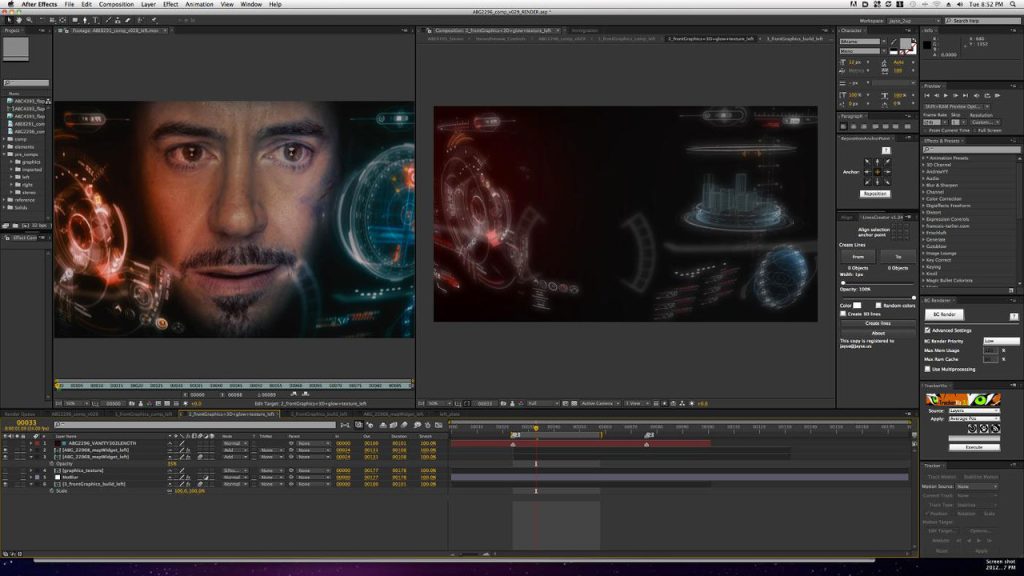
Adobe After Effects 24.0.2 Mac is one of the most powerful motion graphics, animation, and visual effects applications available for macOS. Whether you’re a professional video editor, motion designer, YouTuber, filmmaker, or content creator, this software provides industry-leading tools for creating cinematic intros, animated titles, visual effects, and professional-quality compositions.
Designed to integrate seamlessly with other Adobe Creative Cloud applications, After Effects allows users to combine animation, video editing, compositing, and visual effects into a single workflow. The 24.0.2 release focuses on improving overall performance, stability, and compatibility while addressing bugs reported in earlier versions.
If you’re searching for a reliable motion graphics application for Mac, Adobe After Effects continues to set the industry standard with advanced creative tools and a flexible workflow.
Key Features of Adobe After Effects 24.0.2 Mac
- Professional Motion Graphics
- Create stunning motion graphics for YouTube videos, advertisements, presentations, and social media using powerful animation tools.
- Advanced Visual Effects
- Add cinematic explosions, lightning, smoke, particle effects, green screen compositing, and realistic visual effects with precision.
- Powerful Keyframe Animation
- Animate virtually every property using customizable keyframes and graph editors for smooth motion.
- 3D Workspace
- Design and animate 3D layers directly inside After Effects while combining cameras, lights, and shadows for realistic depth.
- Seamless Adobe Integration
- Work effortlessly with Adobe Premiere Pro, Photoshop, Illustrator, Media Encoder, and Audition to streamline your creative workflow.
- AI-Powered Creative Tools
- Modern Adobe Sensei AI features help automate repetitive tasks such as masking, object selection, and scene refinement, saving valuable editing time.
- Large Plugin Ecosystem
- Expand the software with thousands of third-party plugins for color grading, transitions, typography, particle simulations, and advanced effects.
- Multi-Format Export
- Export projects in multiple formats suitable for YouTube, Instagram, TikTok, presentations, television, and professional filmmaking.
What’s New in Adobe After Effects 24.0.2 Mac
- Although version 24.0.2 is primarily a maintenance update, it introduces several improvements that enhance the editing experience.
- Better Performance
- Projects load faster while timeline responsiveness has been improved, especially on Apple Silicon Macs.
- Improved Stability
- Adobe resolved several bugs that could cause crashes during rendering and project previews.
- Enhanced Compatibility
- Better compatibility with the latest macOS versions and Adobe Creative Cloud applications.
- Faster Rendering
- Rendering performance has been optimized for many effects, reducing export times on supported hardware.
- Workflow Improvements
- Minor interface refinements and background optimizations provide a smoother editing experience.

Pros and Cons
Pros
- Industry-leading motion graphics software
- Excellent performance on modern Macs
- Powerful animation and visual effects tools
- Seamless Creative Cloud integration
- Extensive plugin support
- Regular feature updates
- Suitable for beginners and professionals
Cons
- Subscription required
- Learning curve for new users
- Resource-intensive on older Macs
- Large installation size
System Requirements
- Before installing Adobe After Effects 24.0.2 Mac, ensure your Mac meets these general requirements.
- Operating System
- macOS Monterey (12) or later is recommended.
- Processor
- Apple Silicon (M1, M2, M3 series) or a supported Intel processor.
- RAM
- Minimum: 16 GB
- Recommended: 32 GB or more for complex projects.
- Storage
- At least 15 GB of free disk space, with additional space recommended for cache and project files.
- Graphics
- Metal-compatible GPU for optimal performance.
How to Install Adobe After Effects 24.0.2 Mac
- Download and install the Adobe Creative Cloud desktop application from Adobe.
- Sign in with your Adobe account.
- Locate After Effects in the Creative Cloud Apps section.
- Click Install.
- Wait for the installation to complete.
- Launch After Effects from the Applications folder or Creative Cloud.
Best Alternatives
- If you’re considering other motion graphics or compositing tools, here are some strong alternatives.
- Apple Motion
- A cost-effective motion graphics application optimized for macOS users.
- Blackmagic Fusion
- A node-based compositing application suitable for professional VFX workflows.
- Blender
- A free and open-source 3D creation suite that also supports animation, compositing, and visual effects.
- Apple Final Cut Pro
- Ideal for video editing with integrated motion graphics capabilities.
Frequently Asked Questions
- Is Adobe After Effects 24.0.2 Mac compatible with Apple Silicon?
- Yes. It is optimized to run efficiently on Apple Silicon Macs, including M1, M2, and newer chips.
- Can beginners use Adobe After Effects?
- Yes. While it has a learning curve, there are many tutorials and templates that help new users get started.
- Does Adobe After Effects work offline?
- Yes. After activation, many editing features work offline, though some cloud-based services require an internet connection.
- Is Adobe After Effects suitable for professional video production?
- Absolutely. It is widely used in film, television, advertising, and digital content creation for professional motion graphics and visual effects.
Conclusion
Adobe After Effects 24.0.2 Mac remains one of the most capable motion graphics and visual effects applications available for macOS. With powerful animation tools, professional compositing features, seamless integration with the Adobe Creative Cloud ecosystem, and improved performance in version 24.0.2, it is an excellent choice for video editors, designers, filmmakers, educators, and content creators. Whether you’re producing YouTube videos, social media content, marketing campaigns, or cinematic visual effects, After Effects provides the flexibility and creative control needed to bring your ideas to life.
]]>
Adobe has been a household name in the world of digital creativity for decades. With the release of Adobe Master Collection , the software giant has once again raised the bar, offering an unparalleled suite of tools for creative professionals and enthusiasts. In this article, we’ll take a closer look at this remarkable collection, exploring its features, benefits, and how it can elevate your creative projects.
The All-In-One Creative Solution:
Adobe Master Collection 2026 5.5 is the ultimate package for creative individuals and professionals. It includes a comprehensive range of Adobe’s renowned software applications, catering to various creative needs, such as:
- Adobe Photoshop: The go-to software for image editing and manipulation.
- Adobe Illustrator: Perfect for vector graphics and illustration.
- Adobe InDesign: Ideal for page layout and design.
- Adobe Premiere Pro: The leading video editing software.
- Adobe After Effects: For motion graphics and visual effects.
- Adobe Dreamweaver: A top choice for web design and development.
- Adobe Audition: Professional audio editing and mixing.
- Adobe Lightroom: Essential for photo organization and enhancement.
- Adobe Acrobat Pro: For creating, editing, and managing PDF documents.
New Features and Enhancements:
Streamlined Collaboration
Adobe understands the importance of collaboration in today’s creative industries. The 2026 5.5 version offers improved collaboration tools, making it easier for teams to work together, whether they’re in the same room or on different continents.
Enhanced Performance
Performance is key in any creative endeavor. This version comes with optimized performance, ensuring that you can work on complex projects without hiccups or delays. Whether you’re editing high-resolution images or rendering 4K video, Adobe Master Collection 2026 5.5 has you covered.
Cloud Integration
The Adobe Creative Cloud is seamlessly integrated into this collection. This means easy access to your work from anywhere, automatic updates, and cloud storage for your files. It’s a game-changer for those who are always on the move.
Benefits of Using Adobe Master Collection 2026 5.5:
Adobe’s latest Master Collection offers a multitude of advantages:
- Simplified Workflow: With all your creative tools in one place, you can easily switch between applications, streamlining your workflow.
- Professional Quality: Adobe’s reputation for quality and innovation ensures that your projects will meet professional standards.
- Endless Creative Possibilities: Whether you’re a graphic designer, video editor, or web developer, you have the power to create anything you imagine.
- Time and Cost Efficiency: The collection saves you time by providing all the tools you need, eliminating the need to purchase and learn multiple separate applications.

Getting Started with Adobe Master Collection 2026 5.5:
Installation and Setup
Installing Adobe Master Collection 2026 5.5 is straightforward. You can download it from Adobe’s official website, and the installation wizard will guide you through the process. It’s user-friendly and hassle-free.
User Interface Overview
If you’re familiar with Adobe’s software, you’ll find the user interface intuitive. The interface consistency across Adobe’s applications makes it easy to transition between them.
Industry Applications
Adobe Master Collection 2026 5.5 has a wide range of applications across various industries:
- Graphic Design: Ideal for creating logos, brochures, and marketing materials.
- Video Production: A complete suite for video editing and special effects.
- Web Development: Offers tools for designing and developing websites.
- Photography: Perfect for editing and organizing photos.
- Publishing: A go-to choice for magazine and book layout.
Conclusion:
Adobe Master Collection 2026 5.5 is a creative’s dream come true. With a comprehensive set of tools, enhanced performance, and seamless collaboration, it’s the go-to choice for anyone in the creative field. Whether you’re an aspiring artist or a seasoned professional, Adobe’s Master Collection will help you turn your creative visions into reality.
FAQs:
- Is Adobe Master Collection 2026 5.5 compatible with both Windows and macOS?
- Yes, Adobe Master Collection 2026 5.5 is available for both Windows and macOS, ensuring broad compatibility.
- Are there any system requirements I should be aware of?
- Adobe provides minimum system requirements on their website. Ensure your computer meets these specifications for optimal performance.
- Can I purchase individual Adobe software products separately?
- Yes, Adobe offers individual subscriptions for each of their software products, but the Master Collection offers the most cost-effective solution for multiple applications.
- What is the pricing model for Adobe Master Collection 2026 5.5?
- Adobe offers both monthly and annual subscription plans. The pricing may vary depending on your location and the specific plan you choose.
- Is there a trial version available for Adobe Master Collection 2026 5.5?
- Adobe typically offers a trial period for their software products, allowing users to explore the features before committing to a subscription. Check Adobe’s official website for the latest trial information.
Get Access Now:
Download Link!
]]>