 Posted by
 MacDroid PRO 2.7 for macOS
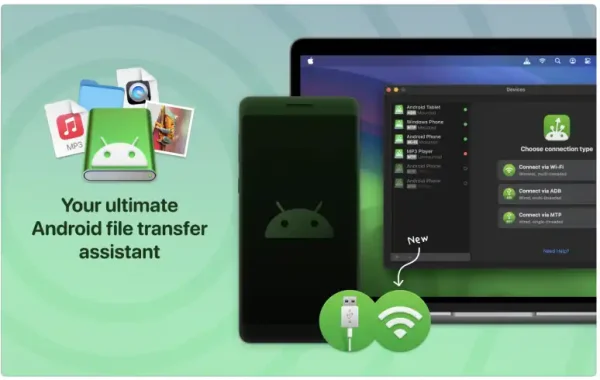
MacDroid PRO is an advanced file transfer and device management tool that enables full access to Android storage directly from a Mac. Once connected, Android devices appear in Finder just like external drives, allowing users to copy, move, delete, and organize files with ease.
Unlike basic file transfer utilities, MacDroid PRO supports both ADB (Android Debug Bridge) and MTP (Media Transfer Protocol) modes, giving users flexibility and stable performance depending on their needs. The PRO version unlocks full bidirectional file transfer, meaning you can move files both from Android to Mac and from Mac to Android without restrictions.
Key Features of MacDroid PRO:
- Two-Way File Transfer The PRO version enables unrestricted file transfer in both directions, allowing you to send photos, videos, music, documents, and folders between your Android device and Mac effortlessly.
- Finder Integration Android devices mount directly in macOS Finder, offering a familiar and user-friendly interface. No need to learn new software layouts—just drag and drop files as you would with any external drive.
- ADB and MTP Connection Modes MacDroid PRO supports: ADB mode for faster and more stable transfers. MTP mode for quick and simple plug-and-play connectivity. This flexibility ensures compatibility with a wide range of Android devices.
- Wireless File Transfer (Wi-Fi Mode): With MacDroid PRO, users can transfer files wirelessly over Wi-Fi, eliminating the need for USB cables and enhancing convenience.
- Full Android Storage Access: The software provides access to both internal storage and SD cards, making it easy to manage large media libraries and files directly from your Mac.
System Requirements:
- Operating System: macOS 10.15 (Catalina) or later
- Processor: Intel-based Mac or Apple Silicon (M1, M2, or newer)
- RAM: 4 GB
- Hard Disk Space: 100 MB of free storage
- Display Resolution: 1280 × 800 or higher
- Internet Connection: Required for activation and updates
How to install:
- Download MacDroid PRO: Visit the official MacDroid (Eltima Software) website and download the latest version of MacDroid for macOS.
- Open the Installer File: Once the download is complete, locate the file in your Downloads folder and double-click it.
- Install the Application: Drag the MacDroid icon into the Applications folder as instructed in the installer window.
- Launch MacDroid: Open MacDroid from the Applications folder. If macOS shows a security warning, click Open to confirm.
- Grant Required Permissions: When prompted, allow the necessary permissions in System Settings > Privacy & Security. These permissions are required for proper device detection and file transfer.
- Connect Your Android Device: Use a USB cable to connect your Android device to your Mac, or select the Wi-Fi mode for wireless connection.
Learn more about Shadow Defender Final’s features in our guide.