 Posted by
 Artstudio Pro 5.2.9 for macOS

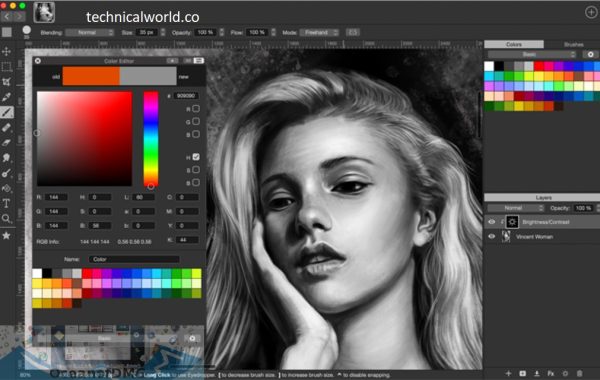
Artstudio Pro is a professional digital painting and photo editing application designed primarily for iPad, iPhone, and Mac users. It provides a complete set of tools for drawing, painting, sketching, and image editing—all within a single app. Think of it as a portable art studio that travels with you wherever creativity strikes.
At its core, Artstudio Pro combines raster-based painting tools with advanced image editing features. You can create detailed illustrations, concept art, matte paintings, and even edit high-resolution photographs. The app supports PSD files, making it compatible with industry workflows and allowing seamless collaboration with artists who use desktop software.
Key Features:
- Advanced Brush Engine: Artstudio Pro comes with a highly customizable brush engine that supports realistic textures and natural stroke behavior. Users can modify brush size, opacity, flow, spacing, and dynamics to create unique brushes tailored to their personal style. The engine supports pressure sensitivity and tilt, making brush strokes feel organic and responsive, especially when using Apple Pencil.
- Professional Layer System: The app supports unlimited layers, layer groups, clipping masks, and layer masks. Advanced blending modes such as Multiply, Overlay, Soft Light, and Color Burn allow artists to create depth, lighting effects, and complex compositions. Layers remain smooth and responsive even on large canvases.
- High-Performance Canvas Handling: Artstudio Pro is built using Apple’s Metal technology, ensuring exceptional performance even with high-resolution canvases and multiple layers. Artists can work on large projects without lag, making it suitable for print-quality artwork and detailed illustrations.
- Apple Pencil Optimization: Full Apple Pencil support is one of Artstudio Pro’s strongest features. It includes pressure sensitivity, tilt detection, palm rejection, and customizable stylus settings. This allows for precise control and a natural drawing experience similar to traditional tools.
- PSD File Compatibility: Artstudio Pro supports Photoshop (PSD) files, enabling seamless workflow integration with desktop software. Artists can open, edit, and export PSD files without losing layers or quality, making collaboration easy.
- Photo Editing Tools: Beyond digital painting, Artstudio Pro includes professional photo editing capabilities. Users can adjust brightness, contrast, curves, levels, hue, saturation, and apply non-destructive filters. This makes it a versatile tool for artists and photographers alike.
- Color Management and Precision: The app supports RGB, CMYK, and LAB color modes, ensuring accurate color reproduction for both digital and print work. Advanced color pickers, palettes, gradients, and fill tools help maintain consistency across projects.
- Drawing Aids and Guides: Artstudio Pro includes symmetry tools, perspective grids, rulers, and guides. These features are especially useful for technical drawings, architectural sketches, concept art, and character design where precision is essential.
How to install:
- Open the Mac App Store: Click on the App Store icon from the Dock or Applications folder.
- Search for Artstudio Pro: Enter Artstudio Pro in the search bar.
- Choose the Official App: Select the app from the search results to open its product page.
- Buy and Download: Click the Buy button and confirm the purchase with your Apple ID.
- Complete Installation: The app will download and install automatically on your Mac.
- Open Artstudio Pro: After installation, launch the app from the Applications folder or Launchpad.
Learn more about Shadow Defender Final’s features in our guide.