 Posted by
 NanoBrowser 1.5.1 for macOS

NanoBrowser Introduction:
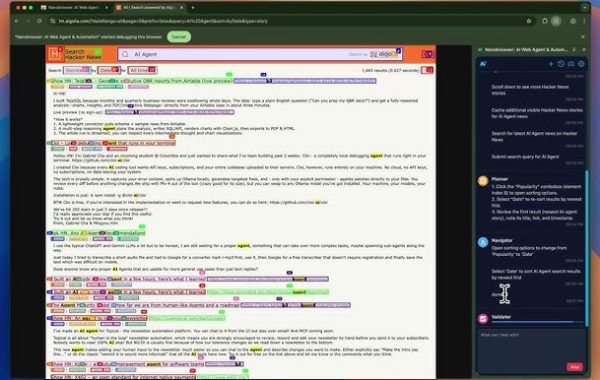
NanoBrowser is a modern, lightweight web browser designed for users who value speed, privacy, and efficiency. Built with a focus on minimal resource consumption and a clean user experience, NanoBrowser aims to deliver fast web performance without unnecessary clutter. It is ideal for users who want a simple yet powerful browsing solution for everyday internet use.
At its core, NanoBrowser prioritizes performance and security. By optimizing background processes and reducing memory usage, it allows users to browse smoothly even on low-end systems. Pages load quickly, tabs respond instantly, and the overall experience feels fluid compared to heavier, resource-intensive browsers.
Privacy is another key pillar of NanoBrowser. The browser is designed to minimize tracking by blocking intrusive ads, third-party cookies, and hidden scripts that collect user data. This built-in privacy-first approach helps users stay safer online without relying heavily on external extensions or plugins.
NanoBrowser also focuses on usability and simplicity. Its interface is clean, distraction-free, and easy to navigate, making it suitable for both beginners and advanced users. Essential features are easily accessible, while advanced settings remain available for those who want more control over their browsing environment.
Whether you are a student, professional, or casual internet user, NanoBrowser offers a balanced browsing experience that combines speed, privacy, and ease of use. It is a practical choice for anyone looking for a lightweight alternative to mainstream browsers while still enjoying modern web standards and reliable performance.
Key Features of NanoBrowser:
- Lightweight and Fast Performance: NanoBrowser is designed to consume minimal system resources, ensuring fast page loading and smooth multitasking. It runs efficiently even on low-end devices, making it an excellent choice for users who want speed without sacrificing performance.
- Privacy-First Browsing: Privacy is a core focus of NanoBrowser. It includes built-in protection against trackers, third-party cookies, and intrusive scripts, helping users browse the web securely and anonymously without needing additional extensions.
- Ad and Tracker Blocking: NanoBrowser comes with integrated ad and tracker blocking technology. This not only improves privacy but also enhances browsing speed by preventing unnecessary content from loading in the background.
- Clean and Minimal Interface: The browser features a clutter-free, intuitive interface that prioritizes content over distractions. Essential tools are easily accessible, allowing users to focus on browsing without being overwhelmed by unnecessary features.
- Low Memory Usage: Unlike many mainstream browsers, NanoBrowser is optimized for low RAM and CPU consumption. This makes it ideal for older computers, lightweight systems, and users who run multiple applications simultaneously.
- Secure Browsing Environment: NanoBrowser includes security features such as HTTPS enforcement, phishing protection, and safe browsing alerts to protect users from malicious websites and online threats.
- Customizable Settings: Users can personalize NanoBrowser according to their preferences, including privacy controls, appearance options, and performance settings, providing flexibility without complexity.
- Modern Web Compatibility Despite being lightweight, NanoBrowser fully supports modern web standards, ensuring compatibility with today’s websites, web apps, and online tools.
- Cross-Platform Support: NanoBrowser is designed to work seamlessly across multiple operating systems, offering a consistent browsing experience on different devices.
System Requirements:
- Operating System: macOS 10.12 (Sierra) or later
- Processor: Intel-based Mac
- RAM: 2 GB
- Storage: 200 MB free disk space
- Display Resolution: 1024 × 768 or higher
How to Install NanoBrowser on macOS:
- Download the macOS Package: Download the NanoBrowser file from the official website.
- Open the DMG File: Double-click the downloaded file to open the installer window.
- Drag to Applications Folder: Drag the NanoBrowser icon into the Applications folder.
- Grant Permissions (If Needed): On first launch, macOS may ask for security confirmation. Click Open.
- Start Browsing: Launch NanoBrowser from the Applications folder or Launchpad.
Learn more about Shadow Defender Final’s features in our guide.